7
User Commands
Chapter 3 User Commands
Any system keypad can be used to program or perform any keypad command. LED keypads use status and zone indicator lights to represent alarm
functions and status. The LCD keypad displays the description and status indicator lights represent alarm functions and status. This section describes basic
keypad commands.
Press the
[#] key to reset the keypad if an error has been made entering user codes or keypad commands.
3.1 Away Arming
The Ready light must be ON to arm the system. If the Ready light is OFF, ensure all protected doors and windows are secure or bypassed. To arm the
system in the Away mode, either press and hold the Away function button for 2 seconds or enter a valid user code and leave the premises through a door
programmed as Delay. Upon arming, the Armed light will turn ON. If a user code was used to arm the system and Stay/Away zones are programmed, the
Bypass light will turn ON and will turn OFF when a door programmed as Delay is violated. If the Audible Exit Delay option is enabled, the keypad will
beep once every second during the exit delay (and three times a second during the last 10 seconds) to alert the user to leave.
3.2 Stay Arming
The Ready light must be ON to arm the system. If the Ready light is OFF ensure all protected doors and windows are secure or bypassed. To arm the sys-
tem in the Stay mode, either press and hold the Stay function button for 2 seconds or enter a valid user code and stay within the premises (do NOT violate
a door programmed as Delay). Upon arming, the Armed light and Bypass light will turn ON. If the Stay function button is used, the keypad will not beep
during the exit delay. If a user code was used, the keypad will beep if the Audible Exit Delay option is enabled.
3.3 Disarming
The user must enter through a door programmed as Delay. Upon entering, the keypad will emit a steady tone (and emit a pulsing tone during the last 10
seconds of entry delay) to alert the user to disarm the system. Enter a valid user code to disarm the system. If an alarm occurred while the panel was
armed, the Memory light and the zones that went into alarm will be flashing (LED keypad) or the keypad will display ‘Alarm in Memory’ (LCD keypad).
Press the [#] key to return the keypad to the Ready state.
3.4 [] Commands
The following is a list of the [] commands available and a description of each:
[][1] Bypass (disarmed state)/Reactivate Stay/Away Zones (armed state)
[][2] Display Trouble Conditions
[][3] Display Alarm Memory
[][4] Door Chime Enable/Disable
[][5] User Code Programming
[][6] User Commands
[][7][x] Command Functions 1 – 4
[][8] Installer Programming
[][9][code] No-Entry Arming
[][0] Quick Arm (disarmed state)/Quick Exit (armed state)
[][1] Bypass/Re-activate Stay/Away Zones
LED Keypad:
Press [][1] to enter the bypass mode. If the Code Required for Bypass option is enabled, enter a valid user code. The Bypass light will flash. The key-
pad will turn ON the corresponding zone light to indicate a zone is bypassed. To bypass or unbypass a zone, enter the 2-digit zone number. Once the cor-
rect zones are bypassed, press [#] to exit. The Bypass light will be ON if any zones are manually bypassed.
LCD Keypad:
Press [][1] to enter the bypass mode. If the Code Required for Bypass option is enabled, enter a valid user code. The keypad will display ‘Scroll to
View Zones’. The keypad will display the programmed zone labels for the zones and include the letter ‘O’ in the bottom, right corner if the zone is vio-
lated or the letter ‘B’ if the zone is bypassed. Scroll to the appropriate zone and press the [] key to change the bypass status (or enter the 2-digit zone
number). Once the correct zones are bypassed, press [#] to exit.
Additional Bypass Commands:
Bypass Recall: Press [99]. The keypad will recall the last group of zones that were bypassed
Clear Bypass: Press [00]. The keypad will clear the bypass on all zones.
Save Bypass: Press [95]. The keypad will save which zones are manually bypassed.
Recall Save: Press [91]. The keypad will recall the bypassed zones that were saved.
Hold Up Zones cannot be assigned to bypass groups.
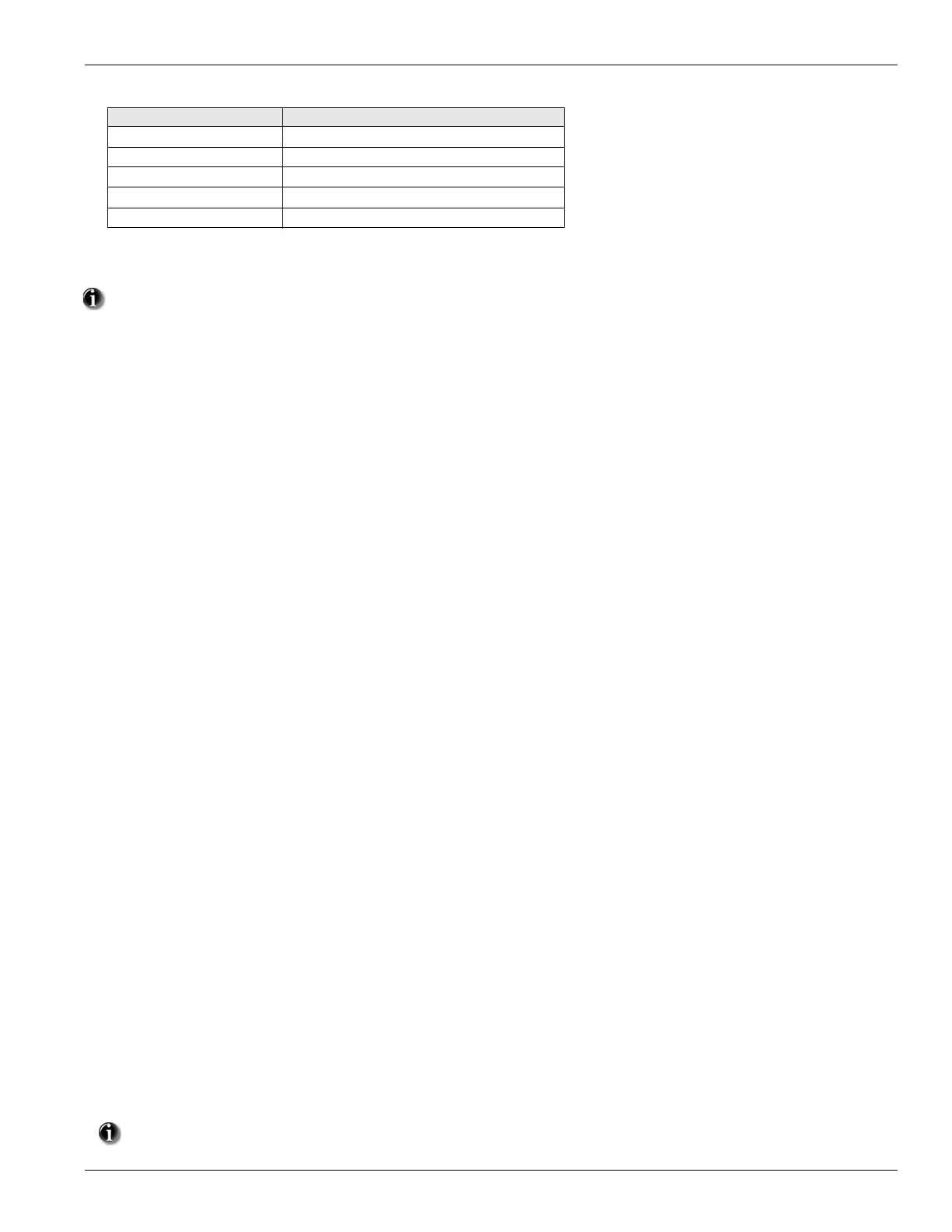
Device Type Zone Definition
2 Door/Window Contact [01] Delay 1
3 PIR or Glassbreak [05] Interior, Stay-Away
4 Smoke Detector [88] Standard 24 Hr Fire (Wireless)
5 Pendant [16] 24 Hour Panic
8 CO Detector [81] 24 Hour CO Detection


 To Next Page