Press to enter Photo Capturing, and press Buon A to take pictures.
in this mode, the photos taken are 12 megapixels.
Press to enter Video Recording, and press Buon B to start or stop
recording.
CAUTION: ALWAYS stop recording video before turning off the
TYPHOON/CGO3 to avoid data loss. If you accidentally turn off the
TYPHOON/CGO3 before you stop recording, re-insert microSDcard (if
removed) and turn the system on again. Wait approximately 20 seconds
unl the camera LED starts to glow solid green indicang the last video
file was recovered.
CAUTION: When enter Photo Capturing, video recording is disabled.
You MUST switch to video recording to start record videos. During
video recording, picture taking (Buon A) is accessible. The resoluon is
set by the video resoluon. In this mode, you will capture sll phtos
from the video.
Taking Photos And Recording Video
The ST10+ seamlessly integrates control of the CGO3 so you can easily
take sll photos and start/stop video recording using the corresponding
buons located on top:
TO START/STOP RECORDING VIDEO
Press the buon located near the top right corner of the ST10+. You’ll hear
an audible indicaon from the ST10+ each me the recording starts/stops.
And while video is recording the LED indicator on the front of the CGO3
will flash blue and green, and there will be a red dot next to the me length
of the recording near the upper right-hand corner on the screen of the
ST10+.
CHOOSING CGO3 PRO FOR TAKING PHOTOS AND RECORDING VIDEOS
If users are professionals in photography and video graphy, and want to
reset related specificaons, please follow the steps below:
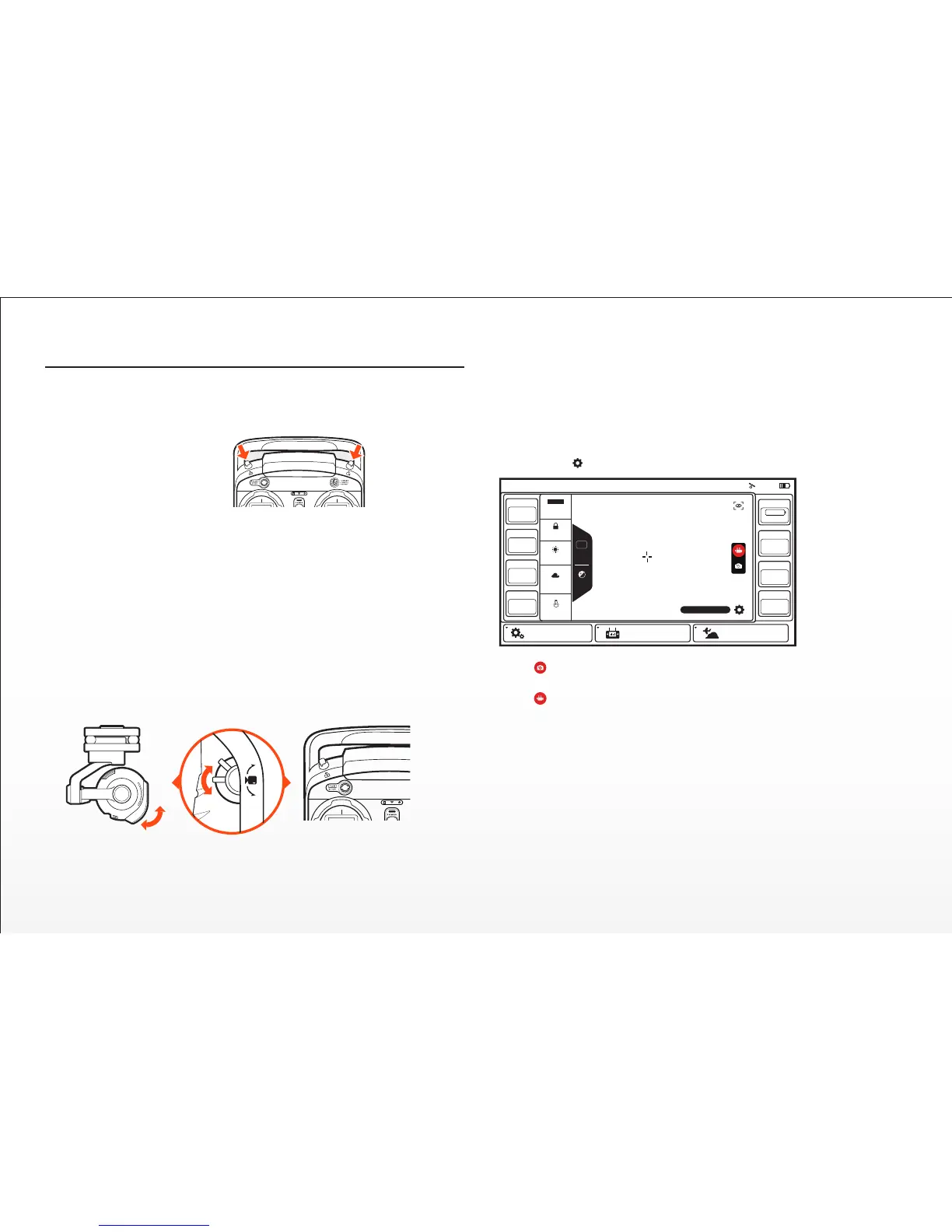
Step 1) Press Flight Sengs, choose Camera Select, press C-GO3-Pro, press
Select, and press OK.
Step 2) The second le column is available for adjusng the camera sengs,
like white balance, etc.
Step 3) Press , and press Video Sengs, different video resoluons are available.
NOTE: CGO3 camera is the default selecon in ST10+. You can take sll
phtos while video recording. The resoluon is set by the video resoluon. In
this mode, you will capture sll photos from the video.
TO TAKE A STILL PHOTO
Press the buon located near the top le corner of the ST10+. You’ll hear
an audible ‘shuer’ sound from the ST10+ and the LED indicator on the
front of the CGO3 will change from glowing solid green to glowing solid
blue. It will take approximately 5 seconds to capture the photo and before
you can take another sll photo.
20
Model:Q500 4K Welcome,Pilot 07:25
GPS
N/A
SAT
N/A
POS
N/A E
N/A N
MODE
N/A
ALT
N/A
VOLTS
N/A V
G-SPD
N/A mph
DIS
N/A
System Sengs Flight Sengs Model Select
WB
ISO 32
1/250s
Auto
Auto
Lock
Sunny
Cloudy
Fluorescent
AWB
3840 x 2160 F30
A
B
C


 To Next Page