30
WARNING: Alkaline Baeries May explode or leak, and cause burn injury if
recharged, disposed of in fire, mixed with a different baery type, inserted
backwards or disassembled. Replace all baeries at the same me. Do not
carry baeries loose in your pocket or purse. Do not remove the baery
label.
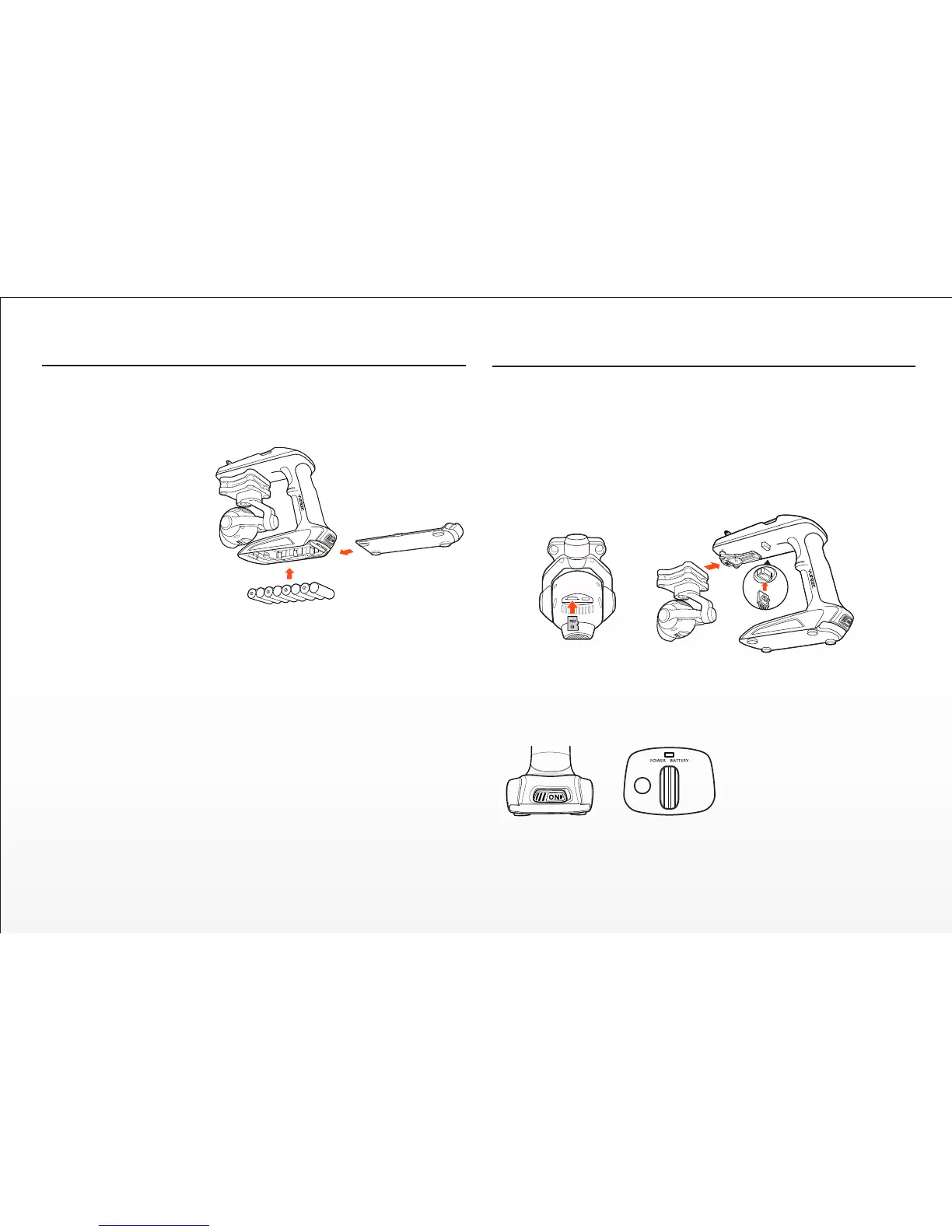
STEP 1) Remove the
Baery Cover / Door from
the boom of the Steady-
Grip™
Hold the boom of the
SteadyGrip™ toward
yourself with the front
part facing downward.
Installing The Steadygrip™ Baeries
WARNING: Before switching on the SteadyGrip™ it is highly recommended
to first securely aach the CGO3 to your SteadyGrip™.
QUICK TIP: It’s a good idea to ensure you have your microSD card with lots
of space for photos and videos handy.
STEP 1) Carefully slide the top part of the CGO3 (that also aaches below the nose of
the Q500 the TYPHOON) onto the mount below the front part of the SteadyGrip™. A
corresponding ‘click’ will be noced once the CGO3 has securely been installed into
the slide-in mount on the SteadyGrip™.
Aaching The CGO3 to The Steadygrip™
Slide the baery cover / door upward with slight force and inspect the AA
baery compartment.
STEP 2) Install 8x AA Baeries
The use of rechargeable baeries is strongly recommended. Alkaline
baeries only support the device to work 15 minutes.
STEP 3) Re-installing the Baery Cover / Door on the boom of the
SteadyGrip™
Once you’ve installed 8 fresh AA baeries, Hold the boom of the Steady-
Grip™ toward yourself with the front part facing downward. Slide the
baery cover / door downward with slight force and ensure you hear and
feel a noceable ‘click’ indicang the baery cover / door has been closed
securely.
STEP 2) Carefully connect the CGO3’s power/control connector to the power/control
port of the CGO SteadyGrip™ and then insert a microSD card into the corresponding slot
on the boom of the CGO3. You can use the included 16GB card (from your RTF
package) or any Class 10 microSD card up to 128GB.
STEP 3) Powering on and inializaon. Place your CGO SteadyGrip™ on a flat and stable
surface, then switch on the Steady-
Grip™ and it will inialize aer 4-8
seconds of no movement or
vibraon.
SteadyGrip™ Main LED Status:
Upon Powering on: Green LED blinking for twice and then solid GREEN for READY TO USE!
Pitch Follow Funcon: GREEN LED blinking
Low Voltage Warning: RED LED blinking slowly
Power Cut-off: RED LED blinking quickly


 To Next Page