IMPORTANT NOTE: Every me you turn the TYPHOON on it will default
to having GPS acve/on (even if you disabled GPS the last me is was
powered on).
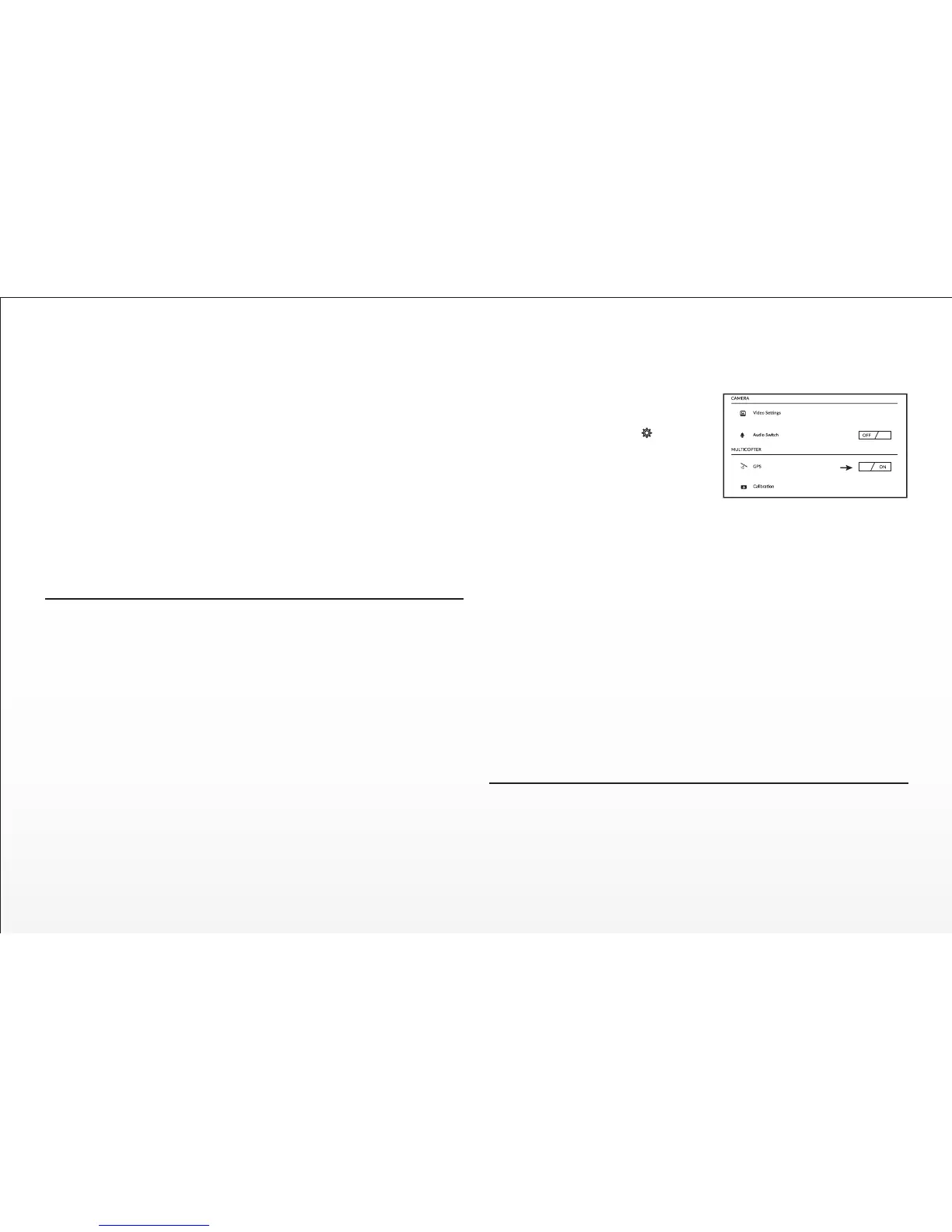
There are two ways to disable the GPS:
GPS can also be disabled manually:
Step 1) While the ST10+ and the TYPHOON are powered on and linked
(and the motors are NOT running), move the Proporonal Control Rate
Slider on the right side of the ST10+ to the uppermost (rabbit) posion.
Step 2) Move the right-hand sck all the way to the right and hold it there
unl step 3 is completed.
Step 3) Move the Flight Mode Selecon Switch from Smart to Home and
Home to Smart mode 4 mes in 3 seconds.
When GPS has been disabled successfully the TYPHOON will emit an
audible indicaon and the GPS status on the ST10+ screen will show
‘Disabled’. Also, the Main LED Status Indicator will flash purple and the
LED Status Indicators below the Motors will flash three (3) mes per
second then will stay off for one (1) second.
AFTER LANDING
ALWAYS turn off the TYPHOON BEFORE turning off the ST10+. Then
remove the baery from the TYPHOON and allow it to cool to ambient/room
temperature before recharging.
WARNING: Do NOT leave the ST10+ and the TYPHOON powered on and
do NOT leave the flight baery installed inside the TYPHOON as doing so
can over-discharge and damage the baeries. Over-discharging can cause
damage to the baeries resulng in reduced performance or failure of the
baeries enrely.
IMPORTANT NOTE: Baery damage, crash damage and ‘fly aways’ are
NOT covered under warranty.
Disabling GPS
WARNING: Smart Mode and Home Mode, along with their corresponding
features, only work when GPS is acve and the TYPHOON has a suitable
GPS signal/lock. If you disable/turn off GPS the TYPHOON can only be
flown in Angle (Pilot) Mode. And if you cannot properly control the
TYPHOON in Angle (Pilot) Mode the aircra may crash or even ‘fly away’.
IMPORTANT NOTE: Crash damage and ‘fly aways’ are NOT covered under
warranty.
We do not typically recommend disabling GPS for any reason, especially if
you’re a first-me or low-me pilot. However, if you’re an experienced
pilot that’s able to properly control the TYPHOON in Angle (Pilot) Mode,
and you do not exceed any altude/distance limits or fly in any ‘no fly
zones’ in your area, you can disable/turn off GPS. Do NOT disable/turn off
GPS unless you accept ALL responsibility and liability for crashes or ‘fly
aways’.
Graphical User Interface (GUI)
You can download the graphical user interface (GUI) soware on the
TYPHOON product page at www.Yuneec.com. Follow the on-screen
instrucons to install and operate the soware which allows you to see the
status of all sensors, to adjust various sengs, check GPS accuracy, update
firmware and more using the included USB Interface/Programmer.
24
When the CGO3 and ST10+, the mul-copter
and ST10+ are bound, press on ST10+
interface, GPS switch can be found, and
turned off.


 To Next Page