ST10+ and Receiver Binding
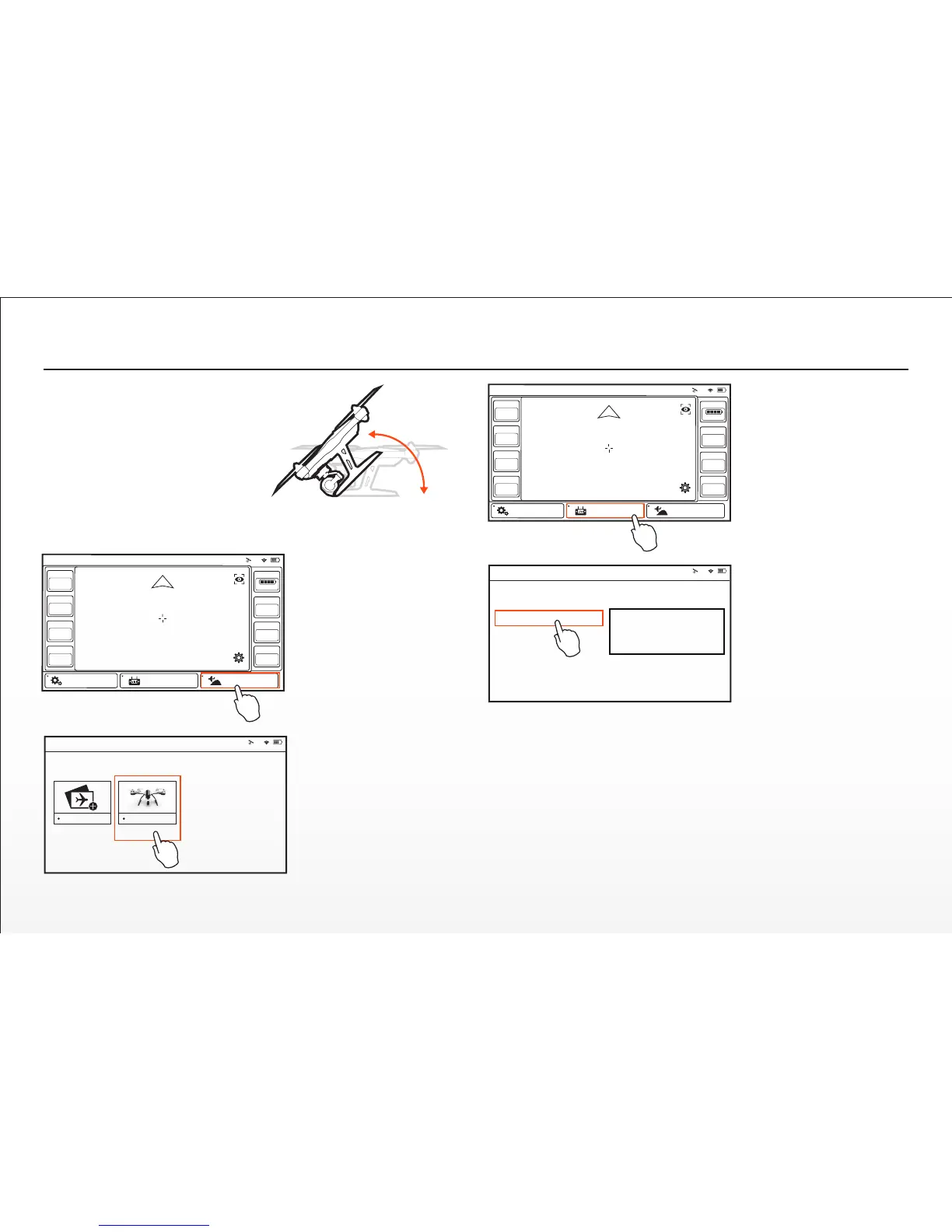
Step 1) Turn on the TYPHOON, and
aer the Main LED Status Indicator
begins to flash blue rapidly, li the
back end upward approximately 45°
then back down to ‘level’ two (2)
mes to put the aircra/receiver into
bind mode. The Main LED Status
Indicator will begin to the flash
orange very rapidly when the
aircra/receiver are in bind mode.
2 x 45+°
Step 2) Turn on the ST10+,
and if required tap the
screen (outside of the pop
up status window) to
bypass the RC and WiFi
connecon process.
Step 3) Tap the ‘Model
Select’ buon, and if
required press ‘OK’ to
bypass any pop up
warnings/alerts.
Step 4) Select the exisng
model (for example: ‘the
TYPHOON’) you would like
to bind to (or create a ‘New
Model’), and if required
press ‘OK’ to bypass any
pop up warnings/alerts.
Model: 4K Welcome,Pilot 10:48:28 pm
10
GPS
Ready
SAT
13
POS
00.0000E
00.0000N
MODE
Angle
ALT
21.4
VOLTS
12.3 V
G-SPD
0.0 mph
DIS
22.5
System Sengs Flight Sengs Model Select
HOME
27
Step 5) Tap the ‘Flight
Sengs’ buon, and if
required press ‘OK’ to
bypass any pop up
warnings/alerts.
Step 6) Tap the ‘Bind’
buon and select the
‘SR24_XXXXX’ receiver
listed in the column under
‘Model’, then tap ‘OK’ aer
the connecon has been
established.
Step 7) Tap the ‘Back’
buon two (2) mes to
return to the main screen
and the model/receiver
should automacally
connect to the ST10+.
Model: 4K Welcome,Pilot 10:48:28 pm
10
GPS
Ready
SAT
13
POS
00.0000E
00.0000N
MODE
Angle
ALT
21.4
VOLTS
12.3 V
G-SPD
0.0 mph
DIS
22.5
System Sengs Flight Sengs Model Select
HOME
Model: 4K Welcome,Pilot 10:48:28 pm
10
SR24_16042
SR24_16042
Not connected
Model Camera
Model: 4K Welcome,Pilot 10:48:28 pm
10
Model Select
New Model gh


 To Next Page