EN UltiMaker S7 Installation and user manual 13
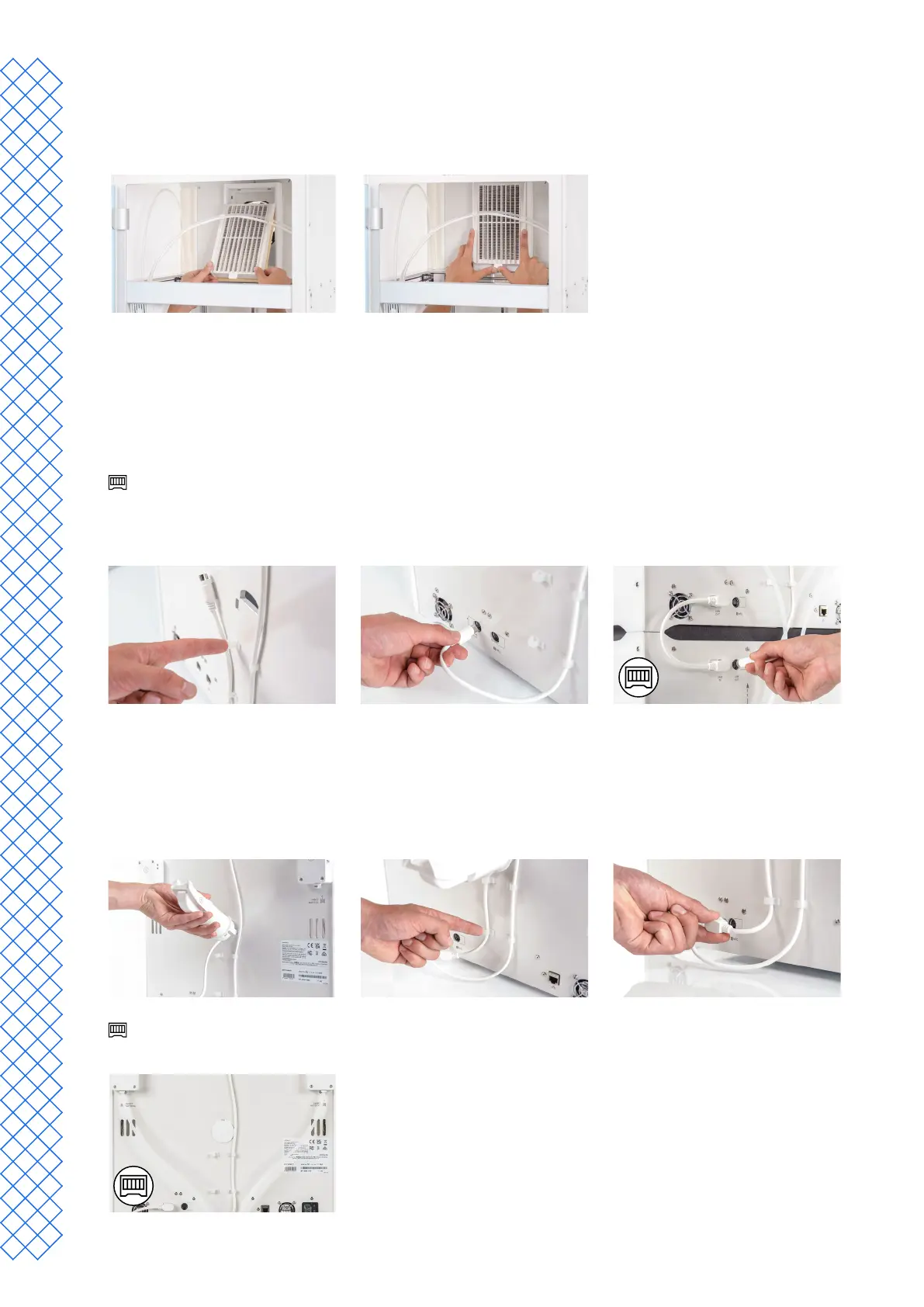
Place the Air Manager lter
1. AligntheAirManagerlterwiththehousing,withthetabatthebottom.
2. Gentlypushtheltercompletelyintothelterhousing.
Connect the Air Manager cable
1. Close the glass door and move to the back of the printer.
2. Disconnect the end of the Air Manager cable from the cable clips in the back panel.
3. Connect it to the UMB OUT port at the back of the printer.
IftheUltiMakerS7isinstalledincombinationwiththeMaterialStation,thecableroutingisdierent.
Connect the Air Manager cable to the UMB OUT port at the back of the Material Station. Connect the short
Material Station cable to the UMB IN port on the Material Station and the other end to the UMB OUT port
on the UltiMaker S7.
Place and connect the NFC spool holder
1. Insert the spool holder into the back panel and push until it snaps into place.
2. Secure the cable behind the two cable clips in the back panel directly underneath the spool holder.
3. Connect the cable to the NFC socket at the back of the printer.
The spool holder is not used if the UltiMaker S7 is installed in combination with the Material Station. Instead,
place the spool holder cap from the Material Station accessories in the hole in the back panel.


 To Next Page