EN UltiMaker S7 Installation and user manual 24
PVAisabiodegradablematerial.However,pleasechecklocalregulationsformorecomprehensiveguidanceon
wastewater disposal or visit this support page for additional information.
It is possible to use the water for more than one print, but this might extend the dissolving time. Through repeated
use,waterbecomessaturatedbypreviouslydissolvedPVA.Forthequickestresult,freshwaterisrecommended.
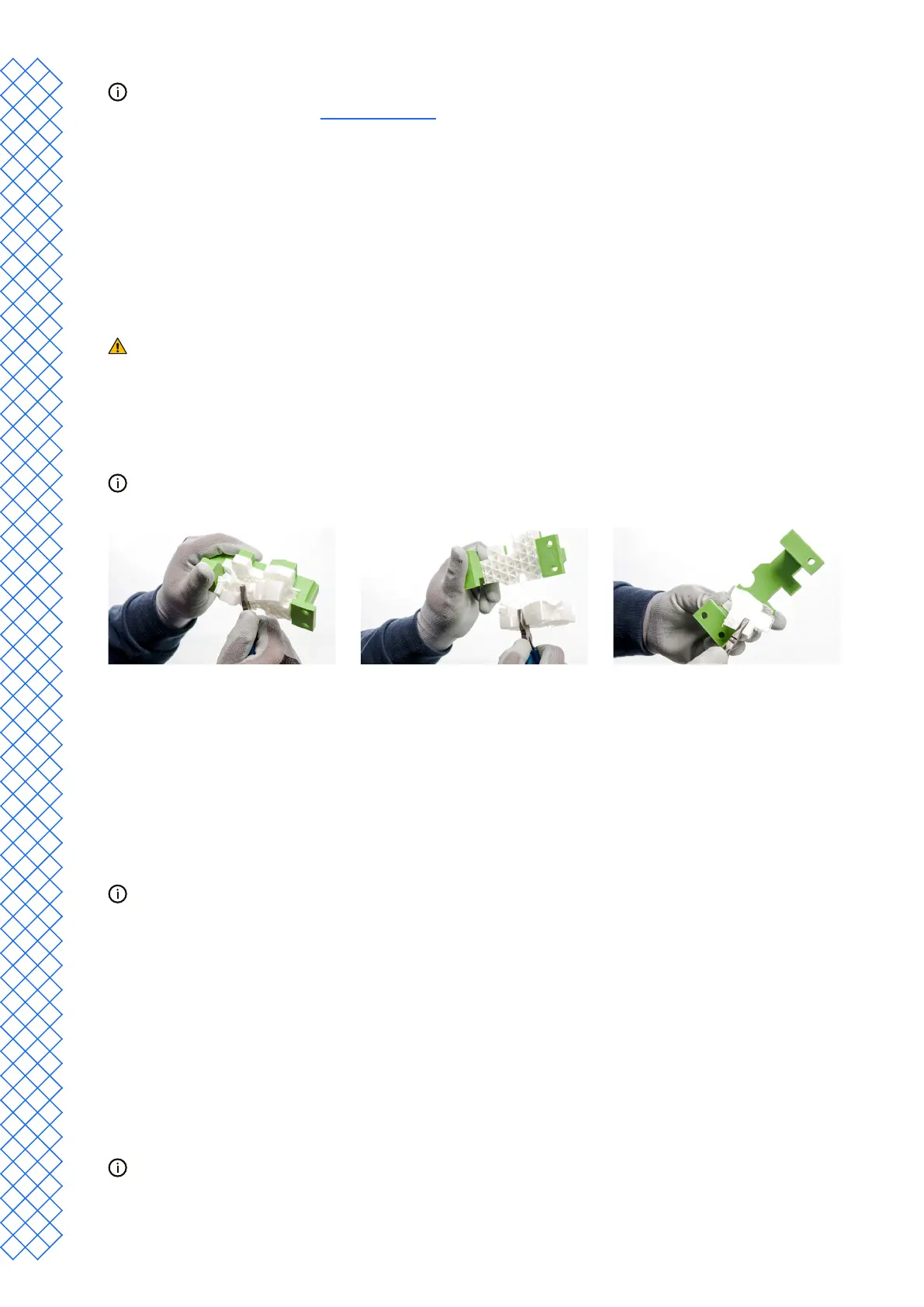
Breakaway support
Prints using UltiMaker Breakaway support material will require post-processing to remove the support structures.
This can be achieved by breaking the support structures from the build material. Follow the steps below and refer
to the UltiMaker website for additional tips and information.
It is advised to wear protective gloves when the support structure contains sharp corners or when
working with larger models.
1. Tear away most of the inner support structure using pliers.
2. Use cutting pliers to grip the Breakaway support interface and pull it away from the model.
3. Remove the last traces of the Breakaway support using cutting pliers or tweezers.
Similar steps can be used to remove support structures printed with build materials. However, these structures
canbemorediculttoremoveandleavemorescarringonthemodel.
4.7 Change the printer conguration
Change materials
The process for changing materials on the UltiMaker S7 depends on whether the printer is used as a standalone
unit, or in combination with the Material Station.
Whenremovingaspoolthatisnotyetempty,puttheendofthelamentthroughthesmallholeinthe
spool to prevent unwinding. Store the material according to the recommended storage conditions as
described in section 5.2.
Standalone printer
The UltiMaker S7 has an assisted process for changing materials. You can also choose to only load or unload a
material. Make sure compatible print cores are installed before you insert materials.
1. In the Conguration menu, select the material you want to use, and select Change.
2. Wait for the print core to heat up and unload the material.
3. Removethematerialfromthefeederandspoolholder.Conrmtocontinue.
4. Placethenewmaterialonthespoolholderandconrmtocontinue.
5. Wait until the UltiMaker S7 detects the material.
When using a third-party material, you can select the material type manually. Ensure you have installed the
correctmaterialprolerst.


 To Next Page