EN UltiMaker S7 Installation and user manual 26
4.8 Calibrations
The UltiMaker S7 is a dual-extrusion printer with a unique nozzle lifting system. For accurate dual-extrusion prints,
theXYosetandthepositionoftheswitchbaymustbecalibrated.
XY oset calibration
ThehorizontaldistancebetweenthenozzlesofthetwoprintcoresintheXandYdirectionneedstobecongured.
A correct XY calibration will ensure that the two colors or materials align well.
The print cores that are supplied with the UltiMaker S7 are already calibrated. For any new combination of print
cores,anXYosetcalibrationmustbeperformed.Theprinterwillthenstorethiscalibrationvalueinternally.
To perform the calibration, you will need the XY calibration sheet as a reference, which is included in the accessory
box. Ensure two print cores and materials are installed before starting the calibration.
1. Conrmthepromptonthedisplaytostart.Alternatively,inthePreferences menu, go to Maintenance → Print
head → Calibrate XY oset and select Start calibration.
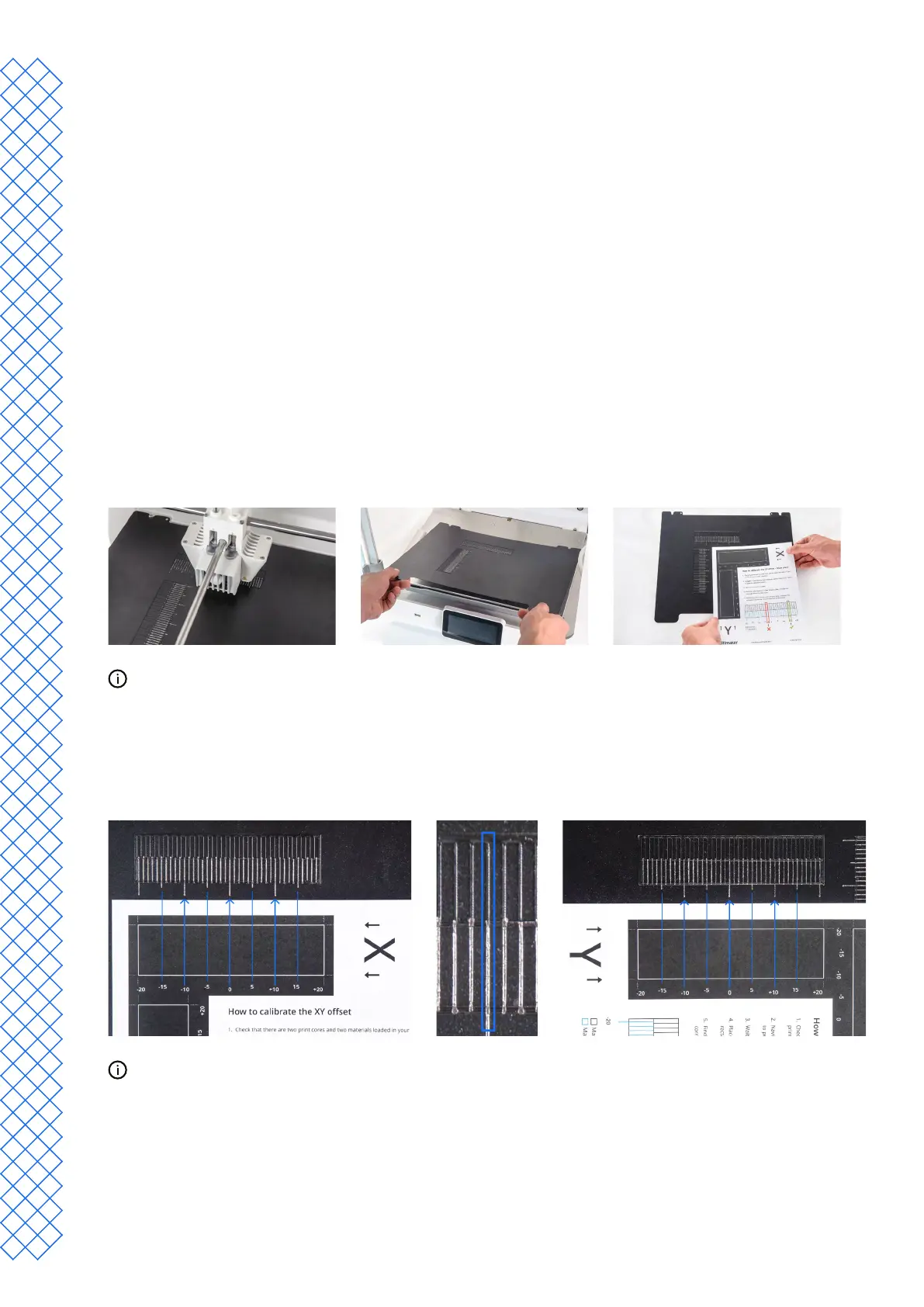
2. The UltiMaker S7 will now print a grid pattern on the build plate. Wait until it is complete.
3. Oncethebuildplatehascooleddown,removetheexiblebuildplatefromtheprinter.
PlacetheXYcalibrationsheetnexttotheexplateasareference.Thisshowswhichofthegridscorrespondsto
X and Y and indicates the numbers for the printed lines.
4. Find the best aligned lines on the printed X grid and note which number corresponds to these lines. Enter this
numberastheXosetvalueonthedisplay.
5. Find the best aligned lines on the printed Y grid and note which number corresponds to these lines. Enter this
numberastheYosetvalueonthedisplay.
ItisimportantthattheprintedXYosetpatternadhereswelltothebuildplateandshowsnosignsofunder-
extrusion. If it did not print well, it is recommended to repeat the calibration print.
AftercompletingtheXYcalibration,placetheexiblebuildplatebackintotheprinter.


 To Next Page