Ultra Electronics Ltd
Magicard Pronto User Manual
- 17 -
PRINTER DRIVER SOFTWARE (THE ‘ULTRADRIVER’)
Note : As part of our continuous improvement program, the UltraDriver software and the Printer
Firmware for Pronto Printers is updated on a regular basis.
To ensure you get th
e best performance from your Pronto Printer, we recommend that you regularly
check the Magicard website for the latest Driver software and Firmware at :-
www.magicard.com/support/technical support
Installing the ‘UltraDriver’
1. Im
por
tant
– be
for
e
lo
ading the Driver, make sure the USB cable is NOT
connected to the
Printer.
Load the Driver CD ROM into the PC
connected to the
Printer.
If t
he C
D d
o
es not run
a
utoma
tically, click the “Start”
button, and then click on “Run”. Type “D:\autorun”
(where D is the Drive letter for your CD Drive), then
press the “Return” key.
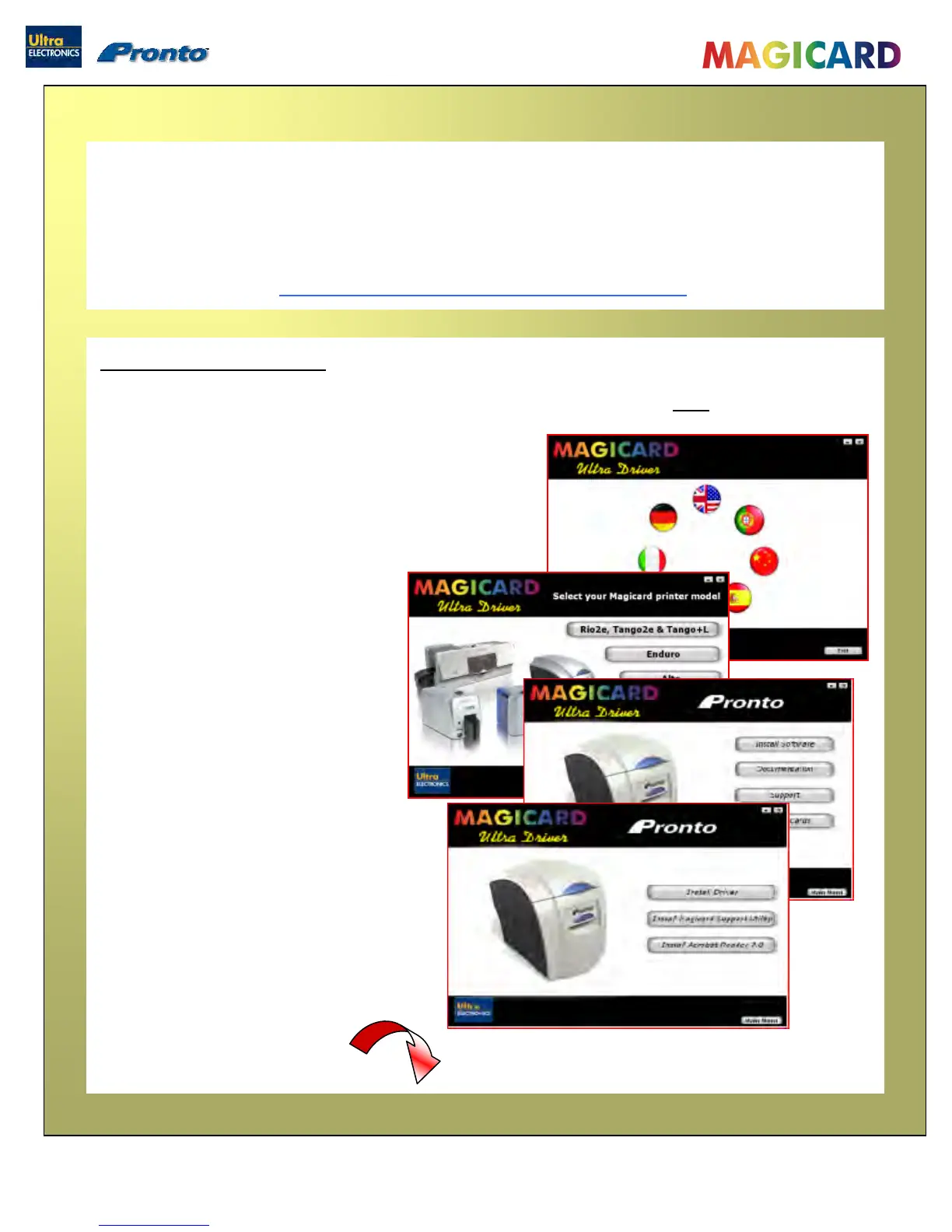
2. Select the language you wish
to use.
3. Select the ‘Pronto’ option.
4. Select ‘Install Software’
5. Then s
elect ‘Install Driver’
The Driver will now start to install…
Please turn to next pa
ge…


 To Next Page