Ultra Electronics Ltd
Magicard Pronto User Manual
- 23 -
Replacing the Cleaning Roller
A new cleaning roller is supplied with every new Dye-Film roll.
–
Open the Printer, remove the used Dye-Film
,
then :-
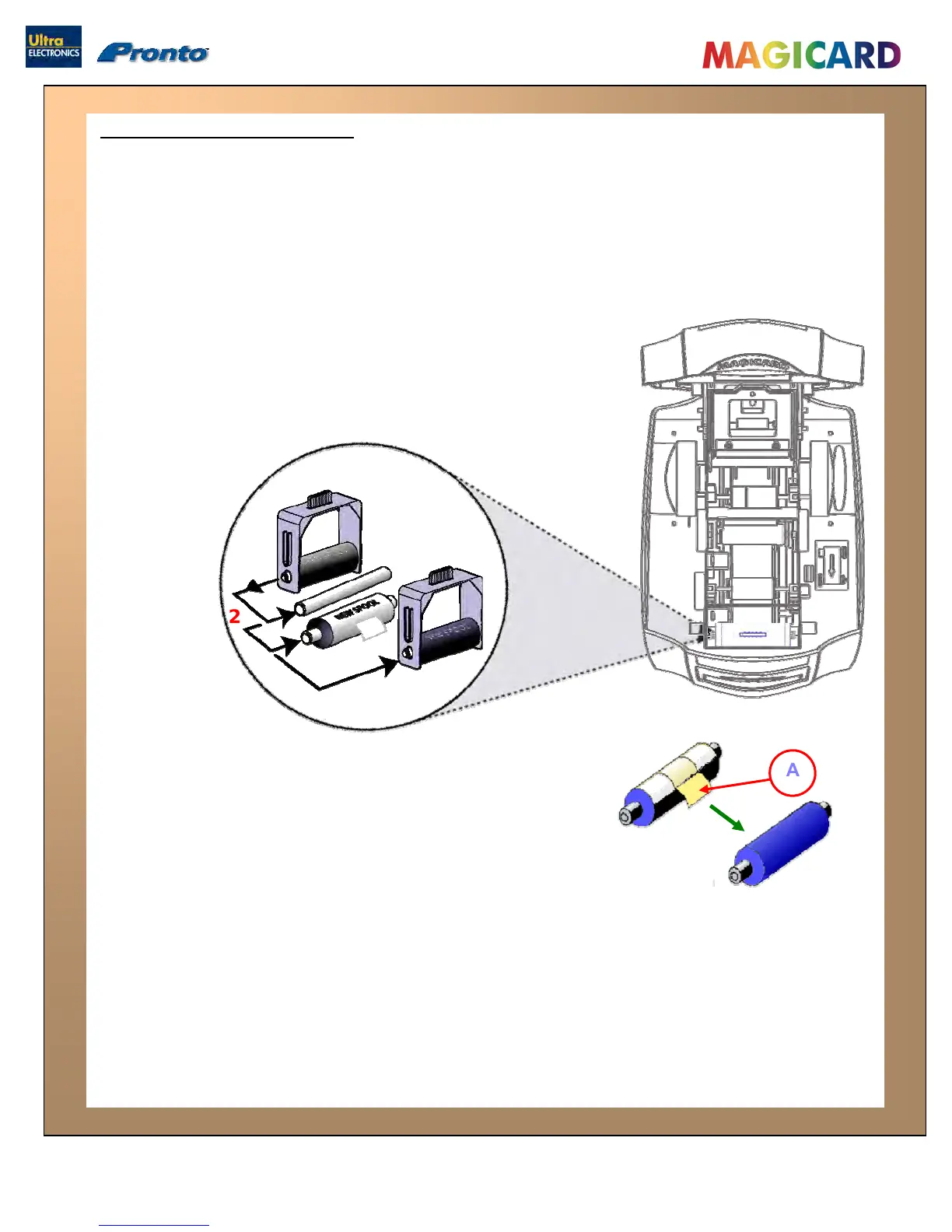
Pull out the Cleaning Cassette.
(This is the positioned towards the front of the Printer – just behind the front
Card slot – see below).
Slide out
Cleaning Rol
Slide the metal
1.
2.
3.
the metal bar, then remove and discard the used
ler.
bar into the new Cleaning
Roller.
A
2
4.
Pull the tab (A) to carefully remove the Cleaning Roller’s
protective cover. This will reveal the Roller’s “tacky” surface.
5. Place the new Cleaning Roller into the Cleaning Cassette,
and refit the Cleaning Cassette into the Printer.
1
2
3
4
5


 To Next Page