INSTRUMENTS AND CONTROLSINSTRUMENTS AND CONTROLS
2-102-10
POWER CONSUMPTION SCREENPOWER CONSUMPTION SCREEN
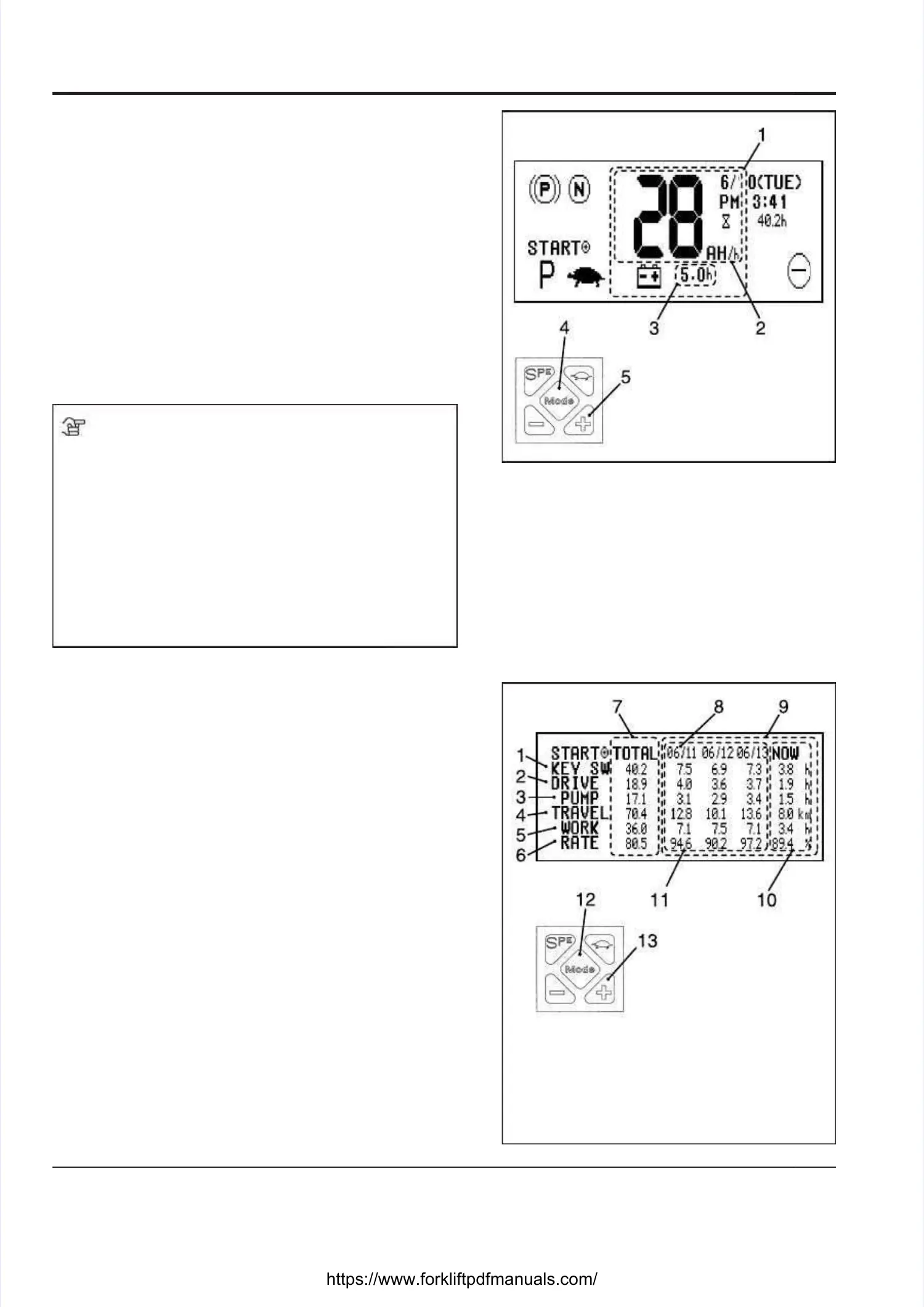
On the Main screen, press the “Mode” button [4] at theOn the Main screen, press the “Mode” button [4] at the
center of the keypad to display the power consumptioncenter of the keypad to display the power consumption
screen.screen.
•• The power The power consumpconsumption [2] tion [2] represerepresents the nts the powerpower
consumption per hour.consumption per hour.
••
The remaining battery The remaining battery time [3] represents time [3] represents the lengththe length
of time the truck can operate in the future withoutof time the truck can operate in the future without
recharging, estimated by calculating from the averagerecharging, estimated by calculating from the average
operating rate of the operating rate of the truck so far.truck so far.
••
The readings of The readings of the power consumption [2] andthe power consumption [2] and
remaining battery time [3] are updated every 6remaining battery time [3] are updated every 6
minutes.minutes.
NOTENOTE
•• The power consumption The power consumption and remaining batteryand remaining battery
time should be used as a rough guide, becausetime should be used as a rough guide, because
they are roughly calculated from the reading of thethey are roughly calculated from the reading of the
battery discharge battery discharge indicator.indicator.
••
The battery capacity used for the basis of The battery capacity used for the basis of
calculation is factory set.calculation is factory set.
If If the the battbatt ery ery is is chanchan ged ged to to a a battbatt ery ery whosewhose
capacity is different from the factory setting, consultcapacity is different from the factory setting, consult
your local UniCarriers your local UniCarriers dealer.dealer.
HOUR METER SCREENHOUR METER SCREEN
Every time the “Mode” button [12] is pressed, the screenEvery time the “Mode” button [12] is pressed, the screen
changes as follows:changes as follows:
→→ Main screenMain screen →→ Power consumption screen Power consumption screen →→ Hour meter Hour meter
screenscreen
••
The current hour mThe current hour meter data can be reter data can be reset by pressingeset by pressing
the + button [13] and holding it down for a while. Thethe + button [13] and holding it down for a while. The
current data will be shifted to the left row in the historycurrent data will be shifted to the left row in the history
table.table.
••
Three rounds of past Three rounds of past data can be stored idata can be stored in the historyn the history
table.table.
•• Actual operating timActual operating time: the total e: the total conduction time conduction time of theof the
drive motor or pump motordrive motor or pump motor
•• Operating rate: Operating rate: Actual Actual operating time/the operating time/the total total timetime
the key switch is kept in the key switch is kept in the “ON” positionthe “ON” position
1. 1. Power Power consumptionconsumption
indicating areaindicating area
2. 2. Power Power consumptionconsumption
3. 3. Remaining Remaining batterybattery
timetime
4. 4. “Mode” “Mode” buttonbutton
5. 5. + + buttonbutton
1. 1. Key Key switch switch “ON”“ON”
timetime
2. 2. Drive Drive motormotor
conduction timeconduction time
3. 3. Pump Pump motormotor
conduction timeconduction time
4. 4. Distance Distance traveledtraveled
5. 5. Actual Actual operatingoperating
timetime
6. 6. Operating Operating raterate
7. 7. TTotal otal timetime
8. 8. Date Date on on whichwhich
recording of datarecording of data
was startedwas started
9. 9. Past Past datadata
10. 10. Current Current datadata
11. 11. 3 rounds 3 rounds of pastof past
datadata
12. 12. “Mode” “Mode” buttonbutton
13. 13. + + buttonbutton





 To Next Page