INSTRUMENTS AND CONTROLSINSTRUMENTS AND CONTROLS
2-112-11
SETTING AND CHANGING THE SETTING AND CHANGING THE DADATE AND TIMETE AND TIME
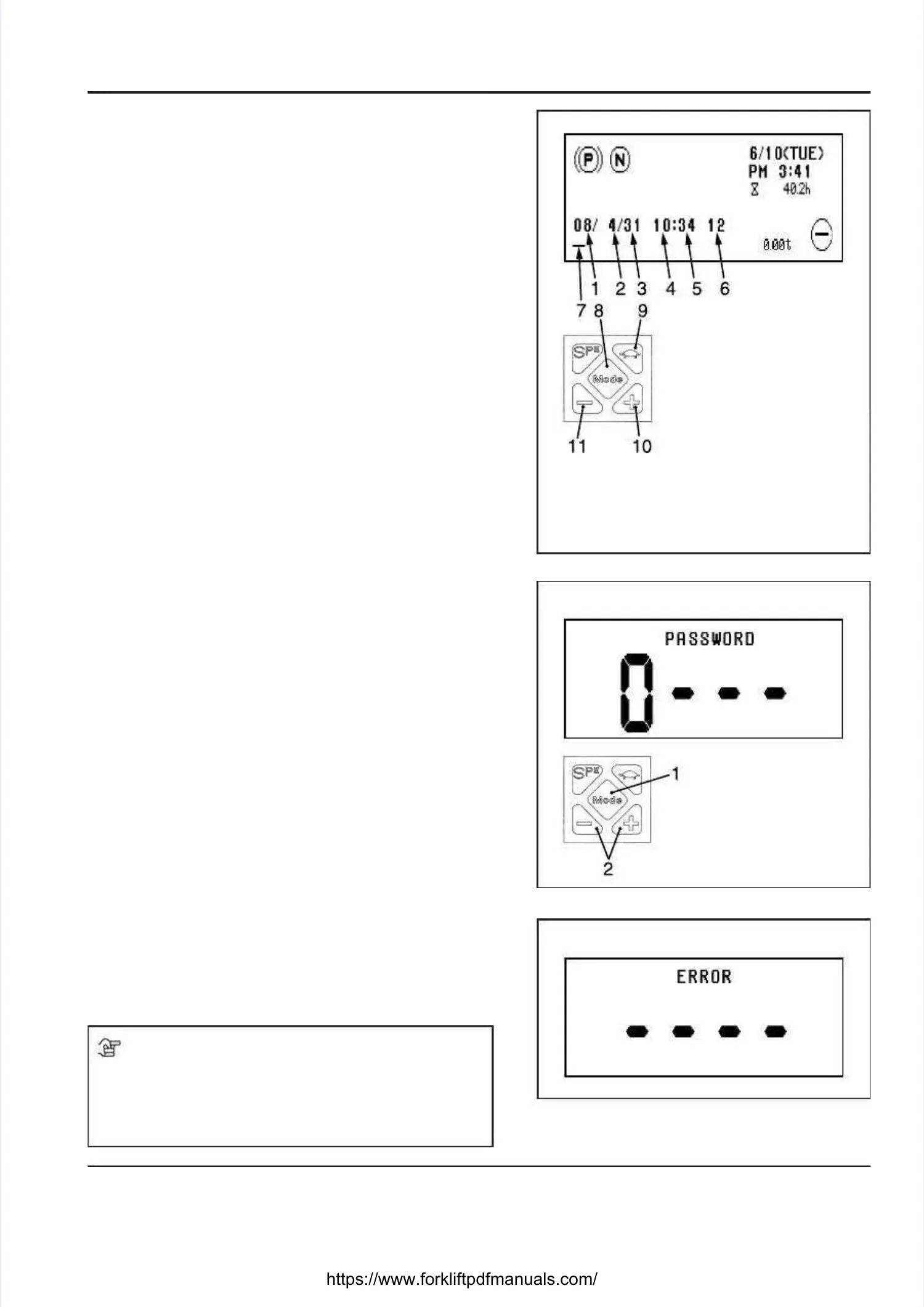
On the Main screen, press the “Mode” button [8] in theOn the Main screen, press the “Mode” button [8] in the
center of the key pad and hold it down for 3 seconds tocenter of the key pad and hold it down for 3 seconds to
display the Date and Time screen.display the Date and Time screen.
You can change any item when it is underlined [7].You can change any item when it is underlined [7].
•• The underline [7] shifts one The underline [7] shifts one digit to the right every digit to the right every timetime
the “Mode” button [8] is pressed.the “Mode” button [8] is pressed.
••
If the “Mode” If the “Mode” button [8] is pressed button [8] is pressed when the underline when the underline [7][7]
is located under the time format [6] item, the change willis located under the time format [6] item, the change will
be stored in memory and the display will return to thebe stored in memory and the display will return to the
Main screen.Main screen.
•• An underlined [7] number can An underlined [7] number can be increased andbe increased and
decreased using the + and - buttons.decreased using the + and - buttons.
For For example, example, PM10:34, PM10:34, (WED) (WED) October October 15, 15, 2008 2008 cancan
be shown as follows:be shown as follows:
→→08 / 10 / 15 / 22 / 34 / 1208 / 10 / 15 / 22 / 34 / 12
••
If the low-speed travel If the low-speed travel (turtle) button is pressed, the(turtle) button is pressed, the
display will return to the Main screen. Then, you candisplay will return to the Main screen. Then, you can
start all over again.start all over again.
•• Even when the Even when the 12-hour format is 12-hour format is selected, enter theselected, enter the
current time in the 24-hour format.current time in the 24-hour format.
•• The day The day of the of the week will be week will be added automatically.added automatically.
CANCELING A PASSWORDCANCELING A PASSWORD
If the truck is password-protected, the PASSWORD screenIf the truck is password-protected, the PASSWORD screen
will appear when the key switch is turned to the “ON” position.will appear when the key switch is turned to the “ON” position.
Enter the 4-digit password on the PASSWORD screen.Enter the 4-digit password on the PASSWORD screen.
The truck won’t operate unless the correct password isThe truck won’t operate unless the correct password is
entered.entered.
•• Every time the Every time the “Mode” button [1] “Mode” button [1] is pressed, the digitis pressed, the digit
that can be changed shifts one digit to the right.that can be changed shifts one digit to the right.
•• The valuThe valu e of e of a digit (0 - a digit (0 - 9) can be 9) can be incrincr easeease d ord or
decreased using the + and - buttons [2].decreased using the + and - buttons [2].
••
After entering the After entering the password, press the password, press the “Mode” button “Mode” button [1][1]
and hold it down for 3 seconds to conrm the entry. Ifand hold it down for 3 seconds to conrm the entry. If
the password is accepted, the Main screen will appearthe password is accepted, the Main screen will appear
and you will be able to operate the truck.and you will be able to operate the truck.
If the password is wrong, the ERROR screen appearsIf the password is wrong, the ERROR screen appears
and then the PASSWORD screen will be displayed again.and then the PASSWORD screen will be displayed again.
•• The password will be The password will be remembered for 2 remembered for 2 hours after thehours after the
key switch is key switch is turned “OFF”.turned “OFF”.
If the If the key switch key switch is turned is turned to to the “ON” the “ON” position withinposition within
2 hours after the key switch is turned “OFF”, the2 hours after the key switch is turned “OFF”, the
instrument panel will be displayed immediately on theinstrument panel will be displayed immediately on the
Main screen, bypassing the PASSWORD screen, andMain screen, bypassing the PASSWORD screen, and
you will be able to operate the truck.you will be able to operate the truck.
If two If two hours hours have have passed passed after thafter the key e key switch is switch is turnedturned
“OFF”, you will need to enter the password again.“OFF”, you will need to enter the password again.
NOTENOTE
••
If you want a password protection system for the truck,If you want a password protection system for the truck,
contact your local UniCarriers dealer. Your UniCarrierscontact your local UniCarriers dealer. Your UniCarriers
dealer will set the dealer will set the passwords for the system.passwords for the system.
••
Two Two different passwords can different passwords can be used.be used.
1. 1. YYear (ear (right-moright-most st 22
digits)digits)
2. Month2. Month
3. 3. DateDate
4. 4. Current Current time time (hours)(hours)
5. 5. Current Current time time (mins)(mins)
6. 6. Time Time format: format: 12 12 oror
2424
(12-hour (12-hour format format oror
24-hour format)24-hour format)
7. 7. UnderlineUnderline
8. 8. “Mode” “Mode” buttonbutton
9. 9. Low-speed Low-speed traveltravel
(turtle) button(turtle) button
10. 10. + + buttonbutton
11. 11. - - buttonbutton
PAPASSWORD INPUT SSWORD INPUT SCREENSCREEN
1. 1. “Mode” “Mode” buttonbutton
2. 2. + + and and - - buttonsbuttons
PASSWORD ERROR SCREENPASSWORD ERROR SCREEN





 To Next Page