STASTATIONARY TIONARY BATTERY CHARGERBATTERY CHARGER
3-173-17
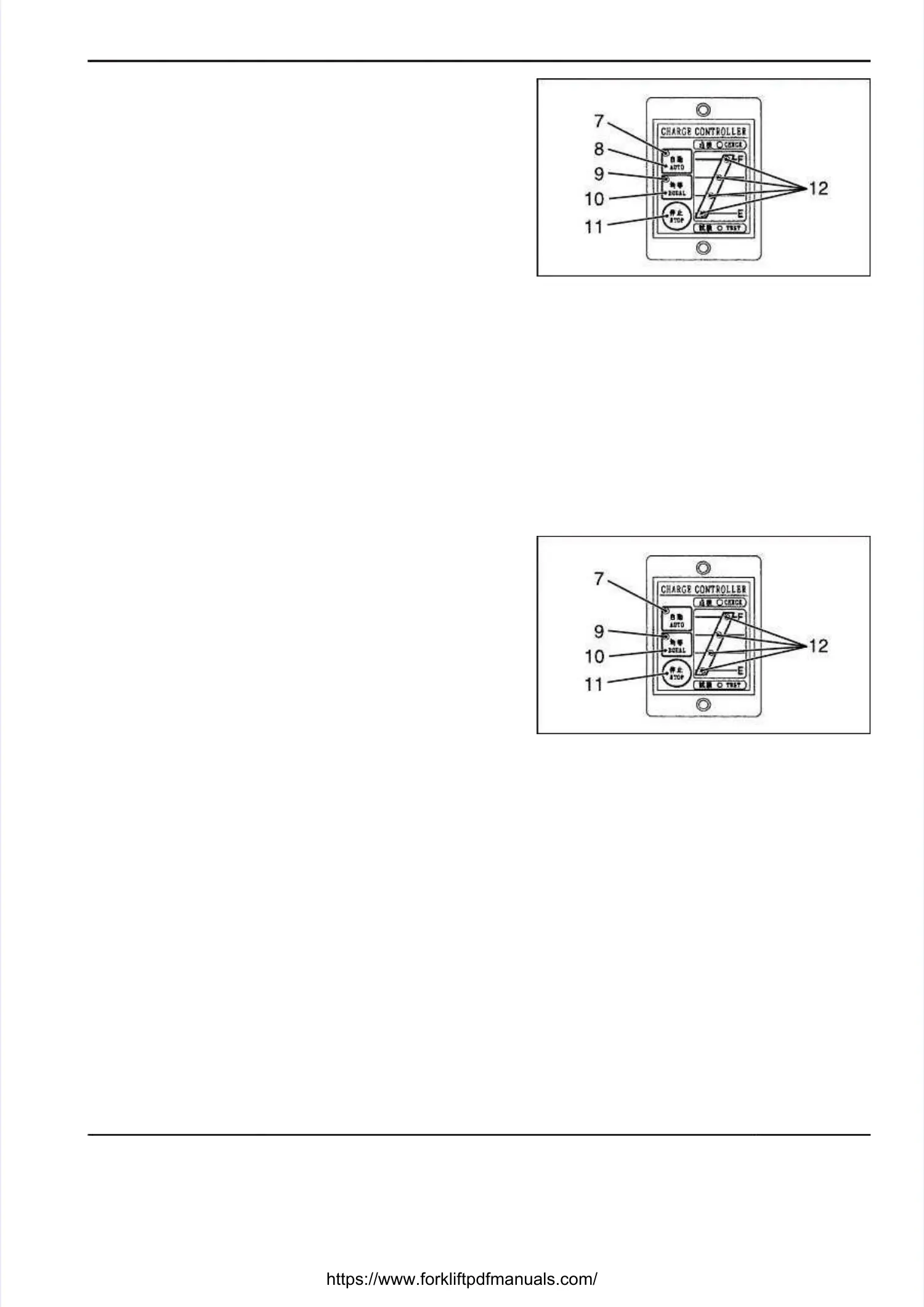
1) 1) Press the automatic charge switch [8]. Press the automatic charge switch [8]. The automaticThe automatic
charge indicating light [7] comes on and an automaticcharge indicating light [7] comes on and an automatic
charge starts.charge starts.
2) As charging progresses, the charge status indicating2) As charging progresses, the charge status indicating
lights [12] come on in sequence from the E side tolights [12] come on in sequence from the E side to
the F side.the F side.
3) When charging is completed, all the charge status3) When charging is completed, all the charge status
indicating lights [12] come on with the other indicatingindicating lights [12] come on with the other indicating
lights going out.lights going out.
4) After charging is completed, turn off the ground-fault4) After charging is completed, turn off the ground-fault
circuit breaker and disconnect the battery plug.circuit breaker and disconnect the battery plug.
5) If you want to stop an automatic charge halfway,5) If you want to stop an automatic charge halfway,
press the “STOP” switch [11].press the “STOP” switch [11].
If an automatic charge is stopped halfway, all theIf an automatic charge is stopped halfway, all the
charge status indicting lights [12] will go out and bothcharge status indicting lights [12] will go out and both
the automatic charge light [7] and the equalizingthe automatic charge light [7] and the equalizing
charge light [9] will come on. After making sure bothcharge light [9] will come on. After making sure both
lights [7, 9] come on, turn off the ground-fault circuitlights [7, 9] come on, turn off the ground-fault circuit
breaker and disconnect the battery plug.breaker and disconnect the battery plug.
EQUALIZING CHARGEEQUALIZING CHARGE
1) Press the equalizing charge switch [10]. The1) Press the equalizing charge switch [10]. The
equalizing charge light [9] comes on and anequalizing charge light [9] comes on and an
equalizing charge starts.equalizing charge starts.
2) As charging progresses, the charge status indicating2) As charging progresses, the charge status indicating
lights [12] come on in sequence from the E side tolights [12] come on in sequence from the E side to
the F side.the F side.
3) When charging is completed, all the charge status3) When charging is completed, all the charge status
indicating lights [12] come on with the other indicatingindicating lights [12] come on with the other indicating
lights going out.lights going out.
4) After charging is completed, turn off the ground-fault4) After charging is completed, turn off the ground-fault
circuit breaker and disconnect the battery plug.circuit breaker and disconnect the battery plug.
5) If you want to stop an equalizing charge halfway,5) If you want to stop an equalizing charge halfway,
press the “STOP” switch [11].press the “STOP” switch [11].
If an automatic charge is stopped halfway, all theIf an automatic charge is stopped halfway, all the
charge status indicting lights [12] will go out and bothcharge status indicting lights [12] will go out and both
the automatic charge light [7] and the equalizingthe automatic charge light [7] and the equalizing
charge light [9] will come on. After making sure bothcharge light [9] will come on. After making sure both
lights [7, 9] come on, turn off the ground-fault circuitlights [7, 9] come on, turn off the ground-fault circuit
breaker and disconnect the battery plug.breaker and disconnect the battery plug.
CHANGING CHARGING MODECHANGING CHARGING MODE
Stop charging once before changing the charging mode.Stop charging once before changing the charging mode.
7. 7. Automatic Automatic charge charge indicating indicating lightlight
8. 8. Automatic Automatic charge charge switchswitch
9. 9. Equalizing Equalizing charge charge indicating indicating lightlight
10. Equalizing charge switch10. Equalizing charge switch
11. Stop light11. Stop light
12. Charge status indicating lights12. Charge status indicating lights
7. 7. Automatic Automatic charge charge indicating indicating lightlight
9. 9. Equalizing Equalizing charge charge indicating indicating lightlight
10. Equalizing charge switch10. Equalizing charge switch
11. Stop light11. Stop light
12. Charge status indicating lights12. Charge status indicating lights





 To Next Page