Home
Union Community
IP Access Controllers
AC-5000
Page 28 (User Management Functions)
Union Community AC-5000 - User Management Functions
65 pages
Manual
Save Page as PDF
To Next Page
To Next Page
To Previous Page
To Previous Page
Loading...
AC
-
5000
/ 5100
User
Guide
28
UNIONCOMMUNITY Co., Ltd.
/
12F, Daemyung Valeon, 127, Beobwon-ro,
Songpa-gu, Seoul, 05836, Republic of Korea
TEL: +82-2-
6488
-
3000
/ FAX
: +82-2-
6488
-3100 E-Mail :sales@unioncomm.co.kr
http://www.unioncomm.co.kr
3. Door
▶
Lock T
ype
▶
DM1
▶
DM2
▶
Open Dur
ation
▶
W
arn Door Open
4. Wiegand
□
Bypass
▶
Wiegand Out
▶
Site Code
5. Card R
eader
▶
Card F
ormat
▶
Re
ad Card NO
.
▶
Dummy Mode
6. External Device
▶
Printer
▶
Lock Controller
▶
Connection Devic
e Setting
□Mode
6. Informa
tion
1. System
Info
2. Network Inf
o
3. Database Inf
o
4. View Log
5. V
ersion Inf
o
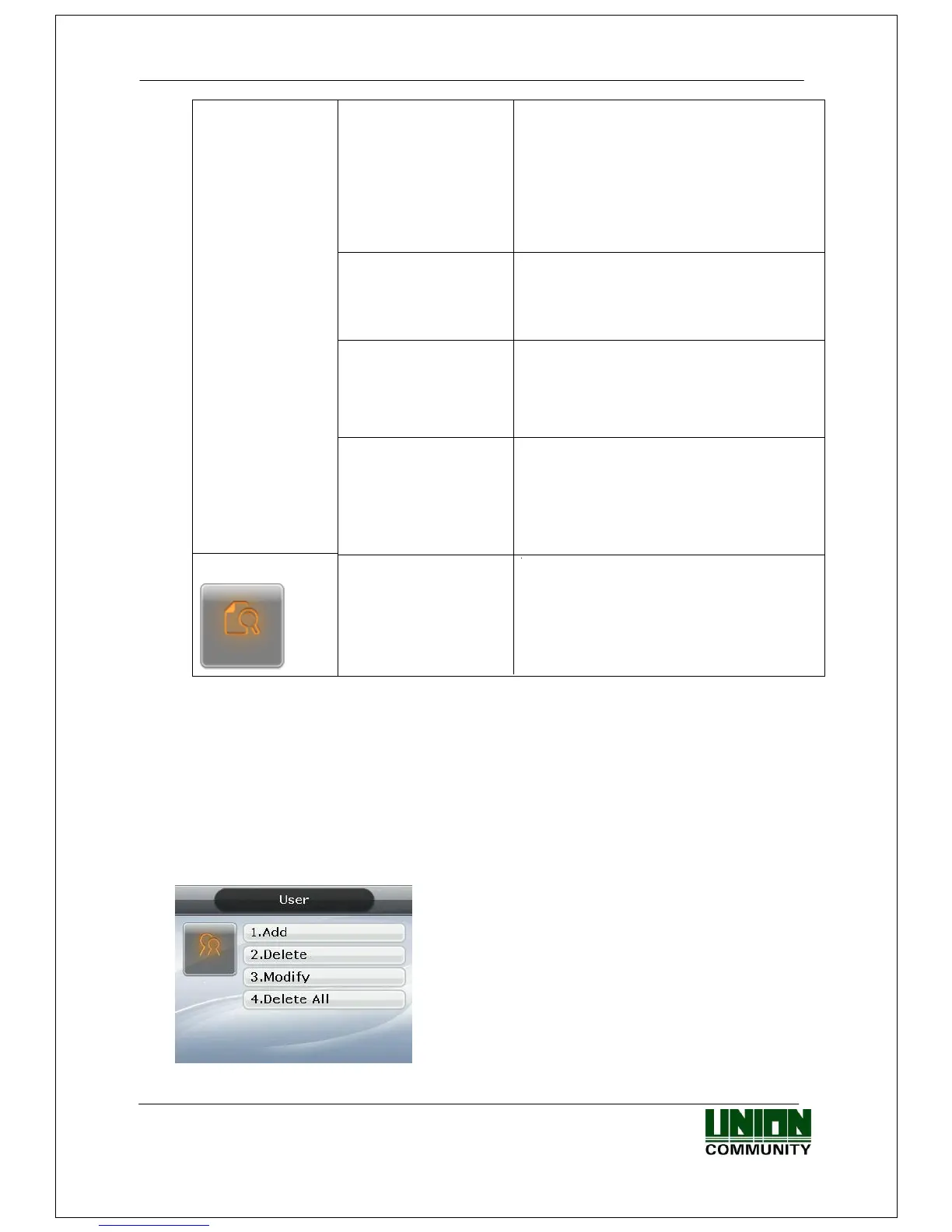
3.3. User
Select “1. User” in the m
ain menu, an
d the follow
ing screen appea
rs:
Press [1] ke
y to register new use
r
.
[2] key to dele
te user
.
[3] key to modif
y user
.
[4] key to dele
te all users.
27
29
Table of Contents
Main Page
Revison History
2
Terminal Description
2
Features
2
Specification
2
Menu Configuration
2
System Setting
2
Language
2
Authentication
2
Features Various Register and Changing Auth Type(13->12)
2
Terminal Option
2
Table of Contents
4
1 Before Use
6
Safety Precautions
6
Terminal Description
7
Screen Description (During Operation)
8
Icons Shown During Operation
8
LED Signal Shown During Operation
12
Keys Used During Operation
12
Used Voices During Operation
12
Buzzer Sounds Used During Operation
13
How to Register and Input Fingerprint
13
2 Product Introduction
15
Features
15
Configuration
17
Standalone (Access)
17
Connect with PC SERVER (Access, Time & Attendance, Cafeteria)
17
Specification
18
3 Environment Settings
20
To be Checked before Environment Settings
20
Enter the Menu
20
How to Access the Menu Without the Admin Verification
20
Modify Set Values
21
Move to Page
23
Save Environment Settings
24
Press the [F4 (←)] Key in the Main Menu Screen of <Figure 3-1> to Save the Changed Settings, and the Following Screen Appears
24
Menu Configuration
25
User
28
Add
29
Delete
33
Modify
34
Delete All
35
Network
35
Server IP
36
Server IP Settings
37
Ddns
37
Terminal ID
38
Application
39
Time Schedule
40
Function Key
41
Extended Key
41
Display
43
RS485 ID Settings
43
System
43
System Setting
44
Authentication
45
Fingerprint
46
Language
47
Date Time
48
Database
48
Terminal
51
Terminal Option
51
Volume Control
52
Door
53
Wiegand
54
Card Reader
55
External Device
56
Information
58
System Info
58
Network Info
58
Database Info
59
View Log
59
Version Info
59
Downloading User's File
60
Change Background Image
60
Change Voice Message
60
Change User Text
61
4 How to Use the Terminal
62
Change of Authentication Mode
62
ID Input
63
Authentication
63
Fingerprint Authentication
63
Card Authentication
63
Password Authentication
64
Fcc Information
65
Related product manuals
Union Community AC-7000
75 pages
Union Community Virdi AC-2100
60 pages
Union Community UBio-X Face
77 pages
Union Community Virdi 4000
59 pages


 To Next Page