AC-5000 / 5100 User Guide 58
UNIONCOMMUNITY Co., Ltd. / 12F, Daemyung Valeon, 127, Beobwon-ro,
Songpa-gu, Seoul, 05836, Republic of Korea
TEL: +82-2-6488-3000 / FAX: +82-2-6488-3100 E-Mail :sales@unioncomm.co.kr
http://www.unioncomm.co.kr
3.8. Information
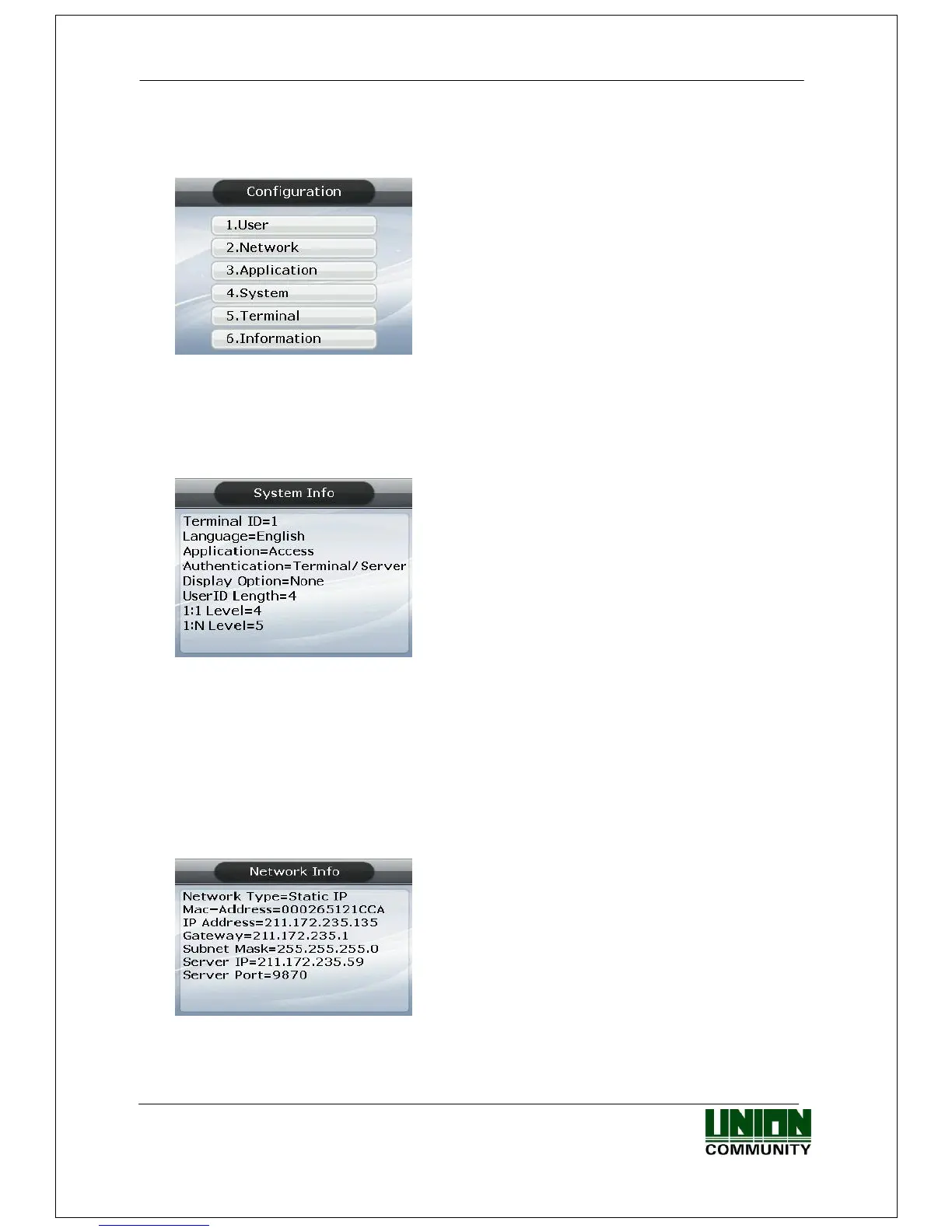
Select ‘6. Information’ in the main menu and the following screen appears:
Menu to view the terminal settings.
Press;
[1] key to view various terminal configurations.
[2] key to view network configuration, such as IP.
[3] key to view the user registration status, etc.
[4] key to view log data.
[5] key to view firmware version.
3.8.1. System Info
Select ◆ [ENT~] [6. Information] [6. System Info] in the initial screen ◆
Press the [F4 (←)] key to exit to the parent menu.
3.8.2. Network Info
Select ◆ [ENT~] [6. Information] [2. Network Info] in the initial screen ◆
Press the [F4 (←)] key to exit to the parent menu.



 To Next Page