Installation Guide for Uplogix Local Managers 18
Ethernet expansion card port mapping
Dedicated Ethernet ports are used to make a direct Ethernet connection between the Local
Manager and a managed device. For instance, the Local Manager can use Ethernet to move
configuration and software image files back and forth between it and its managed devices.
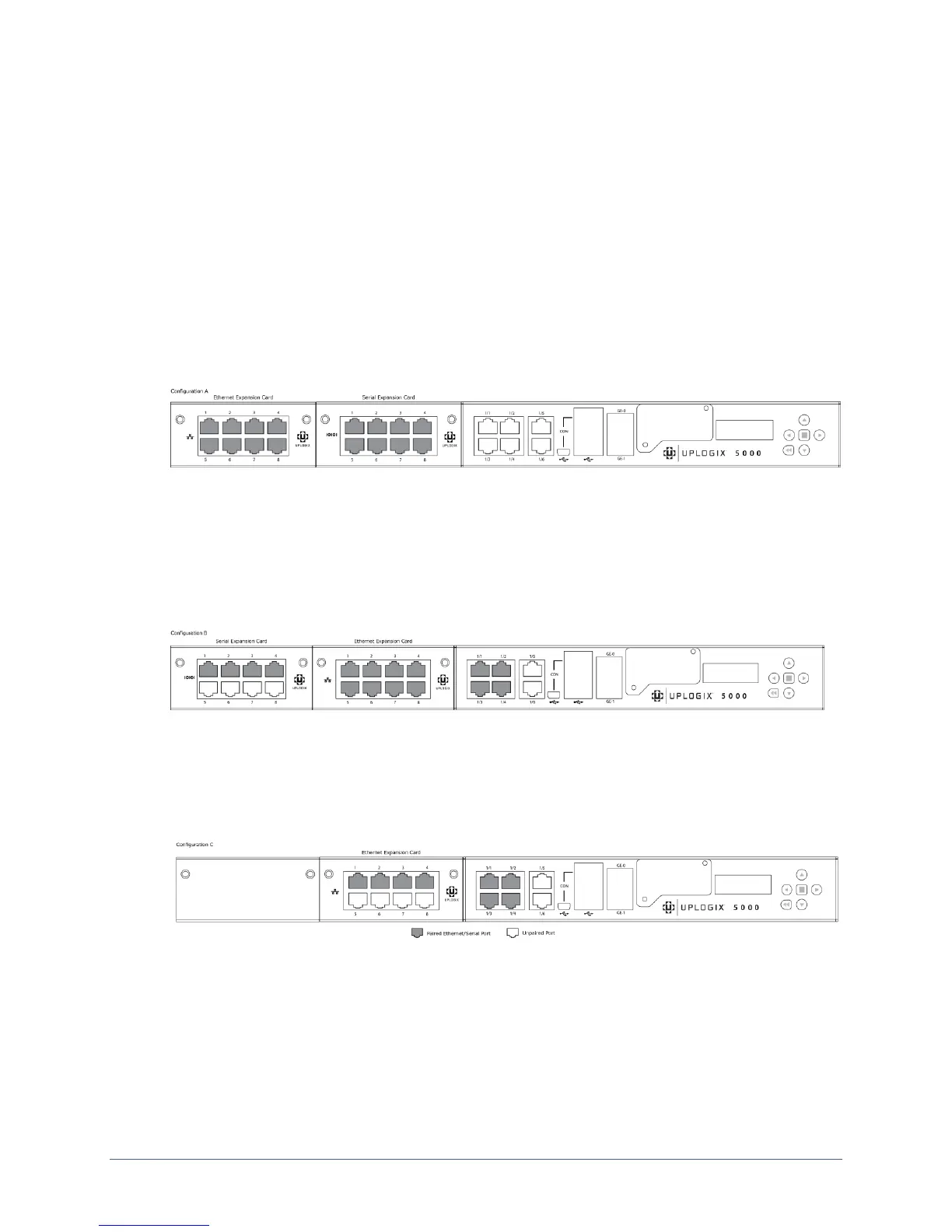
Dedicated Ethernet ports are always paired with serial ports in the system. The placement of
an Ethernet expansion card in the system will determine which serial ports map to its Ethernet
ports.
Configuration A: One Ethernet expansion card, one serial expansion card
When an 8 or 16 port serial expansion card is installed in the right expansion bay (slot 2) and
an 8 port Ethernet expansion card is installed in the left expansion bay (slot 3), the 8
dedicated Ethernet ports in slot 3 are paired with the first 8 serial ports (ports 2/1 to 2/8) in
slot 2.
Configuration B: One serial port expansion card, one Ethernet expansion card
When an 8 port Ethernet expansion card is installed in the right expansion bay (slot 2) and an
8 or 16 port serial expansion card is installed in the left expansion bay (slot 3), the first four
dedicated Ethernet ports are paired with the first four fixed serial ports (ports 1/1 thru 1/4).
The remaining Ethernet ports (ports 5-8) are paired with the first four serial ports on the serial
port expansion card (ports 3/1 to 3/4).
Configuration C: One Ethernet expansion card, no serial expansion card
When an 8 port Ethernet expansion card is installed in the right expansion bay (slot 2), the
first four Ethernet ports are paired with the first four fixed serial ports (ports 1/1 to 1/4). The
remaining fixed serial port (port 1/5) is not paired with a dedicated Ethernet port.


 To Next Page