BY UROVO PRODUCT
主屏幕以打开用于自定义主屏幕的菜单。
Open the homescreen menu for user-defined homescreen settings.
主屏幕的空白区域直至菜单出现。
Blank out the homescreen till the menu is seen.
• 拖动 - 轻触并短暂按住某个项,然后在屏幕上移动手指直至到达新位置。
• Drag - light touch, press for a short time and hold a certain option, and finger the
option in the screen to a new position.
• 滑动 – 滑动以:
• Slide - slide to:
应用中心界面上下或左右滑动以浏览不同的应用程序图标;
Slide up/down or left/right in the app center interface to browse different app icons;
锁屏界面滑动绘制解锁图案以解锁屏幕。
Slide in the lock-screen interface to set the unlocking pattern to unlock the
screen.
•长按 – 长按以:
• Long press - long press to:
主屏幕长按调用 MENU 功能;
Long press the homescreen to call the MENU function;
对应用程序或小工具快捷方式进行拖拽。
Drag any app or tool shortcut.
键盘输入
Keyboard Input
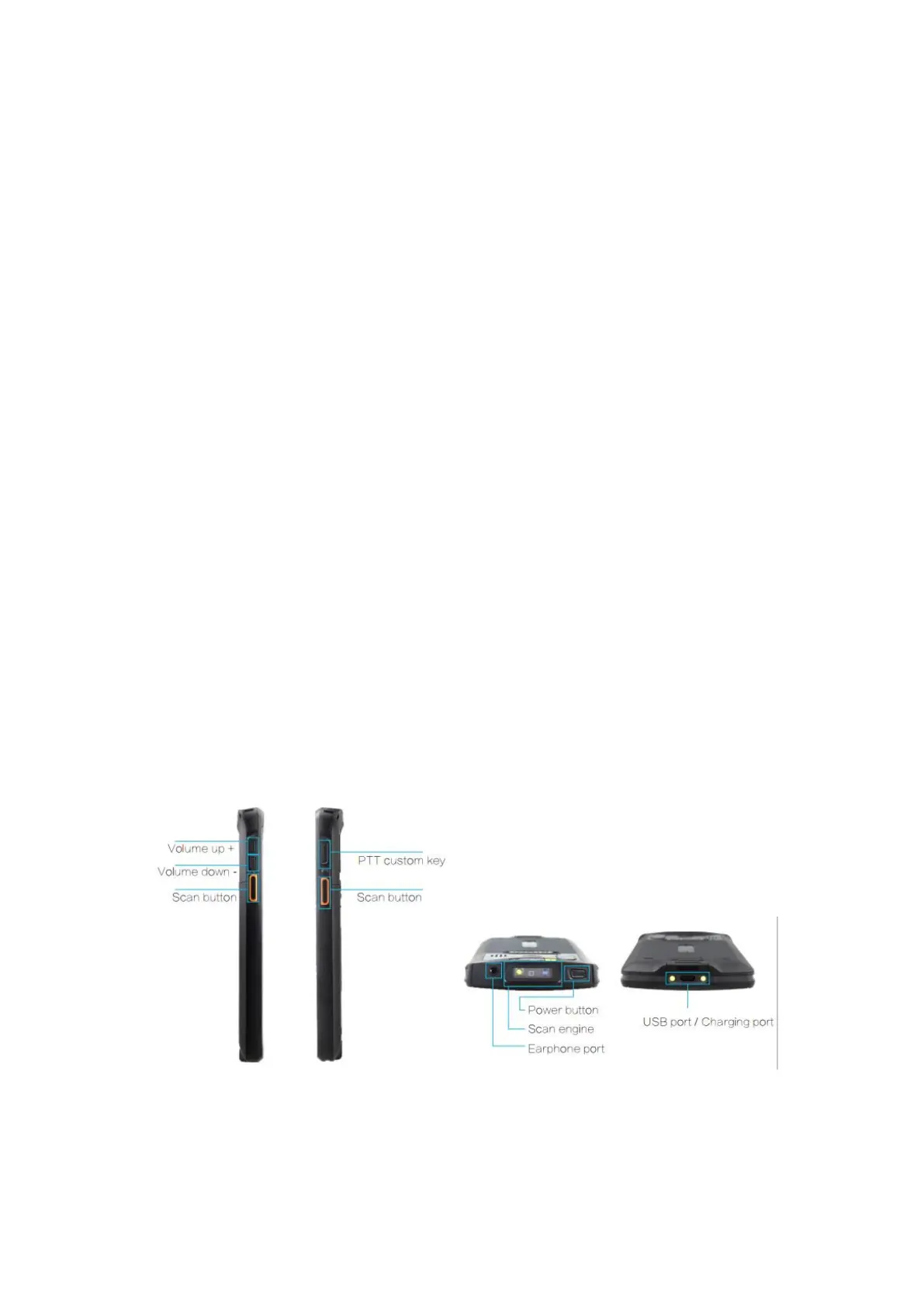
物理按键
Physical key
Figure 2-4 物理按键图
Figure 2-4 Physical Keys



 To Next Page