BY UROVO PRODUCT
Figure 4-8 Bluetooth Pairing
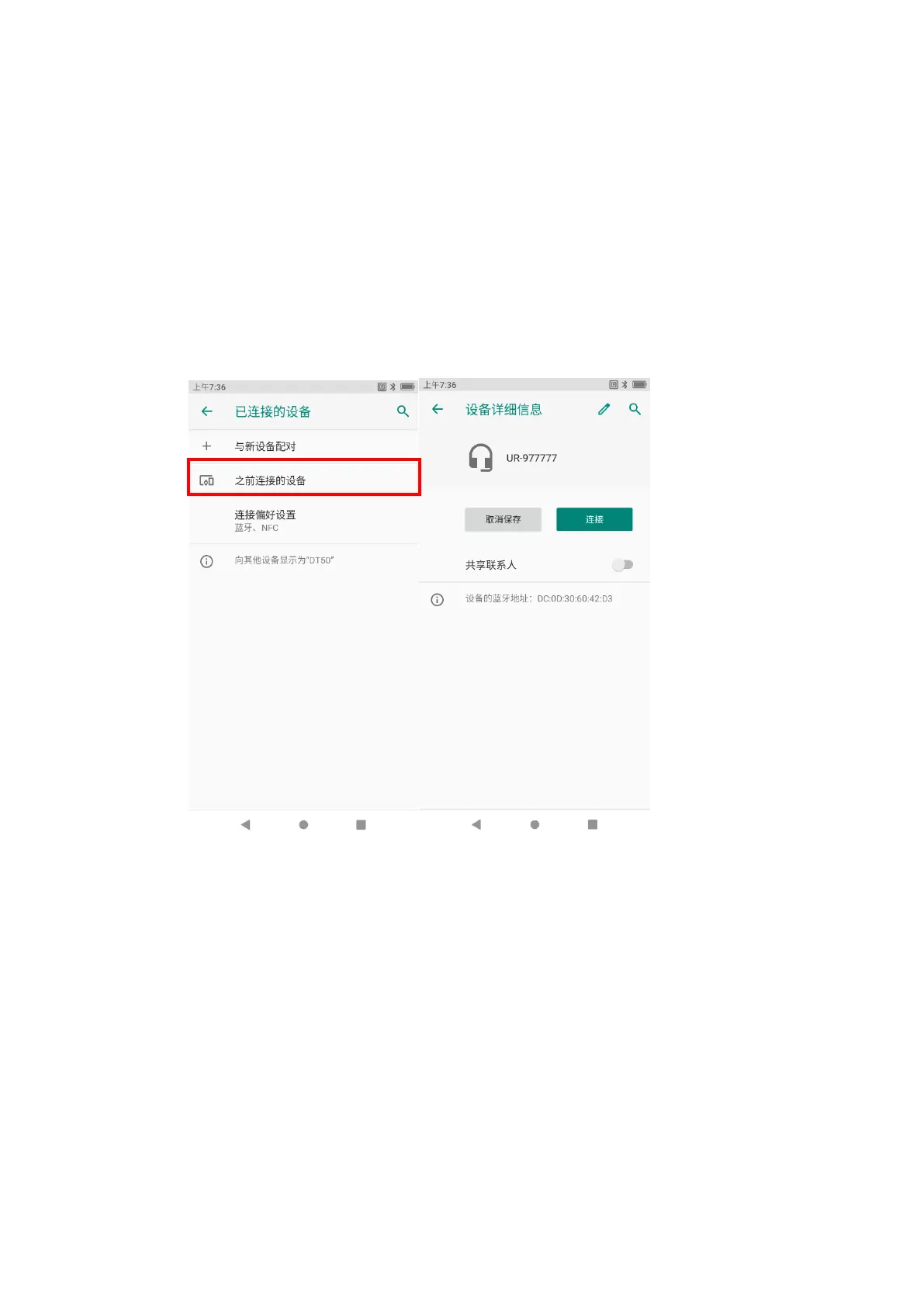
1) 之前连接的设备管理
Management of previously connected devices
1. 下拉状态栏长按蓝牙图标或者点击“设置”-“已连接的设备”进入页面;
Pull down the status bar and long press the Bluetooth icon or click "Settings"-
"Connected Device" to enter the page;
2. 点击“之前连接的设备”,可对之前连接的设备进行“取消保存”、“连接”等管理操
作。
Click "Previously Connected Devices" to "Cancel Saving", "Connect" and
conduct other management operations on any previously connected device.
Figure 4-9 之前连接的设备管理
Figure 4-9 Management of Previously Connected Devices
第五章配件
Chapter V Parts
简介
Introduction
该章节讲解如何使用 DT50 的配件。
This Chapter describes how to use parts of DT50.



 To Next Page