EasyManua.ls Logo

US Cutter Copam - Detail of Carriage Arm; Right Side View

US Cutter Copam
50 pages
Print Icon
To Next Page IconTo Next Page
To Previous Page IconTo Previous Page
Loading...
- 5 -
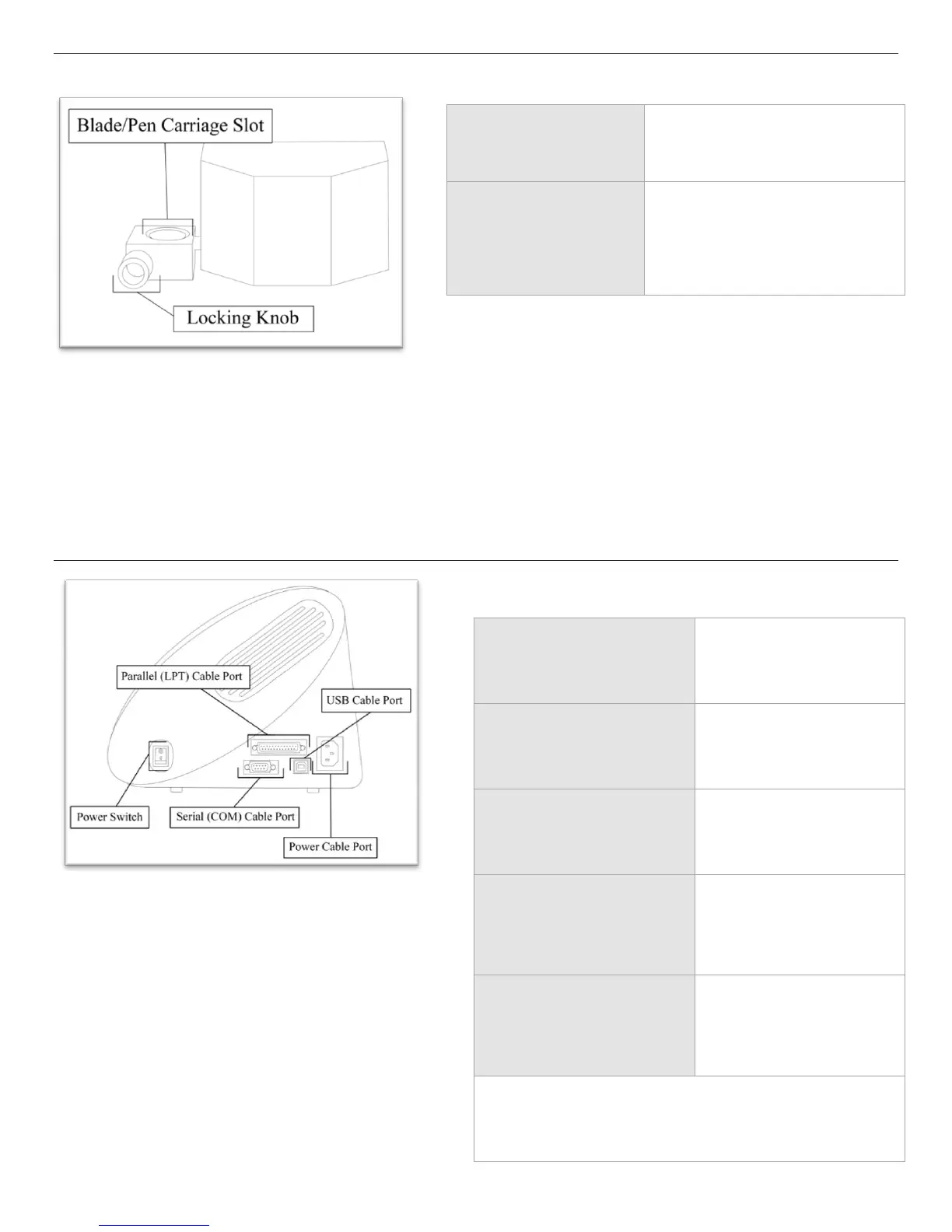
Detail of Carriage Arm
Right Side View
Blade/Pen Carriage
Slot
Holds the Blade or Pen
Carriage in place.
Locking Knob
Allows access to the
Blade/Pen Carriage Slots for
exchanging/replacing
Carriages.
Parallel Cable Port*
Used to connect a
parallel cable from the
cutter to a computer.
Serial (COM) Cable
Port*
Used to connect a serial
cable from the cutter to
a computer.
USB Cable Port*
Used to connect a USB
cable from the cutter to
a computer.
Power Cable Port
Used to connect a
power cable from the
cutter to a wall outlet
or surge protector.
Power Switch
Main power switch for
turning the power of
the cutter on(1) or
off(0).
*Only one of the connection cables should be used to
connect the cutter to a computer.

Related product manuals