Balance: ~25.00
Days Left: 2.5
22.09.12 ~10.00
14.09.12
~15.00
05.09.12
~30.00
23.08.12
~10.00
Date Amount
----------------------
History
Account Info
!
SUPPLY OFF
Emergency Credit
~0.00
Minimum top-up
~0.00
Restore
Electricity
Tariff
Menu
~20.05 for first 10 kWh
~0.10 thereafter
~0.05 for first 15kWh
~0.10 thereafter
~0.15 for the first 10kWh
Smart Energy - NORWEB
- - - - - - - - - - - - - - - - - - - - - - - - - - - - 17:00
- - - - - - - - - - - - - - - - - - - - - - - - - - - - 18:00
Type in your vend
code. Press ‘delete’
to correct. Press
‘Enter’ to send.
E-Credit
Debt Payments
Debt Type: Payment Based
Outstanding owed: £54.00
Repayment Rate: 40% per top-up
Debt
Debt Type: Payment Based
Outstanding Owed:
~54.00
Repayment Rate: 40
%
per top-up
Week
Month
Day
Menu
Updt On: 29.09.12 10:59
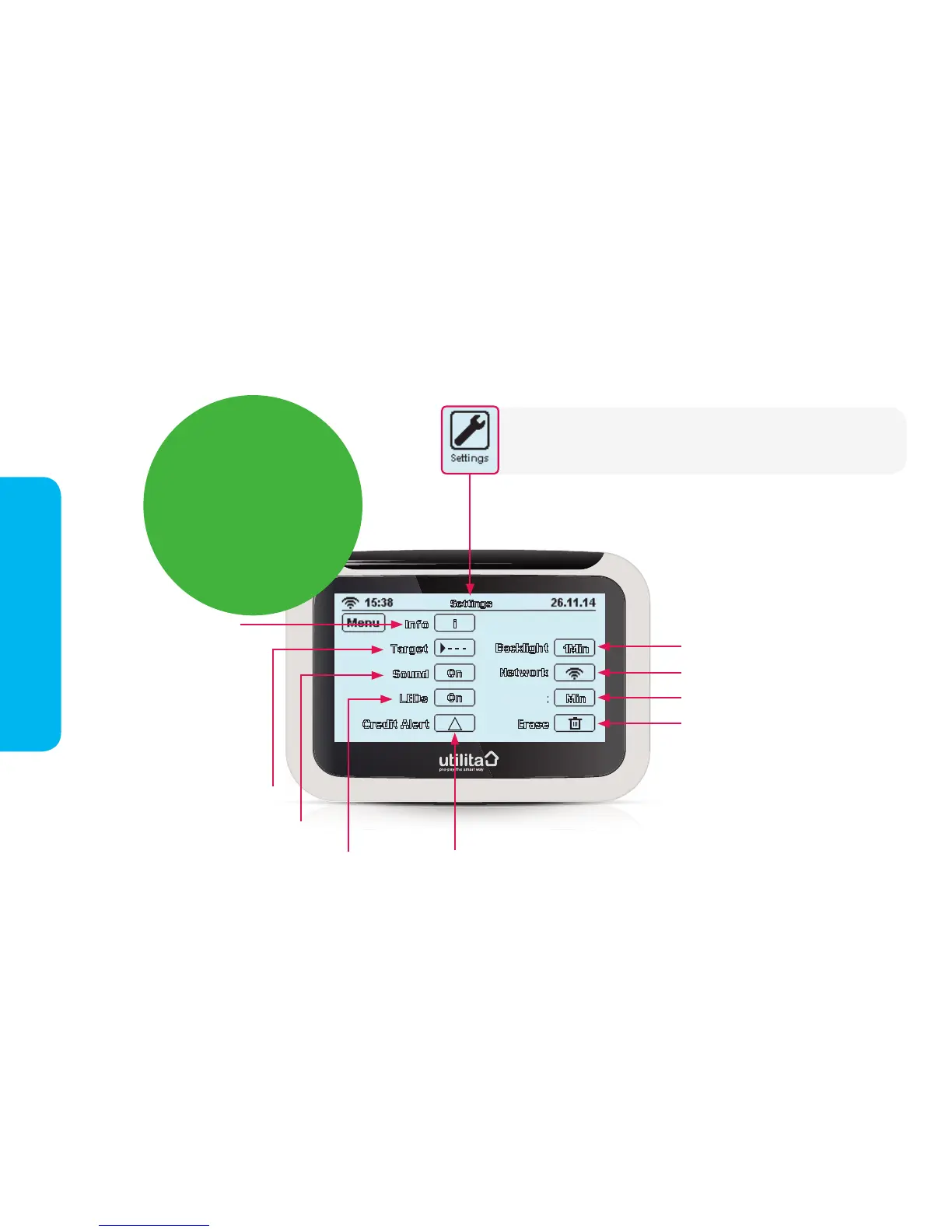
Info – press here to view
your electricity meter
serial number, top-up card
number and MPAN (meter
point reference number).
Targets – see page 13
Sound – press to switch on/off
LEDs – press to switch in-home
display LED lights on/off
Credit Alert – see page 13
Backlight – set the backlight screen to
stay on permanently, or to switch off
after 1 minute. The in-home display
screen light comes back on if you tap
the screen itself. (The light uses so little
energy to run, it would cost you less
than 20p a year if it was on all the time!)
Network – access denied
Erase – access denied
Contrast – press to lighten or darken screen
Settings
Contrast
Press the 'Settings' button via the 'Main Menu' screen to make simple
changes to the in-home display settings, including energy budgeting
features.
Lost or mislaid
your top-up cards?
You can top-up online using just
your electricty top-up card number.
You can access your top-up card
number here by pressing the info
button.
You can also use this infromation to
generate your own e-card online at:
www.utilita.co.uk/e-card
Your Settings


 To Next Page