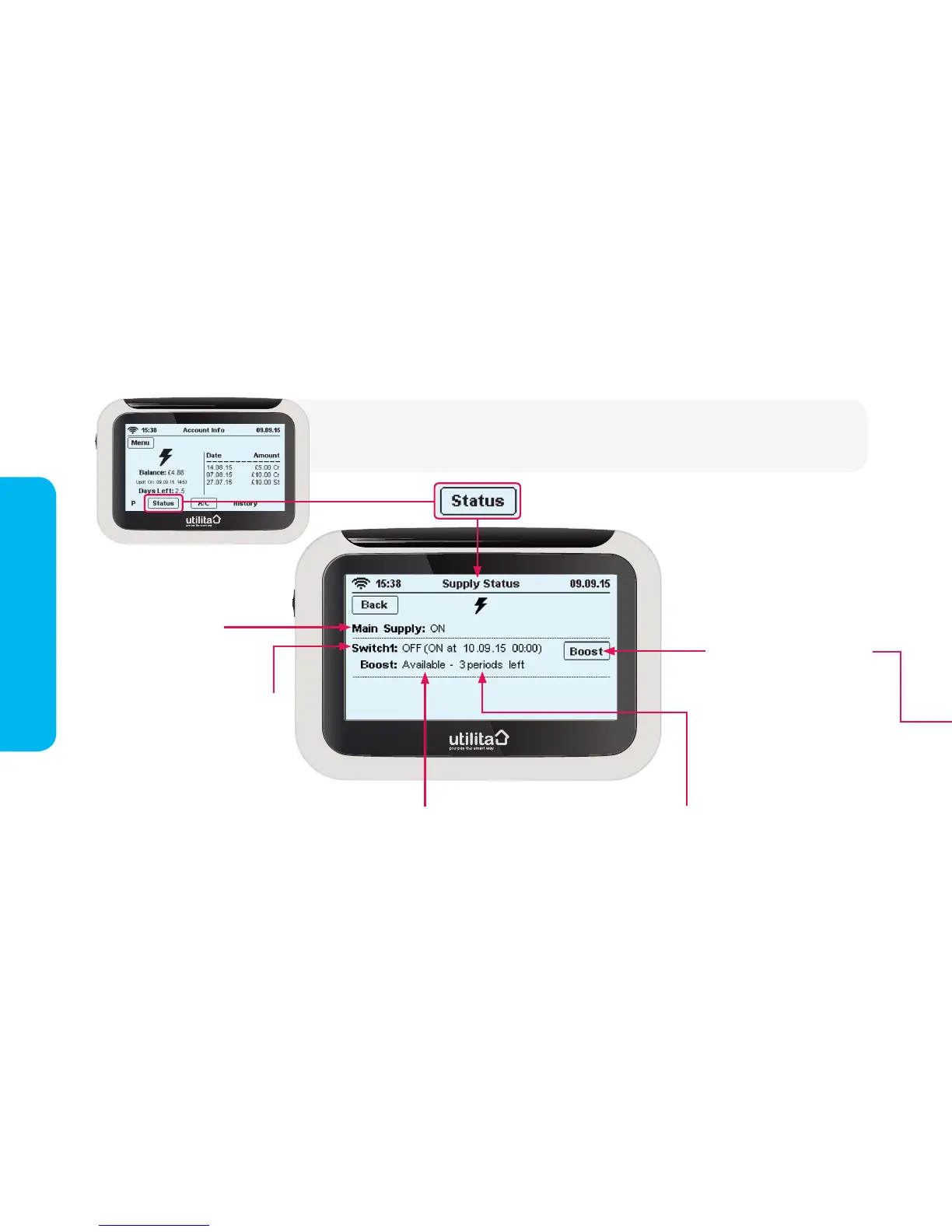
Supply Status
Supply status
Press this button to start a
Boost Period, then select
'Conrm' on the next screen.
Note: If you are already
using a a Boost Period, the
screen on the following page
will display, showing you the
status of your Boost Period
including what time it is due
to end.
Number of Boost Periods available
today. Note: Any Boost Periods used
will be available again from midnight
each day.
15:38 Usage Now 26.11.14
Electricity Dual Gas
HistoryMessage Tariff Payment Settings
15:38
Elect
Press the ‘Status’ button via the 'Account Information' screen to view the status of your electricity
supply. You can also view and control ‘Boost Periods’ on this screen.
Night - 'Switch 1' is the switch that
turns on at night; using electricity
at the ‘off-peak’ tariff rates.
Day - during the day, 'Switch 1'
will be off; ensuring you are using
'peak' electricity tariff rates.
You can check here to see whether
'Switch 1' is on or off - and what
time it is due to change.
Boost Periods will affect this, for
more information see page 15
Available - Boost Period(s) are available
Running - Boost Period is in use
Consumed - all daily Boost Periods have been used
For more information see page 15


 To Next Page