6
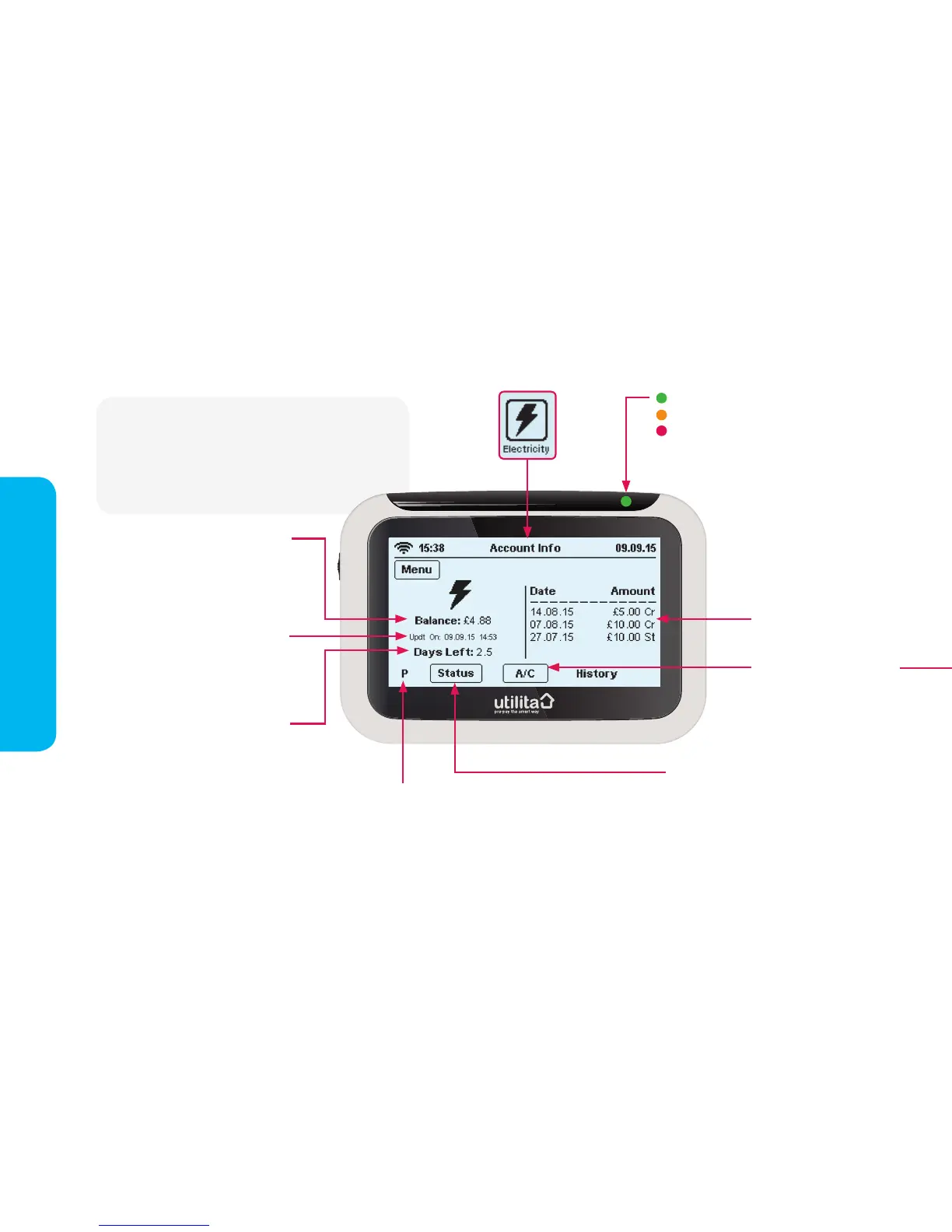
The 'Account Info' screen will show you what your
balance is and how many days it is estimated to
last. It will also display a brief history of your most
recent top-ups. You can also access your current
usage and supply status.
15:38 Usage Now 26.11.14
Electricity Dual Gas
HistoryMessage Tariff Payment Settings
15:38
Elect
Account Info
View your account information
The 'mode' your
meter is in:
P = Prepayment Mode
E = Emergency Credit Mode
F = Friendly Credit Mode
C = Credit Mode
An estimate of how many days
your supply will last, based on
your current rate of usage - if
you increase or decrease your
rate of usage, this gure will
change to show how long your
balance is likely to last.
Note: When your meters are
rst installed, this feature will
take about a week to display an
accurate estimate
How much credit you currently
have on your meter
Press this button to view
different screens showing
your current usage; you can
view usage in '£ per hour',
'kWh' and 'CO2Kg'
When on the 'Account Info' screen', an LED light
will ash to show credit alerts:
Green = plenty of credit
Orange = medium level of credit
Red = low credit
You can set a 'Low Credit Alert' of your choice
via the 'Settings Screen', see pages 12-13.
Your most recent
top-up history
The date and time your
in-home display last updated
with information from your
electricity meter
This button is displayed when your
electricity supply is on. Press the
button to view your supply status and
control ‘Boost Periods’,
see pages 14-15.


 To Next Page