Boost Periods
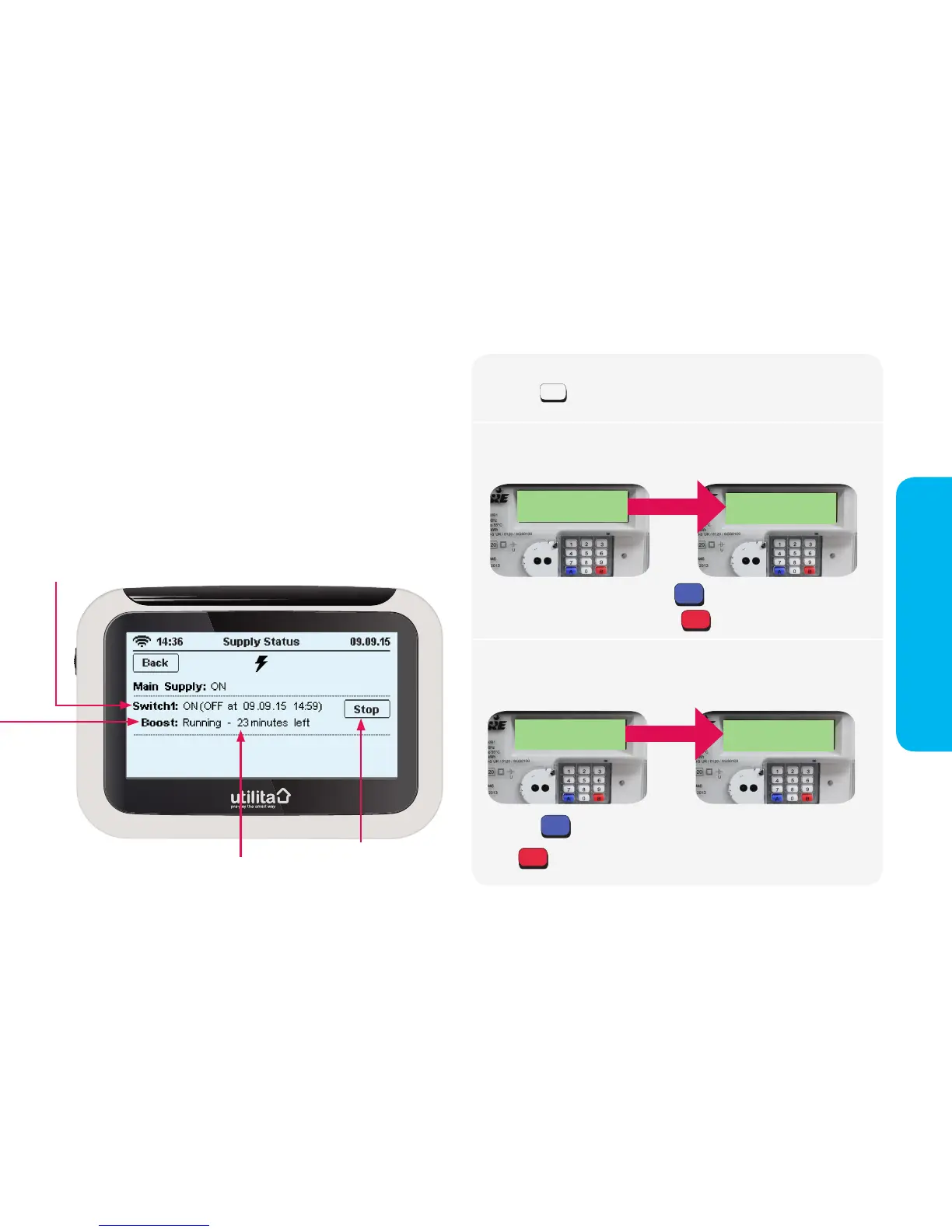
Press this button to ‘Stop’
a Boost Period at any time
while it is running
A- YES B - NO
Number of minutes left
of the Boost Period in use
Pressing the 'Boost' button turns on ‘Switch1’. When this is turned on
during ‘peak’ tariff times, any extra energy used to heat your home or
water will be charged at the peak tariff rate. If a Boost Period is started,
but no extra energy is used, it will not cost you anything.
1: If you are not currently using a Boost Period, the screen will
display the message: BOOST followed by the number of Boost
Periods left, followed by the message: A-YES B-NO.
2: If a Boost Period is already running, the screen will display the
number of minutes left of the Boost Period. Wait for the message:
STOP BOOST to display, followed by: A-YES B-NO.
Press the button to STOP the Boost Period.
Press to ignore.
To START a Boost Period press the button for 'YES'.
To ignore a Boost Period, press the button for 'NO'.
BOOST - 03
With Economy 7 meters there may be times you need more hot water
or a 'boost' to your heating, so a number of ‘Boost Periods’ are available
each day. They can be started from your in-home display on the 'Supply
Status' screen or from your electricity meter directly. Each Boost Period
provides extra energy for up to 60 minutes. If you choose to stop the
Boost Period before the 60 minute period has ended, that period will not
be available again - minutes do not roll over!
A- YES B - NO
34 minutes
B
A
A
B
Pressing on your electricity meter directly, will display the
status of your Boost Periods.
Controlling Boost Periods from your electricity meter
2


 To Next Page