26
How to manually enter a top-up code
via the electricity keypad
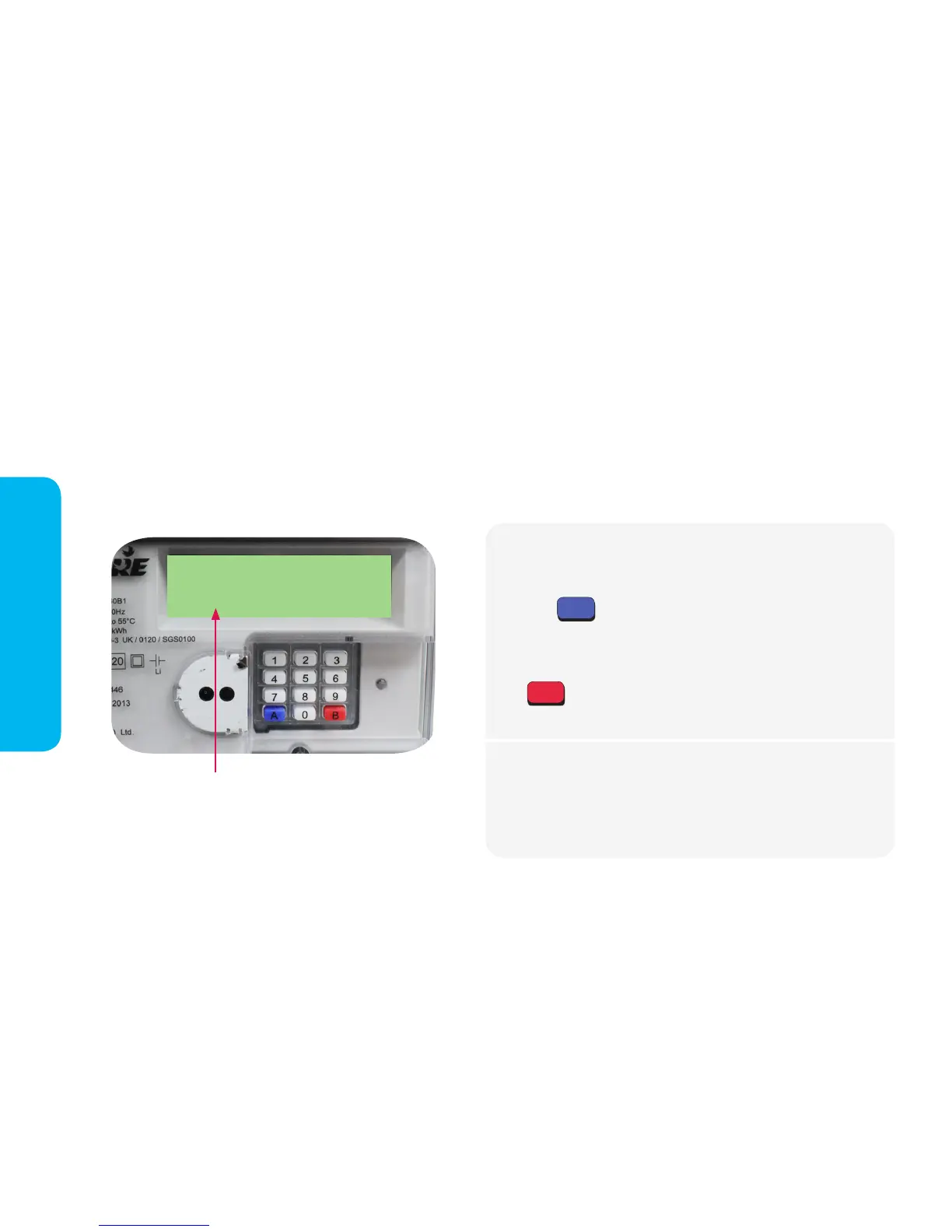
Using the electricity meter keypad
We recommend using your in-home display for convenience but you can also access your electrcity account
information and meter functions via your electricity meter directly (except in the event of a power cut!). You can view
your account balance and usage information, enter top-up codes, accept Emergency Credit and restore your supply
after a loss of power. The electricity meter is usually located in a cupboard, hallway or a meter box outside. It is a good
idea to familiarise yourself with its location (and where the key to any outside meter box is) in case you need to access
the electricity meter's keypad during a loss of power.
When you press a button on the keypad,
information will scroll here on the meter
screen. Each number brings up different
information, detailed on pages 28-29.
Press the button and the message VEND MODE will display.
When you have nished entering the entire top-up code, press
the button. If the manual top-up has been successful, the
screen
Enter your 20, 40 or 60 digit top-up code.*
If the meter displays the message: REJECTED, one of the following
message will display:
DUPLICATE - The top-up has already credited the meter.
INCORRECT - The top-up code has been entered incorrectly.
INCOMPLETE - You have not entered enough digits.
A
B
Electricty Meter
*If you type a digit incorrectly, you can press A to delete.
In-Home Display


 To Next Page