21
Topping-up
E-Credit
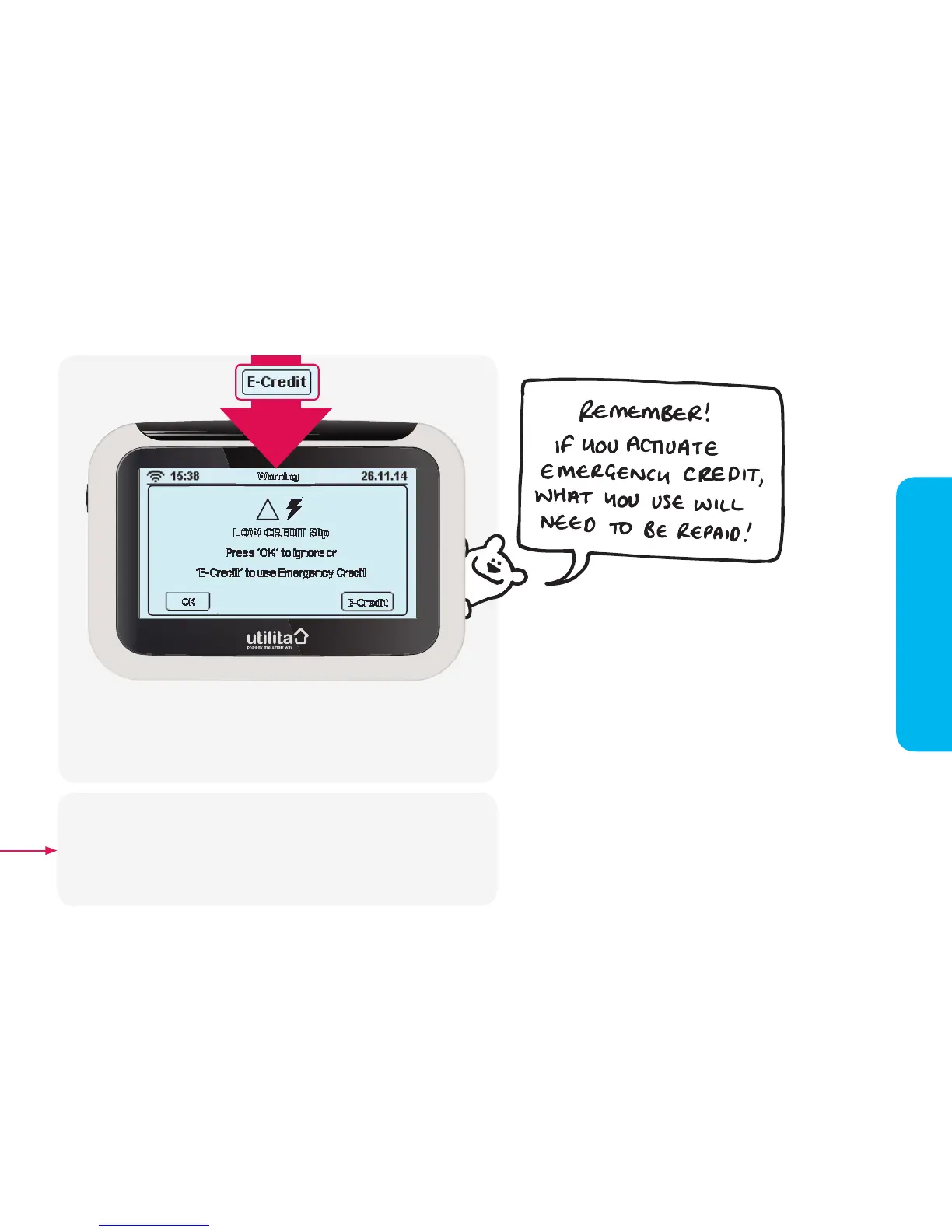
If you have ignored notications that your credit is low or if you wish
to activate Emergency Credit early; press the 'E-Credit' button on the
'Payment' screen. The above screen will appear asking for you to accept
£10 of Emergency Credit. Press the 'E-Credit' button to activate it, or 'OK'
to go back.
15:38 Usage Now 26.11.14
Electricity Dual Gas
HistoryMessage Tariff Payment Settings
15:38
Elect
22.09.12 ~10.00
14.09.12
~15.00
05.09.12
~30.00
23.08.12
~10.00
Date Amount
----------------------
Warning
OK
E-Credit
LOW CREDIT 50p
Press 'OK' to ignore or
'E-Credit' to use Emergency Credit
!
22.09.12 ~10.00
14.09.12
~15.00
05.09.12
~30.00
23.08.12
~10.00
Date Amount
----------------------
Warning
OK
E-Credit
ELECTRICITY CREDIT ~0.00
Press 'OK' to ignore or
'E-Credit' to use Emergency Credit
!
22.09.12 ~10.00
14.09.12
~15.00
05.09.12
~30.00
23.08.12
~10.00
Date Amount
----------------------
Warning
Transaction Failed
Code has already been used
!
Try Again
22.09.12 ~10.00
14.09.12
~15.00
05.09.12
~30.00
23.08.12
~10.00
Date Amount
----------------------
Warning
Transaction Failed
Code has been entered incorrectly
!
Try Again
Balance: -~5.00
Days Left: 1.0
E
22.09.12 ~10.00
14.09.12
~15.00
05.09.12
~30.00
23.08.12
~10.00
Date Amount
----------------------
History
A/C
Account Info
Updt On: 29.09.12 10:59
By pressing the 'E-Credit' button, you are allowing permission for your
meter to enter Emergency Credit when/if your meter runs out of credit. To
check whether Emergency Credit has been activated, check the 'Account
Info' screens via the 'Main Menu' – then select 'Electricity', if you are in
Emergency Credit an 'E' will be visible in the left-hand corner of the screen,
see page 25.
2


 To Next Page