HANDSET DESCRIPTION
THE FUNCTION KEYS
98
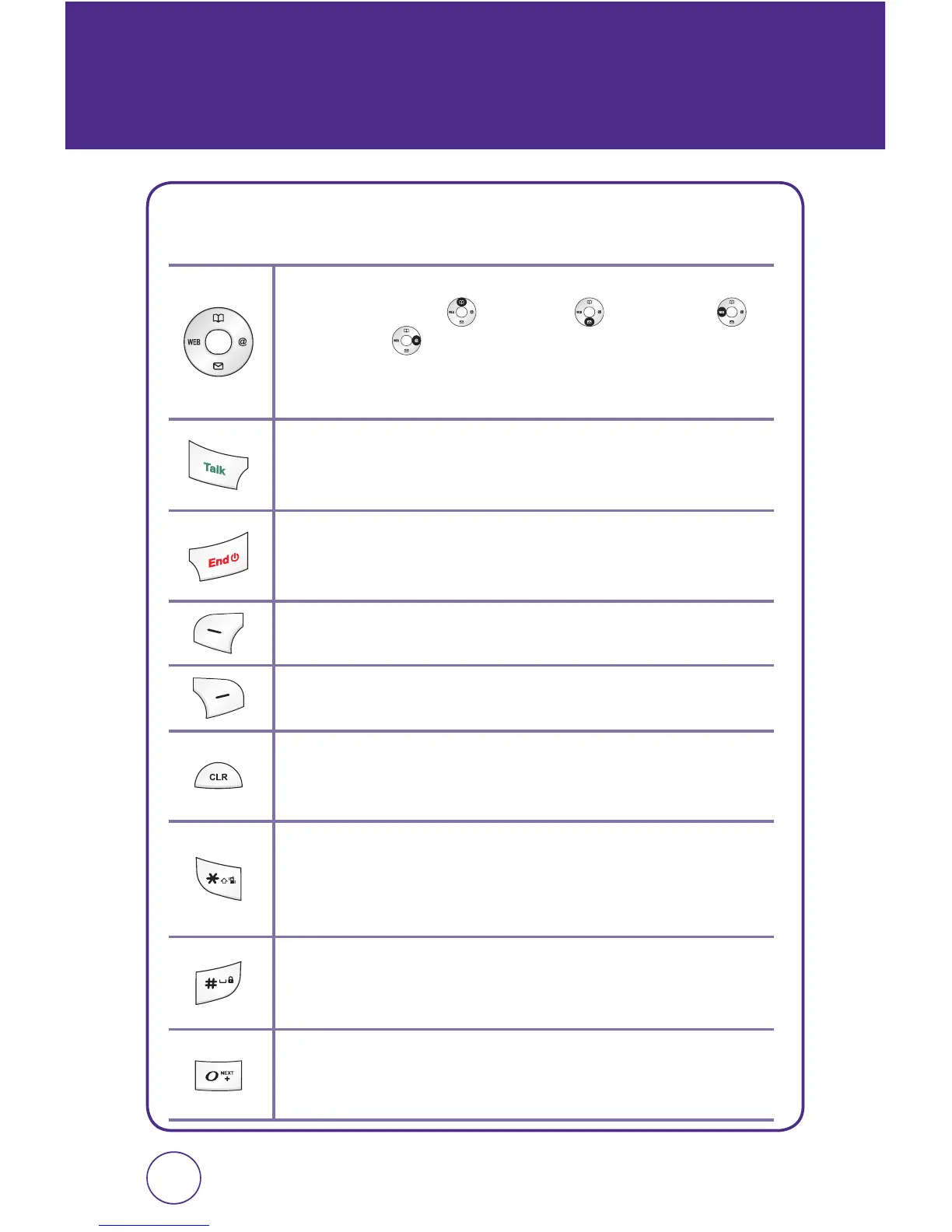
NAVIGATION KEY
In Idle Mode:
Press for Contacts, for Messaging, for
MetroWEB and for @metro.
Within a Menu:
Within a menu, use to scroll through menu or to
select a function displayed on the screen.
Send Key
Press to make or receive a call or in idle mode, press to access the
All calls list.
End Key
Press to terminate a call or to return to idle mode. Press and hold to
turn the phone on/off.
Left Soft Key
Press to access Main Menu or function displayed on bottom line.
Right Soft Key
Press to access @metro Menu or function displayed on bottom line.
CLR Key
Press to clear a digit or press and hold to clear all digits from the
display. Press to return to the previous page.
Shift Key
Enters the asterisk [*] character for calling features. In text entry mode,
press to change the character input type. Press and hold to turn on/off
Etiquette mode.
Space Key
In text entry mode, press to accept the word and add a space.
Press and hold to lock/unlock the phone.
0 Key
In T9 Mode, press to see other word choices. Press and hold to display
a plus sign (+) for international dialing.



 To Next Page