TOOLS
CALCULATOR
1.
Press Left Soft Key [Menu], then press “Tools”.
Press “Calculator”.
2.
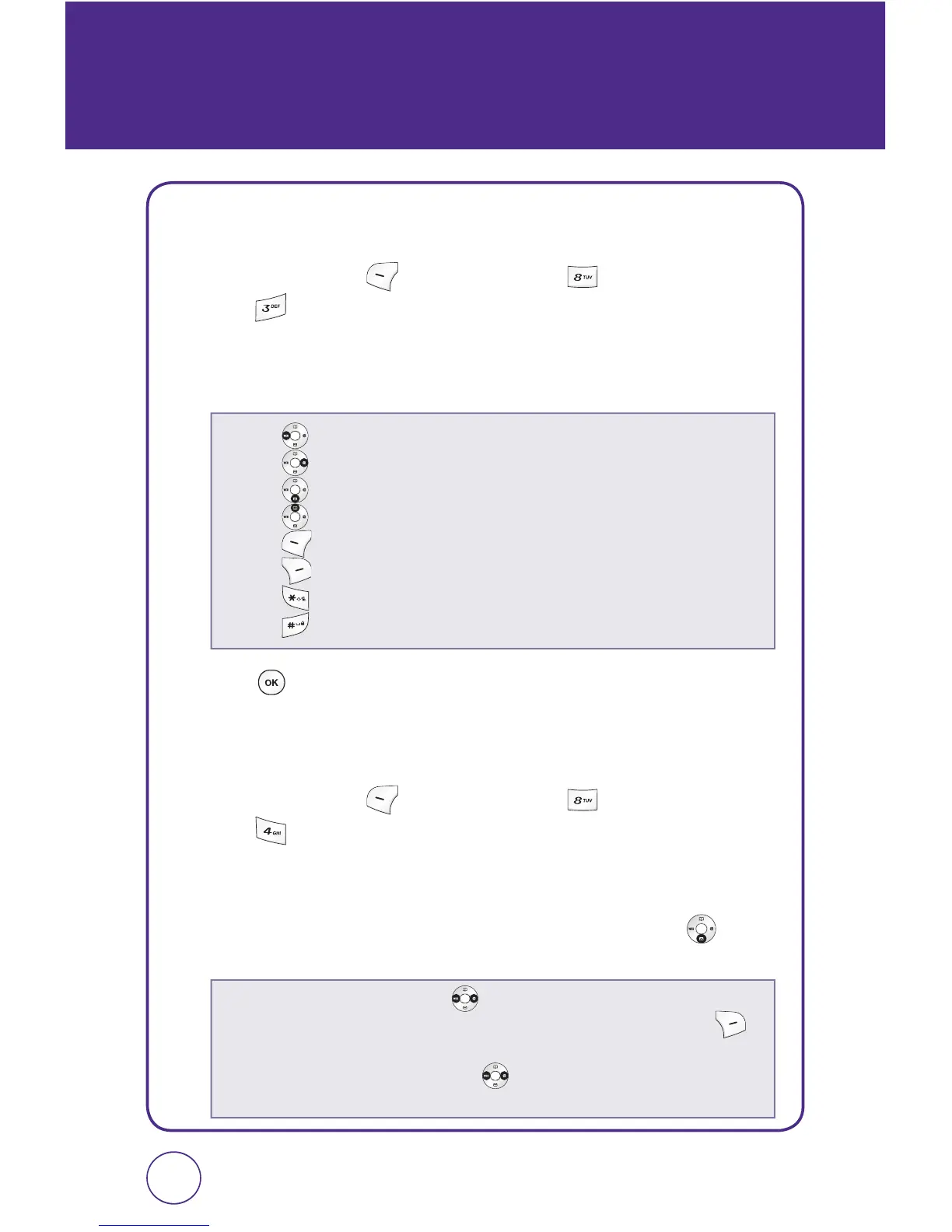
Enter numbers using your keypad, and use the following keys to
enter mathematical functions:
3.
Press to calculate the result.
ALARM CLOCK
1.
Press Left Soft Key [Menu], then press “Tools”.
Press “Alarm clock”.
2.
Select “Alarm #1“, “Alarm #2“ or “Alarm #3“ to set a new alarm.
3.
The set field will be highlighted. Press the Navigation Key down
to select alarm options.
8584
• Press for Multiplication (x).
• Press for Division (÷).
• Press for Subtraction (-).
• Press for Addition (+).
• Press [Clear] to clear all numbers.
• Press [Operator] to use “1. (“, “2. )”, “3. Power”.
• Press for a decimal point.
• Press to change a number from positive (+) to negative (-).
•
Set:
Press the Navigation Key left or right to select alarm “On“ or “Off“.
•
Time:
Use the keypad to set a time for the alarm and Right Soft Key to
select “am” or “pm”.
•
Repeat:
Press the Navigation Key left or right to select “Daily“, “Once“,
“Mon to Fri“, “Sat to Sun“.



 To Next Page