UTT Technologies Application
http://www.uttglobal.com Page 40
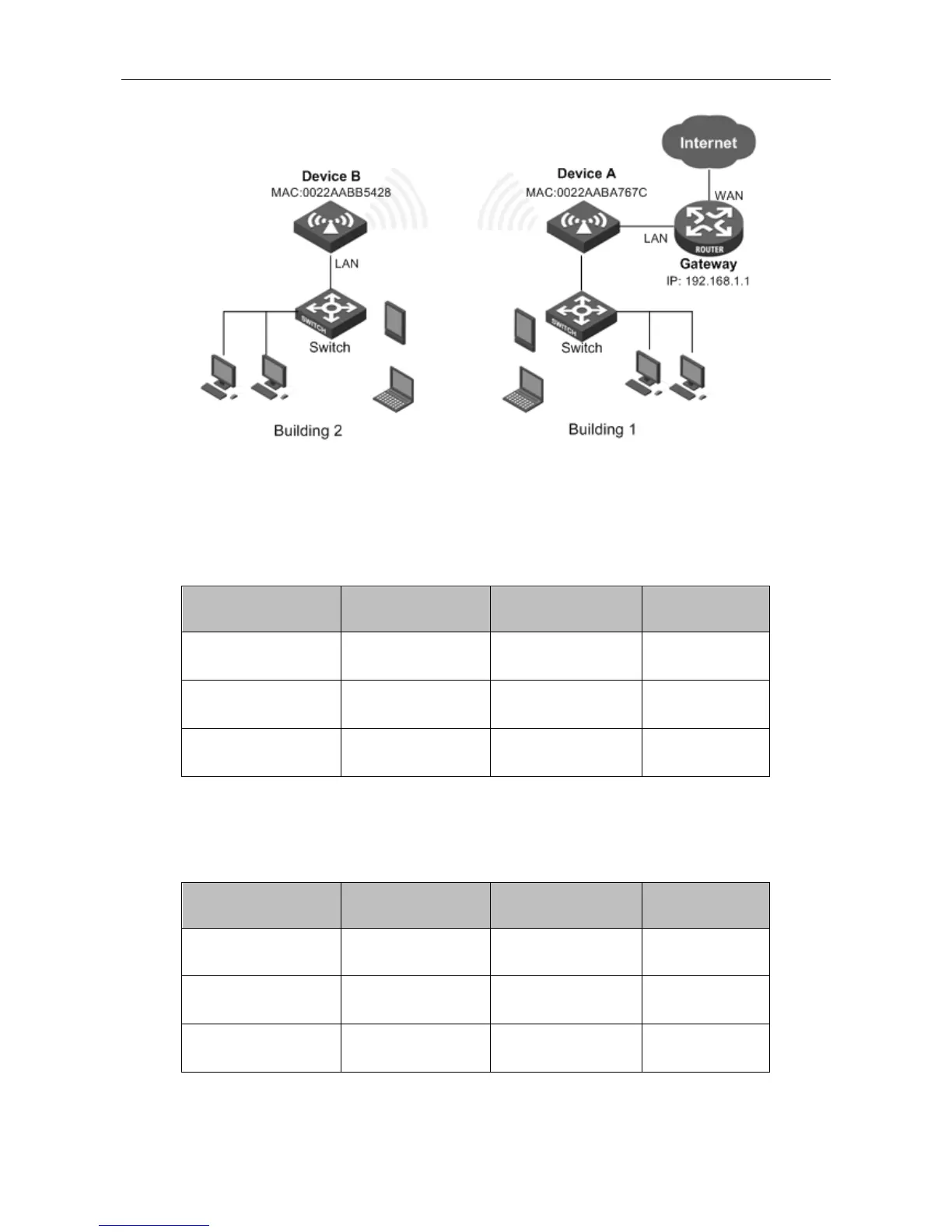
Figure 4-18 Network Topology – WDS Configuration Example
2) Configuration Steps
Steps 1: Login to Device A. Go to Application > Wireless > 2.4G Settings page to set
parameters as the following table.
Parameters Value Parameters Value
SSID 1
UTT_A
Security Mode
None
Wireless Channel 6
Wireless Mode
11b/g/n
Channel Width
40M LAN IP address 192.168.2.2
Table 4-1 The parameters of Device A
Step 2: Login to Device B, Go to Application > Wireless > 2.4G Settings page to set parameters
as following table and go to Application > DHCP Server to disable DHCP Server.
Parameters Value Parameters Value
SSID 1
UTT_B
Security Mode
None
Wireless Channel 6
Wireless Mode
11b/g/n
Channel Width
40M LAN IP address 192.168.2.3
Table 4-2 The parameters of Device B



 To Next Page