Step 1
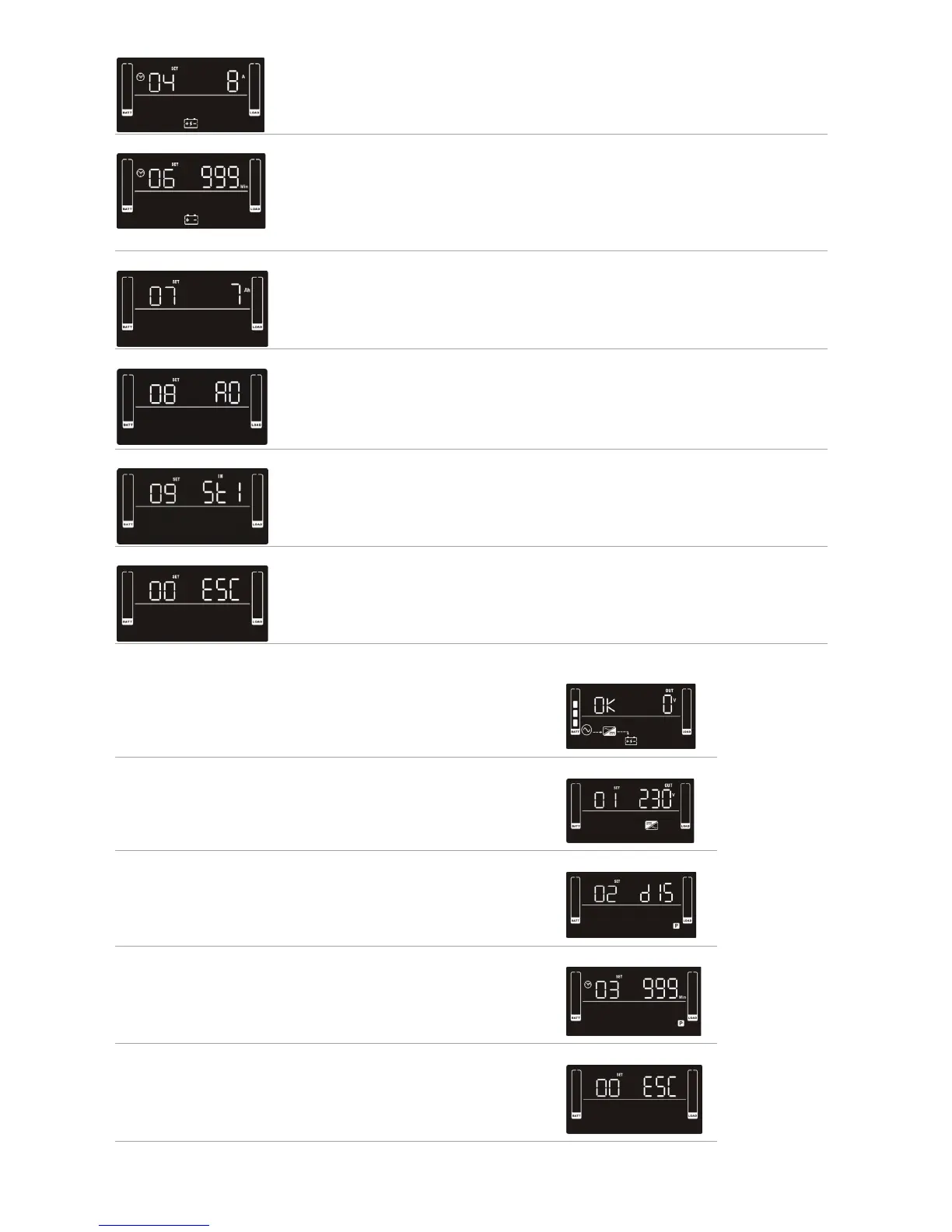
Before entering setting mode, the UPS should be in Stand-by mode (o-
charging) and make sure the battery is connected. The LCD display is shown
on the right.
Step 2
Press and hold the “Select” button for 3 seconds to enter Setting Mode.
Step 3
Press the “Up” button (ON/MUTE) to switch to “02” of program list. Then press
“Enter” button to enter value setting of parameter 2. Press the “Up” button to
change the value to “ENA” to enable the programming outlet function. Then
press “Enter” button again to conrm the setting.
Step 4
Press the “Up” button (ON/MUTE) again to switch to “03” of program list. Then
press “Enter” button for setting programmable outlet time. Push “Up” button to
change the value of backup time. Then press “Enter” to conrm the setting.
Step 5
Press “Up” button (ON/MUTE) to switch to “00” of program list. Then press “Enter”
button to exit setting menu.
Step 6
Disconnect AC input and wait until the LCD display is o. The new setting will
be activated when turning on the UPS again.
04 Maximum charger current setting
Set up the maximum charger current
You can change the charger setting to 1/2/4/6/8 ampere
(Default setting is 8A)
Note: this setting is only eective for super charger
06 Autonomy limitation setting
Set backup time on battery mode for general outlets.
Set the back up battery time from 0-999 minutes for general outlets on battery
mode
DIS > Disable the autonomy limitation: back up time will depend on the battery
capacity (Default setting)
Note: when setting is “0”, the back up time will only be 10 seconds
07 Battery total AH setting
Set up the battery total AH of the UPS
Set the battery total capacity from 7-999 in AH
*Set the correct battery total capacity if there is a connected battery bank
08 EPO Logic Setting
Set up the EPO function Control Logic
AO > Active Open (Default): When AO is selected as EPO Logic, it will activate EPO
function with Pin 1 and Pin 2 in open status
AC > Active Close: When AC is selected as EPO logic, it will activate EPO function
with Pin1 and Pin 2 in closed status
09 Input waveform sensitivity setting
St1: high sensitivity. min 4/32 cycle detection and waveform distortion detection
(Default)
St2: middle sensitivity. min 7/32 cycle detection
St3: low sensitivity. min 10/32 cycle detection (use with generators)
00 Exit setting
Exit the Setting mode


 To Next Page