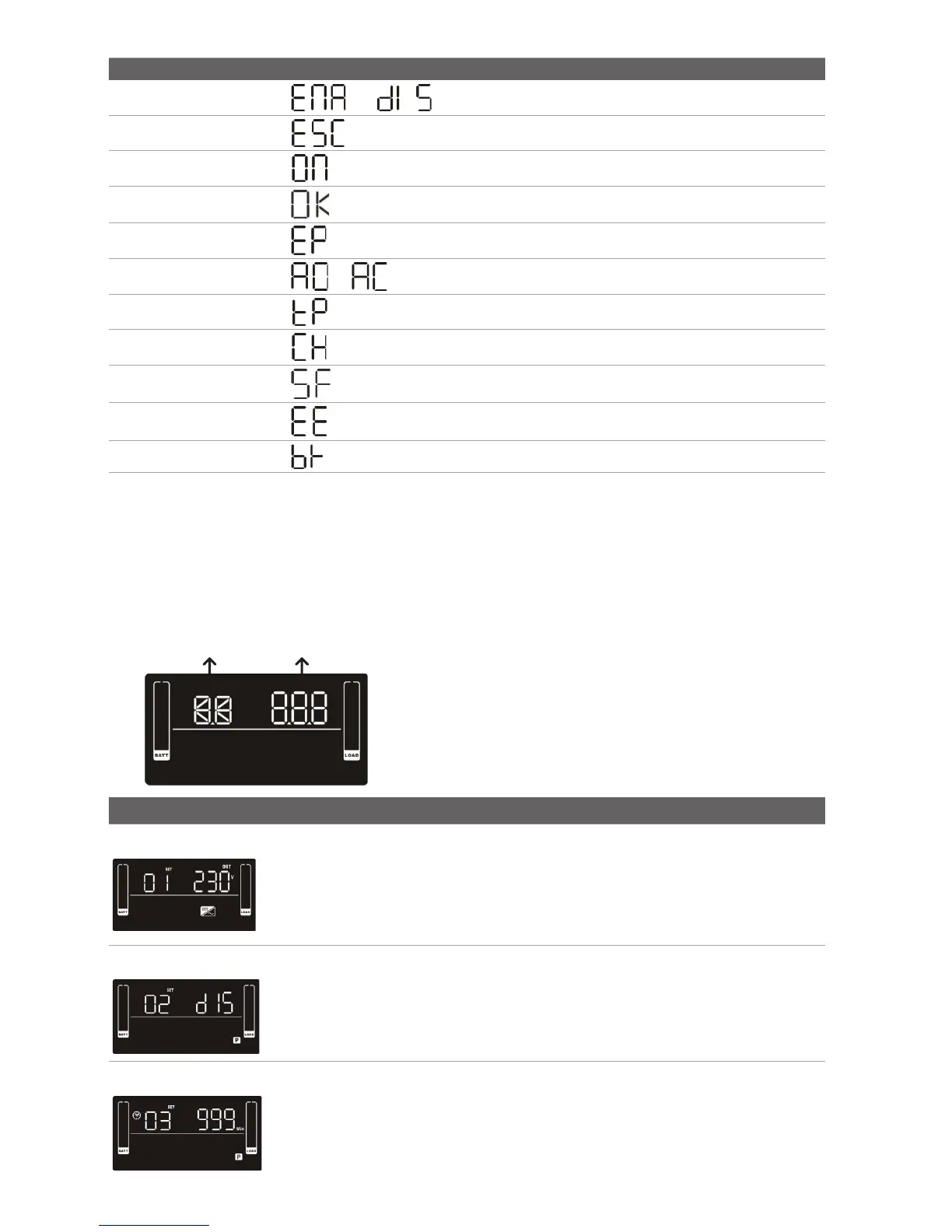
2.4 LCD Display Wording Index
2.5 UPS Setting
Parameter 1
Parameter 2
There are 2 parameters to set up the UPS
1. For program alternatives (Refer to table below)
2. Setting options or values for each program
Interface Setting
01 Output Voltage Setting
For EU Models you may choose 208/220/230/240 VAC settings
230VAC is the default. (Changing this setting is not recommended)
For US Models you may choose 110/115/120/127 VAC
120VAC is the default. (Changing this setting is not recommended)
02 Programmable outlets enable/disable
ENA > Programmable outlets enabled
DIS > Programmable outlets disabled
03 Programmable outlet settings
Set up the backup time limits in minutes from 0-999 for programmable out-
lets which connect to non-critical devices on battery mode. (Default = 999)
Abbreviation Display Content Denition
ENA / DIS
/
Enable / Disable
ESC
Escape
ON
ON
OK
OK
EP
EPO
AO / AC
/
Active Open / Active Close
TP
Temperature
CH
Charger
SF
Site Fault
EE
EEPROM Error
BR
Battery Replacement
ST1 / ST2 / ST3
St1 / St2 / St3
Input Waveform Sensitivity Setting


 To Next Page