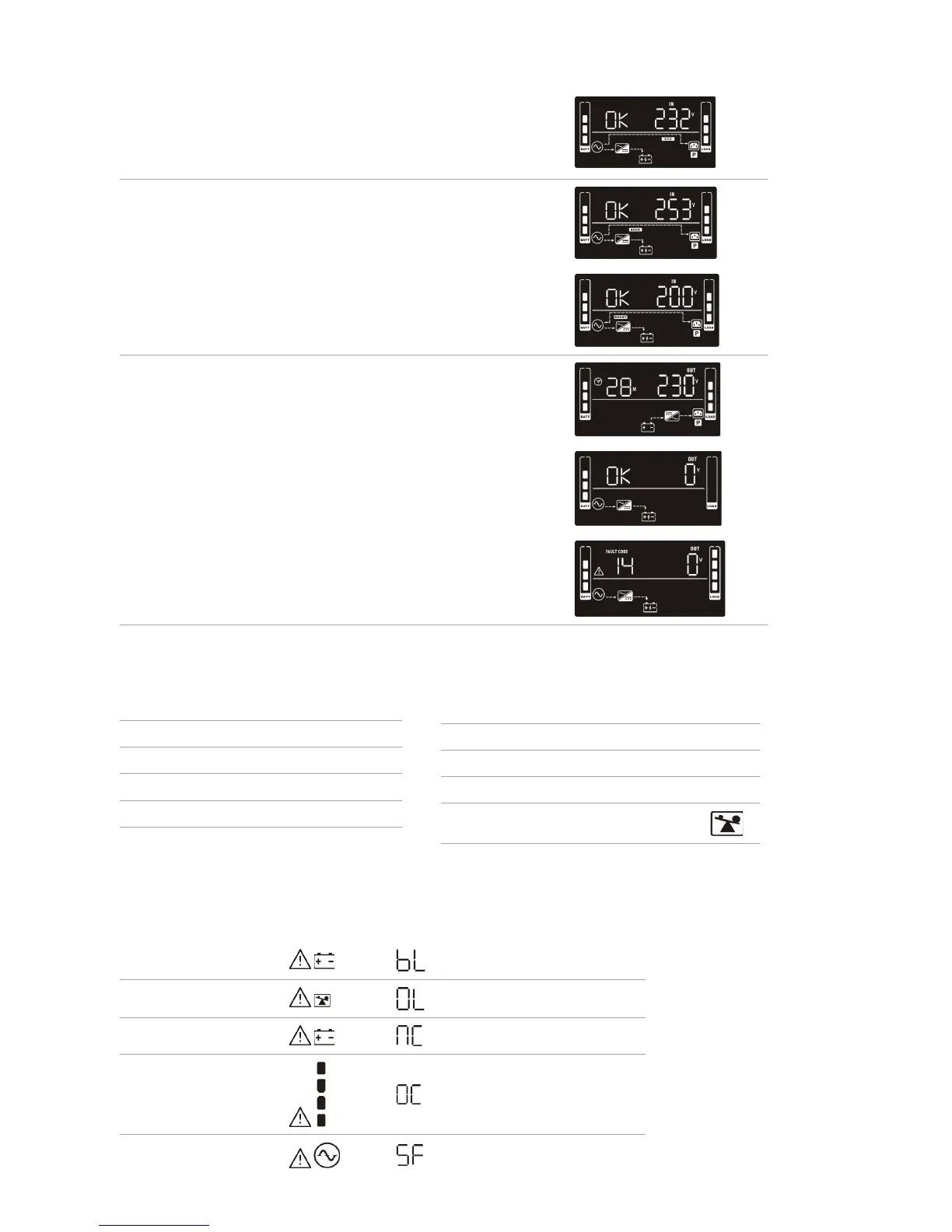
Operating Mode Description LCD Display
ECO Mode When the input voltage is within voltage regulated
range, UPS will power the output directly from the
mains. ECO is an abbreviation of Eciency Corrective
Optimizer. In this mode, when the battery is fully
charged, the fan will stop working to save energy
Buck Mode when
AC is normal
When the input voltage is higher than the voltage
regulation range but lower than high loss point, the
buck AVR will be activated
Boost mode when
AC is normal
When the input voltage is lower than the voltage
regulation range but higher than low loss point, the
boost AVR will be deactivated
Battery Mode When the input voltage is beyond the acceptable range
or power failure and alarm is sounding every 10 seconds,
UPS will backup power from battery
Standby Mode UPS is powered o and no output supply power, but can
still charge batteries
Fault Mode When a fault occurs, the ERROR icon and the fault code
will be displayed
2.6 Operating Mode Description
Fault Event Fault Code Icon
Bus start fail 01 x
Bus over 02 x
Bus Under 03 x
Inverter soft start fail 11 x
Inverter voltage high 12 x
Inverter voltage low 13 x
Fault Event Fault Code Icon
Inverter output short 14
x
Battery voltage too high 27 x
Battery voltage too low 28 x
Over temperature 41 x
Over load 43
Charger failure 45 x
2.7 Faults Reference Codes
Warning Icon (Flashing Code Alarm
Low battery
Sounds every 2 seconds
Overload
Sounds every second
Battery is not connected
Sounds every 2 seconds
Over Charge
Sounds every 2 seconds
Site wiring fault
Sounds every 2 seconds
2.8 Warning Indicator


 To Next Page