EasyManua.ls Logo

Vaisala HPP272 - User Manual

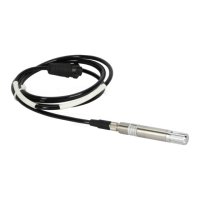
Vaisala HPP272
66 pages
Print Icon
To Next Page IconTo Next Page
Loading...
M211972EN-B
User Guide
Vaisala PEROXCAP
â
Hydrogen Peroxide,
Humidity and Temperature Probe
HPP272

Table of Contents

Questions and Answers

  • J
    Jennifer FisherSep 13, 2025
    Why H2O2 or humidity reading doesn't change for less than 5 minutes on Vaisala Measuring Instruments?
    • C
      Crystal FisherSep 13, 2025
      If the H2O2 or humidity reading does not change during regular use for less than 5 minutes on Vaisala Measuring Instruments, it may be because a purge is being performed, which lasts for 4 minutes. No action is required.
  • E
    Erin FigueroaSep 15, 2025
    Why is start-up purge not performed in analog mode in Vaisala HPP272 Measuring Instruments?
    • S
      savageashleySep 15, 2025
      If the start-up purge is not performed in analog mode on Vaisala Measuring Instruments, check pin #5 to ensure the probe is not in digital mode at start-up.
  • S
    Susan BarajasNov 18, 2025
    Why is the response time slower than specified in Vaisala HPP272 Measuring Instruments?
    • M
      Marcus VasquezNov 18, 2025
      The slower than expected response time in Vaisala Measuring Instruments can be due to several reasons. The filter might be blocked, in which case you should change it, being careful not to touch the sensors when the filter is off the probe. If the probe has fallen and the filter hit the floor, remove the filter and visually inspect the sensors. If they are intact, replace the filter as the porous material may have become less permeable. If the sensors are damaged, contact Vaisala technical support. Also, exposure to unsuitable chemicals like DMSO can slow response time, so replace the filter and perform a chemical purge. Lastly, check if the measurement filtering factor is configured too slow; use Vaisala Insight software, Modbus configuration register 030Ahex, or an Indigo 200 transmitter...

Summary

Product Overview

Basic Features and Options

Lists the key features, measurement capabilities, and connectivity options of the probe.

Safety

Outlines crucial safety warnings and precautions for handling and using the probe.

Measured Parameters

Lists all parameters that the HPP272 probe can measure, with units.

H2 O2 Measurement

Operating Principle of H2 O2 Measurement

Explains the PEROXCAP sensor technology for measuring H2O2 vapor concentration.

Installation

Wiring

Details the probe's M12/5 pinout, wire colors, and connection requirements.

Power Supply

Specifies the operating voltage range and maximum current consumption for the probe.

Setting Probe in Analog or Digital Mode

Instructions on how to select the probe's output mode using pin #5.

Operation

Behavior at Exposure to H2 O2

Explains the probe's reaction and requirements when exposed to H2O2 condensation.

Vaisala Insight Software

Connecting to Insight Software

Step-by-step guide for connecting the probe to the Vaisala Insight software.

Using Probe with Indigo Transmitters

Connecting to Wireless Configuration Interface

Details how to enable and access the probe's wireless configuration interface.

Logging in to Wireless Configuration Interface

Explains user levels and the process for logging into the wireless configuration interface.

Maintenance

Cleaning the Probe

Provides instructions and precautions for cleaning the probe body and cable.

Troubleshooting

Problems and Their Possible Solutions

Guides users through common operational issues and their potential resolutions.

Analog Output Error State

Describes the conditions that cause the analog output to enter a defined error state.

Technical Data

Appendix A: Modbus Reference

Measurement Data Registers

Lists Modbus registers for reading measurement data values.

Configuration Registers

Lists Modbus registers used for configuring the probe's settings.

Modbus Communication Examples

Provides examples of Modbus requests and responses for reading and writing data.

Technical Support

Vaisala HPP272 Specifications

General IconGeneral
Measurement ParametersHumidity, Temperature, Pressure
Humidity Measurement Range0 ... 100 %RH
Protection ClassIP65
Temperature Measurement Range-40 to +60 °C
OutputRS-485
Power Supply10...30 VDC
Operating Temperature Range-40 to +60 °C
Humidity SensorVaisala HUMICAP®

Related product manuals