Manual for VAKI Micro/Macro
9. Calibrate is pressed to calibrate the counter before a counting session.
10. Press EXIT to close the counting software.
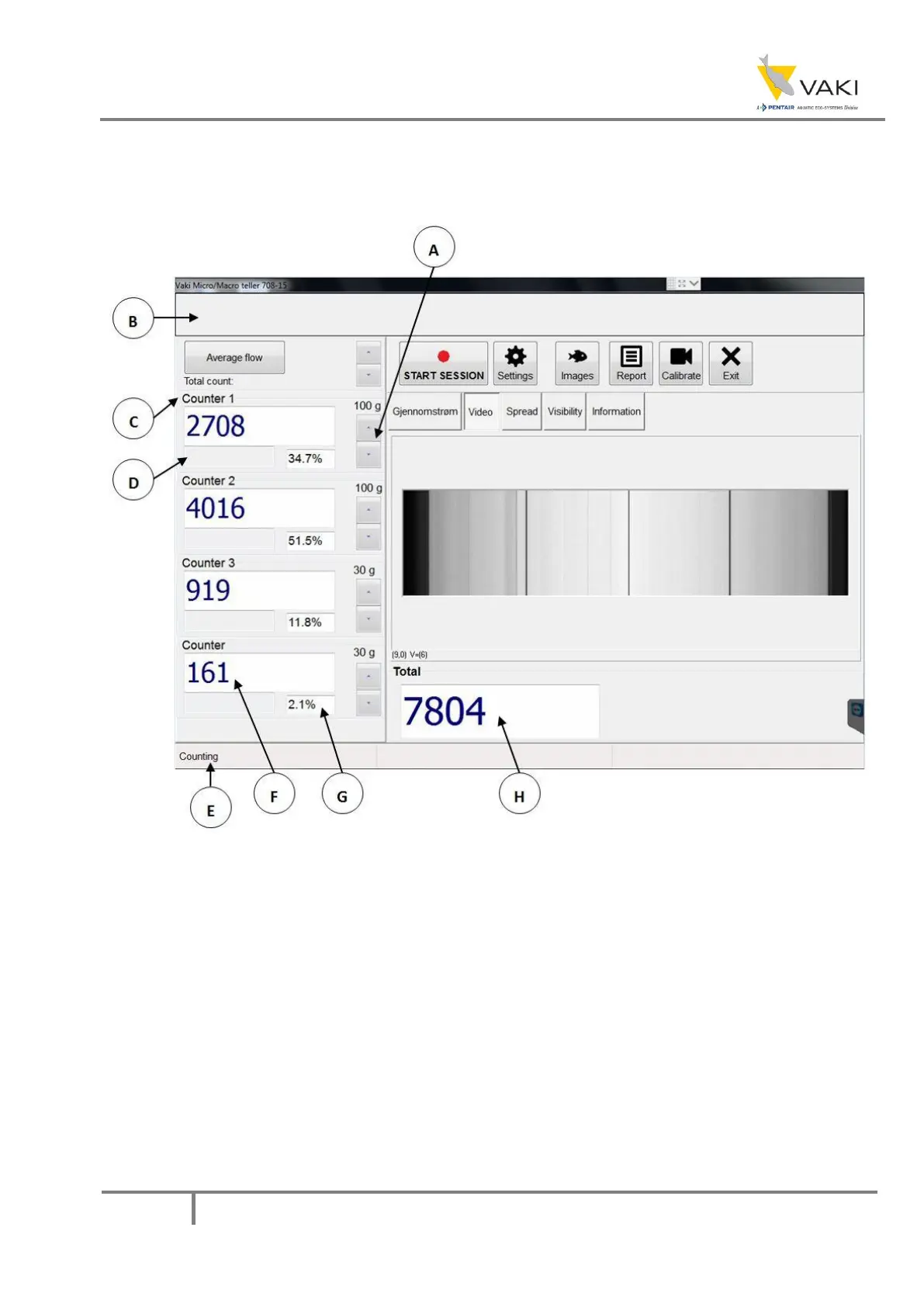
Figure 11 – Counter main window 2
A. Fish size adjustment buttons to be counted in the different channels. Choose the weight
closest to the expected average for the fish to be counted in the current channel. Selected
weight is displayed directly above the buttons.
B. Load indicator showing how much the counter load is. The bar will be green from 0-100%,
yellow from 100-130% and red at load over 130%. The risk of miscalculation increases with
increasing load over 100%.
C. Channels. The names can be changed by pressing the respective channel names - the on-
screen keyboard will then appear.
D. Estimated average weight is shown in these fields provided the size measurement is
enabled. (The progress indicator that becomes visible at the beginning of the count is a
symbol that the counter must measure a number of fish before it has a basis for estimating
the average weight. The number of estimated average weight appears when a sufficient
number is measured.)


 To Next Page