Manual for VAKI Micro/Macro
12 Start Counting Session
To start counting press “New counting session” button on the main screen.
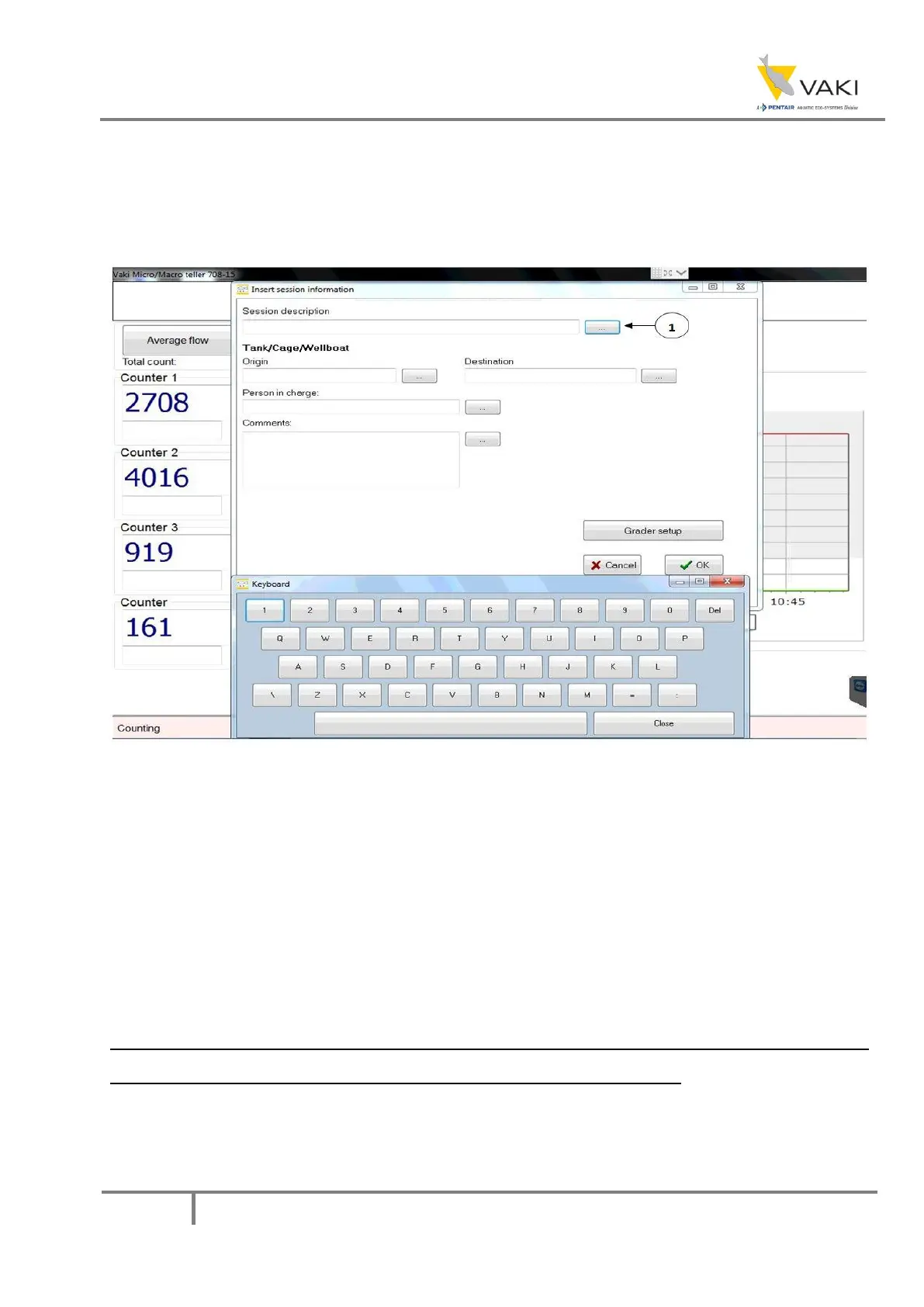
The display will show:
Figure 26 - Starting a new counting session
The text entered in the fields will be included in the count report generated after counting. If
necessary, press the button to the right of the text fields (shown at 1 in the figure above) to bring up
the screen keyboard. If this keyboard is used, press CLOSE between each entry and press the
keyboard button of the next field where you want to enter information. Press the OK button after
entering the desired information. The information posted here will also be visible in the VAKI Cloud.
Detailed accurate information then makes it easier to identify the sessions for later reference.
IT IS IMPORTANT THAT ONLY LETTERS AND NUMBERS ARE USED WHEN A NAME IS GIVEN. DO
NOT USE SIGNS SUCH AS ( / , . & - OR THE DATA FILE WILL NOT BE SAVED.
The counter should now show 0 in all counting windows. Start pumping or netting the fish into the
counter.


 To Next Page