Manual for VAKI Micro/Macro
15 Reviewing the counting session
Press Images on the main screen to view the recording of the count (image file). These files have
the same name that the report, date and description. Each image represents approximately one
second of the recording.
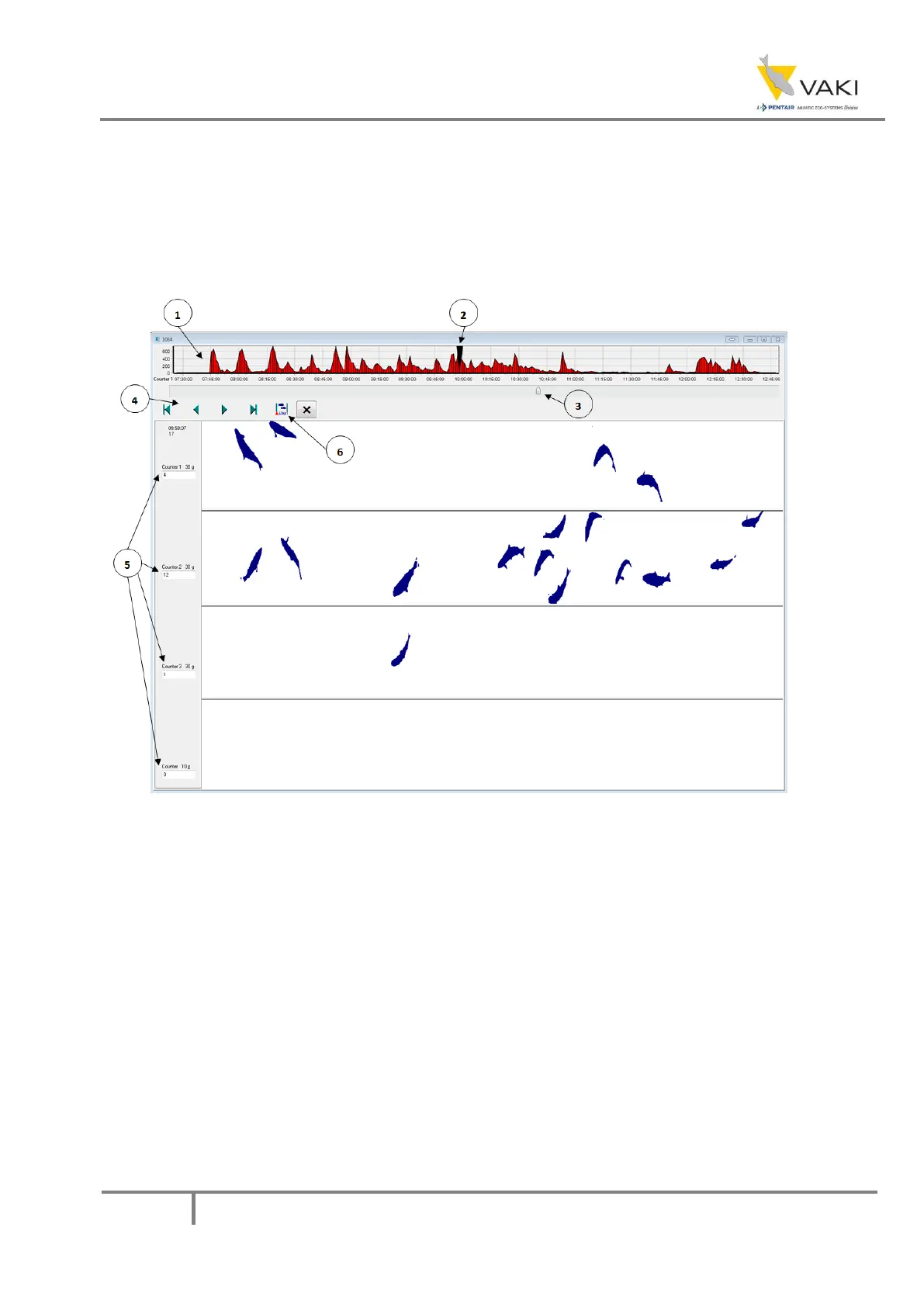
Figure 38 - The image file
1. The upper graph shows the load on the counter, ie fish through the counter per time unit. Click
on the chart to switch between channels.
2. This pointer shows where in the recording the current image comes from.
3. This pointer can be used to navigate the recording.
4. Navigation buttons in the recording:
◄ ► - these buttons are used to move the screen back or forward one step.
◄ ►
- these buttons are used to go to the beginning or end of the recording.
5. This field contains the name of the channel, the size setting and the number of fish shown in the
image. Note that if ► is pressed, the number shown will added to the previous number


 To Next Page