Manual for VAKI Micro/Macro
17 Switch between single and multi channel mode
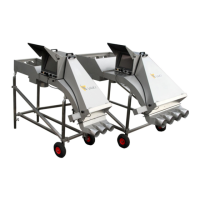
Both Micro and Macro counters are available as multi-channel counters that can be connected to a
sorting machine. The counters can also be used in single-channel mode. To convert from multi-
channel to single-channel, the channels must be removed. Fish can then be pumped into the up-
well inlet under the counter, or alternatively heaped in.
Channel dividers that cover two channels are also available. This is particularly relevant when it
comes to sorting, and one group of fish, for example, accounts for 60-70% of the total. That way,
this amount of fish can be distributed over a larger area of the counting field, which helps maintain
capacity and accuracy.
The multi-channel outlet can also be replaced with a one-channel outlet.
In the counting program, you can switch between single-channel or multi-channel counting under
Settings and Settings. However, it is recommended to leave the counter in multi-channel mode even
if it is used with only one channel. This allows monitoring of fish passing through each channel
sector to ensure that fish are spread throughout the counting field and that one can maintain
capacity to a maximum.
18 Storage of the counter
When storing the counter, it is important to pay attention to the following:
Use fresh water to remove any residual salt water from the counter after use.
Store the counter in a dry place where there is little temperature variation.
The counter head must be handled with care. Do not lift the counter with the head attached.
Feel free to remove the PC or counter head and store it in a location where it is protected
from moisture, shock and temperature variations.
Cover any open contacts on the PC and counting head.


 To Next Page