Temperature Compensation Correction Curve
You can define temperature compensation correction
curve for Valmet MCA if you notice temperature depend-
ency in the measurement results.
Define the correction curve by entering 2 - 6 pairs
of temperature/consistency points. Based on the curve
drawn from these points, Valmet MCA subtracts the
curve consistency from the measurement results.
Determine the correction curve pairs of points as
described in section 9.1. Then enter the pairs of points
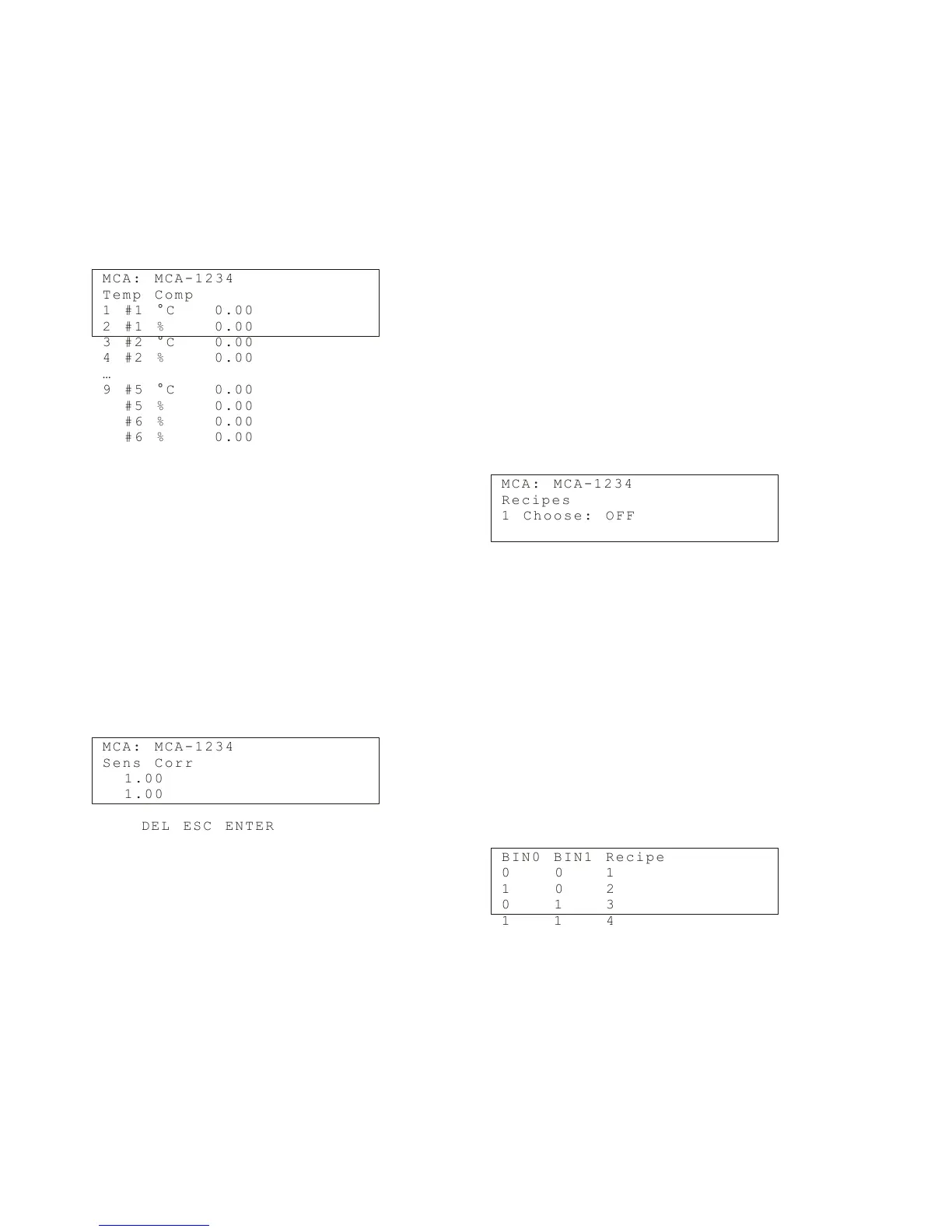
in the menu Temp Comp., which appears as follows:
M C A : M C A - 1 2 3 4
T e m p C o m p
1 # 1 ° C 0 . 0 0
2 # 1 % 0. 0 0
3 # 2 ° C 0 . 0 0
4 # 2 % 0. 0 0
…
9 # 5 ° C 0 . 0 0
# 5 % 0. 0 0
# 6 % 0. 0 0
# 6 % 0. 0 0
Enter temperature and consistency values for the
desired points (#1 - #6). Then press SEND (F2) to send
the values to Valmet MCA.
Sensitivity Correction
Valmet MCA consistency sensitivity is set according to
the wood fiber. The measurement sensitivity can be
changed if necessary, e.g. if you are measuring some
material other than wood fiber.
If you do not know the sensitivity correction of the
material beforehand, you can determine it according
to the instructions in section 9.2 and enter it in the Sens.
Corr. menu.
M C A : M C A - 1 2 3 4
S e n s C o r r
1 . 0 0
1 . 0 0
D E L E S C E N T E R
Recipes
The Recipe function may be necessary in special
functions in which measurement conditions change so
much that one calibration cannot cover it.
Such a change may be e.g.
– A change in consistency greater than the device
measurement range ( 9 - 15 % depending on the
type of sensor).
– A change in the measured material, since different
materials have different consistency sensitivity.
– A large chemical fluctuation (e.g. change of chemical
type) that cannot be compensated for with chemical
compensation.
In these cases, each process condition has its own
calibration and configuration performed.
This calibration and configuration is saved as its own
recipe. In addition to consistency calibration, for each
recipe you can set chemical compensation, temperature
consistency correction, sensitivity correction, and cur-
rent output scaling. You can save a maximum of four
recipes.
The Recipes menu is as follows:
M C A : M C A - 1 2 3 4
R e c i p e s
1 C h o o s e : O F F
In Choose, set the desired recipe number. The op-
tions are as follows:
– OFF: the recipe function is not in use (default),
– 1, 2, 3, 4: select the recipe number,
– BIN: select the recipe according to binary input.
Select the recipe. Then perform recipe calibration
and current output scaling. Begin using the recipes as
follows:
When you use the recipe selection method ‘BIN’,
connect the automation system digital control lines to
the TCU connector casing binary inputs BIN0 AND
BIN1. Connect their grounded line to BINGND. Select
the recipe with the digital output lines according to the
following table:
B I N 0 B I N 1 R e c i p e
0 0 1
1 0 2
0 1 3
1 1 4
Installation & Owner’s manual OUL00298 V2.3 EN
56
Valmet Mircowave Consistency Transmitter



 To Next Page