Remote I/O Cable Hookup Instructions
03-914642-00:6
8-11
8.7
Archon to OI 4460/4560 with HP 5890, P/N DY-505871-00
Red
White
Black
Pin Outs
Remote I/O Archon
Color
Relay I/O
OI Function Color
HP
5890
Terminal
15
Green
5 GC Ready Red 1
Desorb
Drain
2
Brown
4 GC Ready Black 2
5
Red 7
Start
Purge 18
White 8
6 GC Start Green 5
7 GC Start White 9
14
Blue 1
P&T
Ready 1
Black 2
5 Start Red To
Start White Data
4 Start Black System
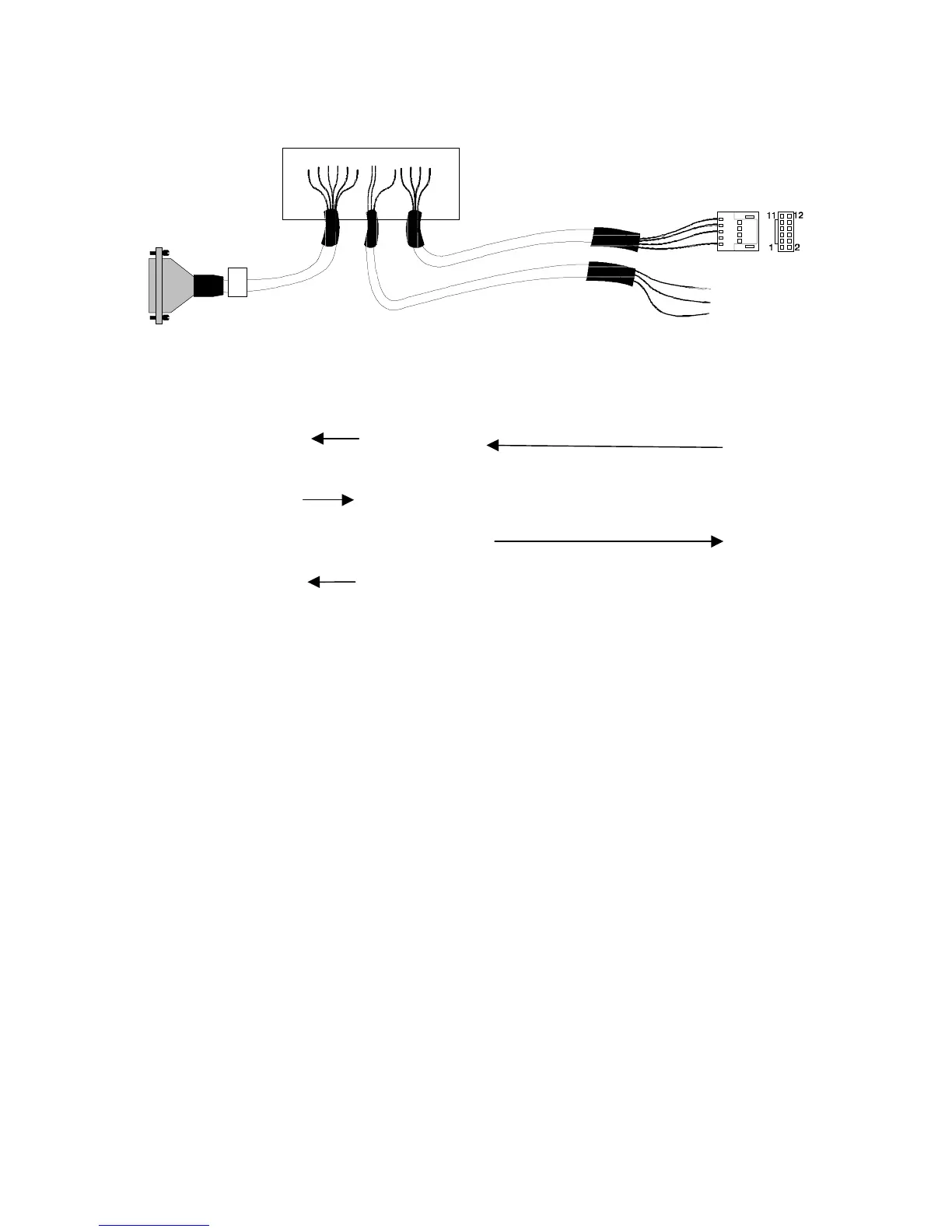
Attach the “D” connector of the cable to the Archon.
Be certain the locking screws secure the
connector to the chassis.
Attach the 12-position connector to the HP 5890.
Attach the individual wires to the Relay I/O terminal at the rear panel of the OI concentrator.
The remaining cable can be used to start the data system.
Refer to the above schematic for the correct wiring locations and to your GC and Data System
manuals for correct connector locations.
Note: 4460A
Archon Color OI
15 Green 4
3Brown5
Dip Switches
1 on (closed)
6 on (closed)
7 on (closed)
Female





 To Next Page