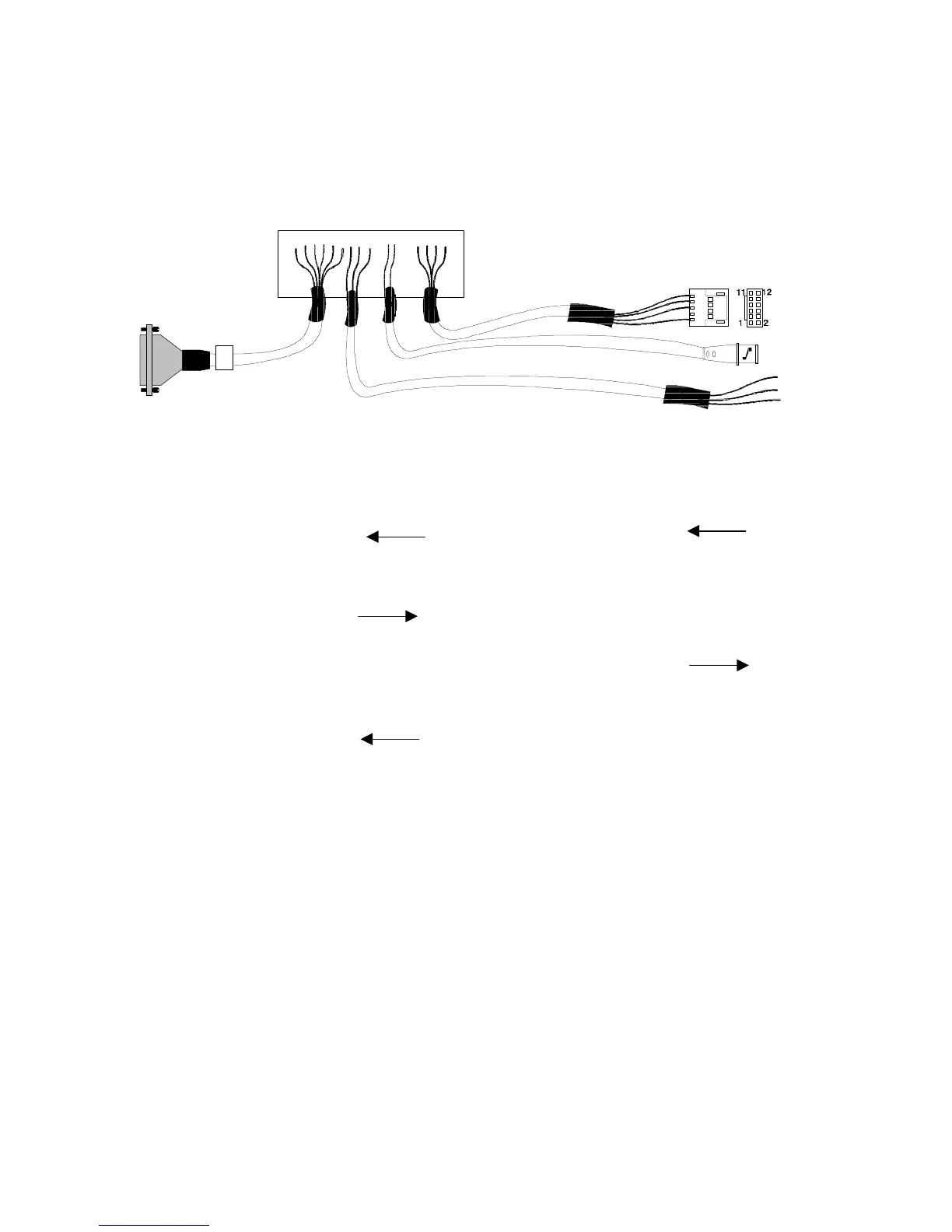
Remote I/O Cable Hookup Instructions
03-914642-00:6
8-13
8.9
Archon to OI 4460 / 4560 to HP 5890, RTE HP 1000 GC / MS Software
HP 5970 MSD or HP 5988 MS, P/N DY-505875-00
Red
White
Black
Pin Outs
Remote I/O Archon
Color
Relay I/O
OI Function Color
HP
5890
Terminal
15
Green 5 Start
Purge
Red 1
Desorb
Drain
2
Brown 4 Start
Purge
Black 2
5
Red 7
Start
Purge
18
White 8
6 GC Ready Green 6
7 GC Ready White 5
14
Blue 1
P&T
Ready
1
Black 2
5 Start Red
White
4Black
4 Start Shield
5 Start Center
Attach the “D” connector of the cable to the Archon.
Be certain the locking screws secure the
connector to the chassis.
Attach the 12-position connector to the HP 5890.
The remaining cable can be used to start the data system.
Attach the BNC connector to the start box on the GC/MS.
Refer to the above schematic for the correct wiring locations and to your GC and Data System
manuals for correct connector locations.
Female





 To Next Page