03-914642-00:6
3-1
3 Keypad Definition & Layout / Screen Display
3.1
General
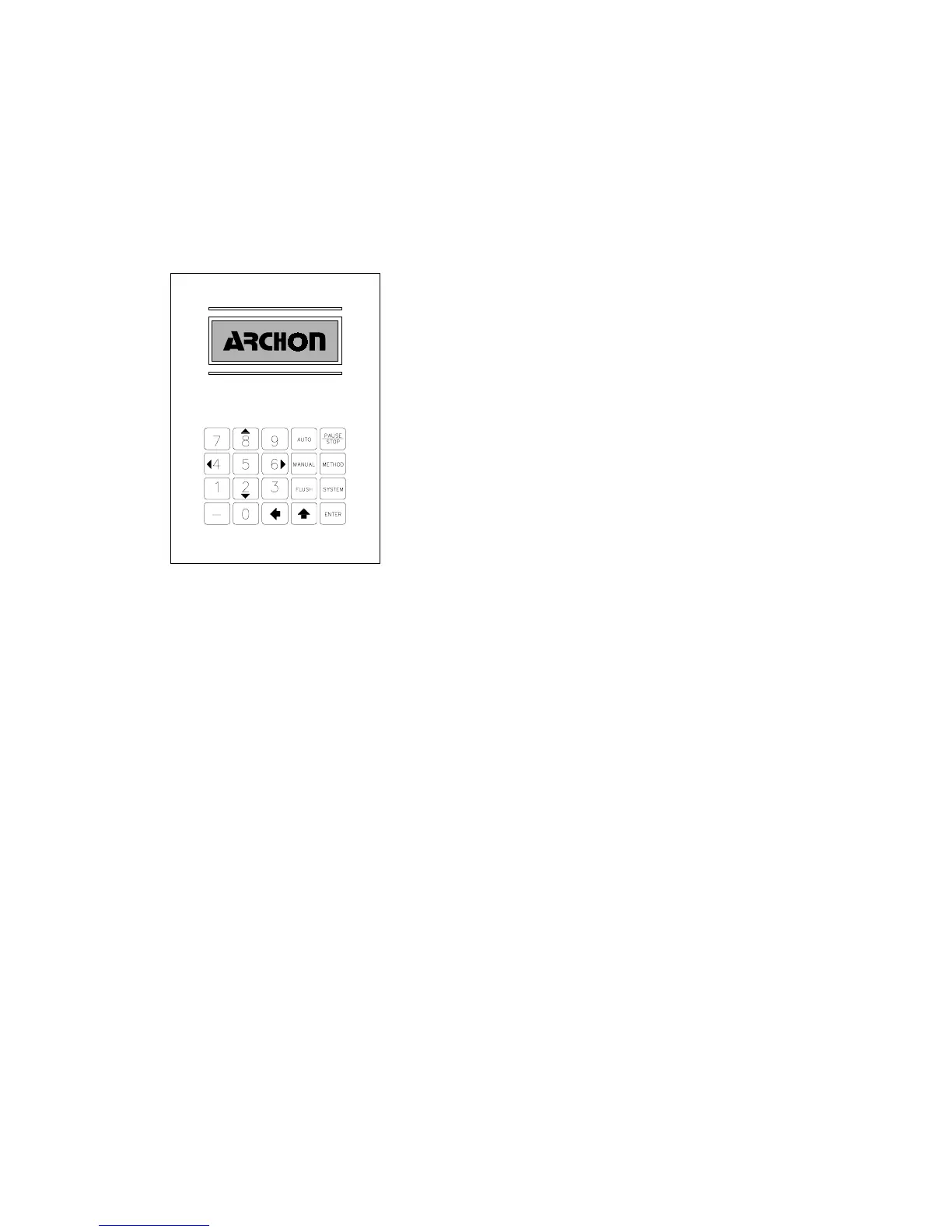
Figure 3-1
The keypad provides a complete numeric pad as well
as a motion operation pad for the X-Y-Z axis arm. The
keypad is coupled with a 4 line, 20 character LCD
screen for displaying programming and status
information. The information will include the current vial
number, sample process sequence, temperatures,
remaining time in a run, Auto or Manual sample
indications, method parameters, warning indicators, and
general status information.
The keypad can be segmented into three key types:
Operational, Setup, and Special.
See Section 4,
Operation Keys, for a complete description of
operational key functions.
Numeric keys are used to enter numeric values 0-9 for
entering numeric information such as time or
temperature programming.
Operational Keys
Auto
Starts the autosampling procedure, see Section 4.1.
Manual
Starts a single sampling procedure or runs a Priority Sample,
see Section 4.2.
Flush
Performs the water/helium gas flush sequence of the sample
path, see Section 4.3.
Pause/Stop
Provides a pause in the current operation and/or a complete
abort of the current operation.
Setup Keys
Method
Selects a Method for editing and modifies the various Method
parameters.
System
Provides access to System Operation, Configuration,
Maintenance and System Diagnostics menus.




 To Next Page