VATECH Co., Ltd.
Release
V2.0.0
PaX-500
54
3.4. How to Use LCD Panel
3.4.1. Pano Standard (For Normal Imaging)
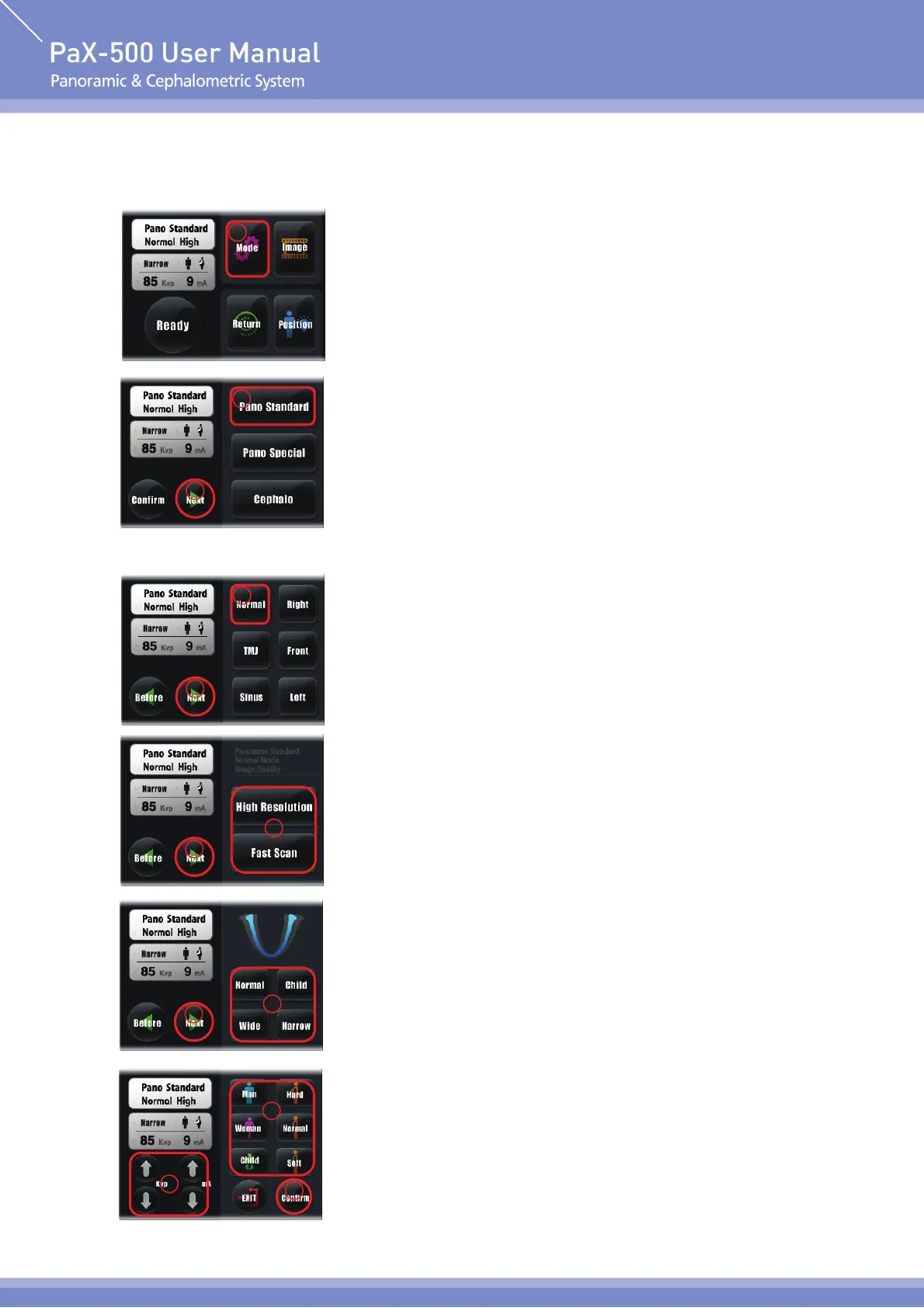
① Mode : select the mode for imaging.
② Pano Standard : Select to capture the image of Pano Standard
mode(Select the Button of corresponding mode if you want
to capture the image in Pano Special or Cephalo mode.)
③ Next : Move to the next stage. Press “Next” Button to move to the
next stage. Press “Confirm” Button to go back to the main
screen.
④ Normal : Capture the image of normal panorama(Press the Button
of image to capture if you want to capture other image).
⑤ Next : Move to the next stage.
⑥ High Resolution / Fast Scan : Select this button to capture the
image of High Resolution. Select this button to capture the
image of Fast Scan.
⑦ Next : Move to the next stage.
⑧ Select Arch : select the arch suitable for patient(Wide, Normal,
Narrow, Child).
⑨ Next : Move to the next stage.
⑩ Select Pateint : Select the X-ray exposure conditions suitable for
feature of patient (sex / bone density).
⑪ Select Kvp / mA : Directly select the X-ray exposure amount suitable
for patient.
1
2
3
4
5
6
7
8
9
10
11
12












 To Next Page