21
HPS50 PersonalScope
TM
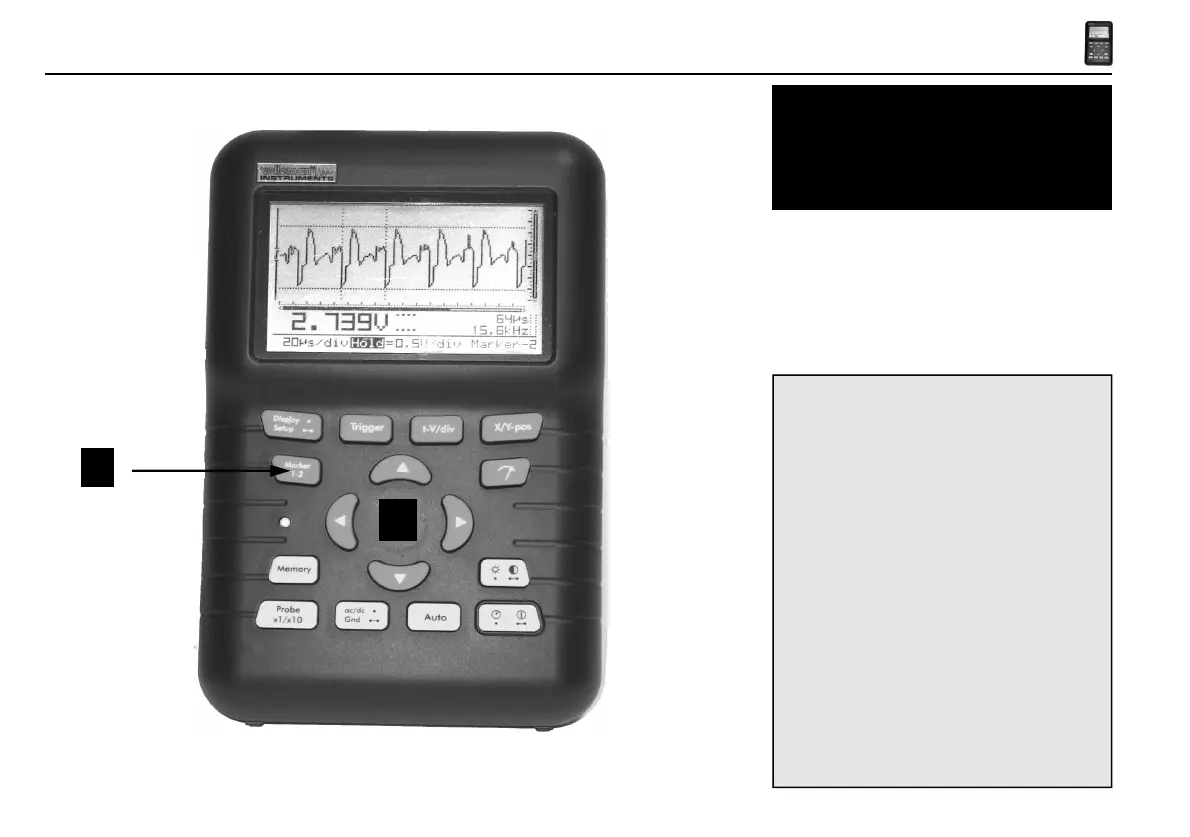
Markers
Fig 34
1
2
Determining the frequency of a signal requires
the measurement of a period. The easiest way to
do this would be by placing the vertical markers
either on two consecutive peaks or two identical
slopes of a signal.
1. Press the “Marker 1-2”-key to view, select or
hide the markers. (1)
2. Press the cursur keys to move the markers. (2)
Notes:
• By pressing the ‘Marker 1-2’-key, you
select between marker 1 or 2. The screen
shifts automatically until the selected time
marker is on screen.
• At dynamic display mode (see display set-
up), the best display layout is chosen
depending the use of time markers or voltage
markers.
• Some meter readouts are replaced by the
marker readouts.
• Depending on the chosen display layout, not
all of the marker readouts can be displayed
at the same time.
• Removing the markers from the screen can
be done by repeatedly pressing the ‘Marker
1-2’-key or by a short press of the ‘Display’-
key and using the up/down cursor keys.


 To Next Page
 Loading...