VEMCO - VR2Tx Manual 15 March 2019 25
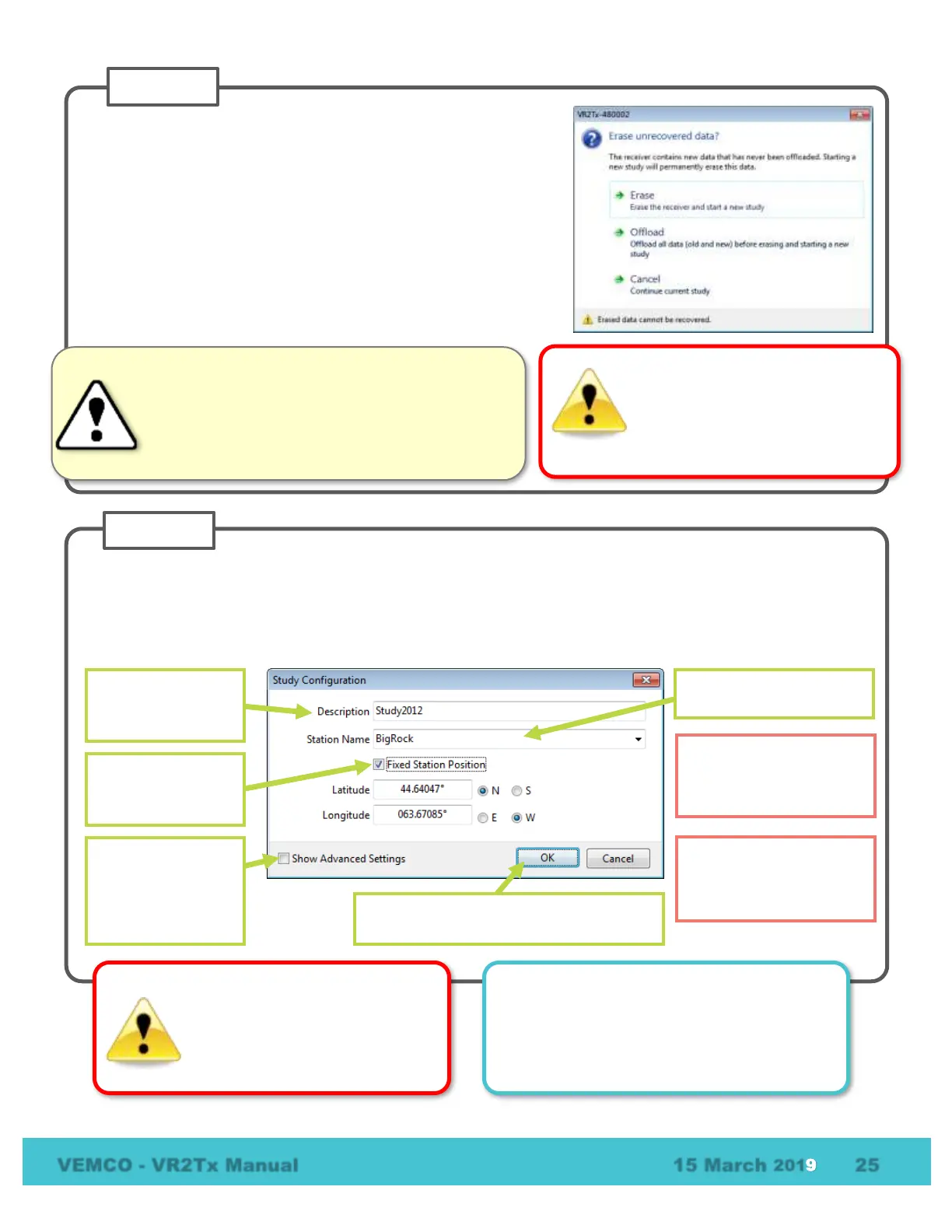
Enter a description of the study in the Study Configuration window. The station name is optional and can be
selected from a list of existing stations (if a database is open) or by simply typing in the “Station Name” line to
create a new station. If this station is a fixed position, then click a check mark in the “Fixed Station Position”
box and enter the latitude and Longitude. If the fixed location information is already entered for an existing
station, then the lat/long data will appear as soon as the station name is selected from the drop-down list.
Choose unique station
names for each
deployment location.
Enter a
description/title for
this study.
Select or enter a station
name.
Settings includes
changing the map
and blanking
Click OK to put the VR2Tx in Recorder
Mode and begin the study.
WARNING
Incorrectly changing the Advanced
Settings can prevent the VR2Tx
from hearing your tags. Only do so
under VEMCO’s direction.
How do I know the VR2Tx is recording?
Watch the red Status Light (LED). Two quick,
bright red flashes every 5 seconds indicate the
VR2Tx is in Record Mode.
Select one of the three options displayed.
• ERASE: when the data stored in the VR2Tx has already
been offloaded and you wish to erase the data and begin a
new study.
• OFFLOAD:
when the data has not been offloaded from the
VR2Tx or if there is any uncertainty about the data being
offloaded.
• CANCEL: when you wish to continue the study that is
currently running in the VR2Tx receiver. No changes to the
Initializing the VR2Tx will erase
the receiver’s memory. Retrieve
all detection logs before the
Verify the receiver you are communicating
with is the intended unit, particularly before
initializing and erasing receiver memory files, or data
could be lost. Communication can occur with any
VR2Tx, or VR2W, with Bluetooth® wireless
technology activated within a 10 meter range.



 To Next Page