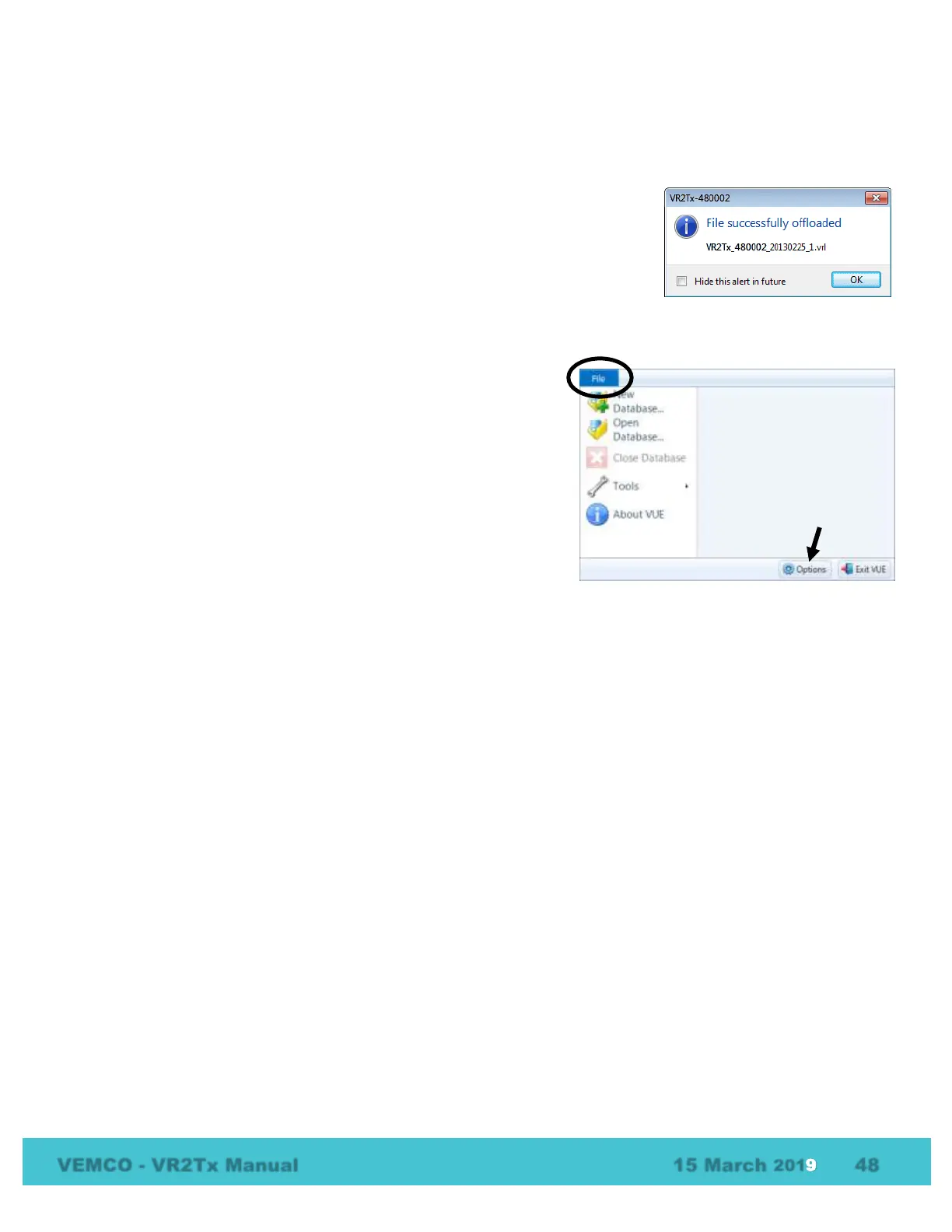
7.1.5 What does the “Hide this (window) in future” mean?
There are a number of pop-up windows that appear while using the VUE software. These windows are
wonderful when you’re just learning the software or when you’ve been away from it for an extended period
of time, but they can be very annoying when you’re in the middle of a big study.
A number of these pop-up windows have a selection box in the bottom left
corner that say something along the lines of “Hide this alert in future.”
Selecting this option means that this window will not appear the next time the
task is performed. The pop-up windows can be returned by altering the local
options or selecting “Restore All Hidden Dialogs” in the Options window (see
section 6.3). All hidden dialogs are restored automatically if one week elapses without VUE being opened.
7.1.6 How do I open the Options window?
The Options window is accessed by selecting the File menu
(circled in picture at right) and clicking the “Options” button at
the bottom of the menu box (see arrow in picture at right). The
Options window contains the following tabs: Display, Offload,
Export, Devices, and Other. These are described in detail in the
VUE manual.



 To Next Page