VEMCO - VR2Tx Manual 15 March 2019 34
5.2.2 Clean O-ring Surfaces
The O-ring surfaces must be clear of all debris and dirt. Any debris could cause water to enter the case and
destroy the receiver.
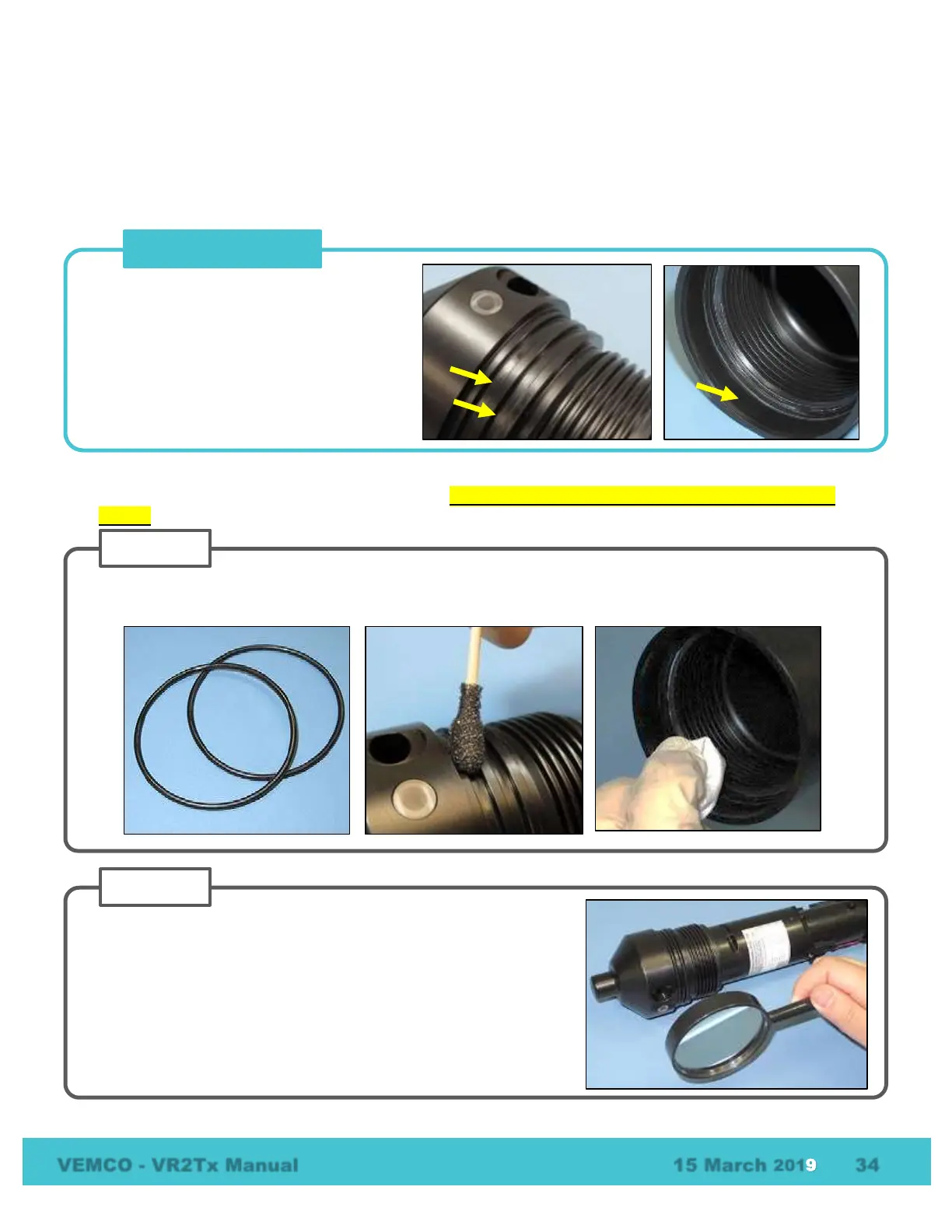
An O-ring surface is any surface the O-ring touches. The VR2Tx has three, the two grooves the O-rings sit in
and the smooth area inside the Outer Cylinder that sits between the threads and the end of the cylinder.
It is vital that all O-ring surfaces are clean and damage free or water may work its way inside the case and
destroy the electronics within the VR2Tx receiver. Always wear protective gloves when handling O-ring
grease!
An O-ring surface is any surface the O-ring
touches. The VR2Tx has three, the two
grooves between the threads and the LED
on the end cap and the first flat section
inside the Outer Cylinder (2 cm).
Use a lint-free cloth to clean the old grease and any debris from the O-rings and the O-ring surfaces. A lint-
free swab is very helpful for cleaning inside the grooves.
Inspect the O-ring surfaces for any scratches or debris – use a
magnifying glass and a bright light. Scratches in the O-ring groove
would allow water to bypass the O-ring, potentially flooding the
receiver and destroying the internal electronics. If you find debris
(dirt, dust, hair, etc.) inside a groove, then use a lint-free swab to
remove it. If you find a scratch in any of the O-ring surfaces, then
contact our Support department.



 To Next Page