Ventis™ MX4 Product Manual
© 2014 Industrial Scientific Corporation
28
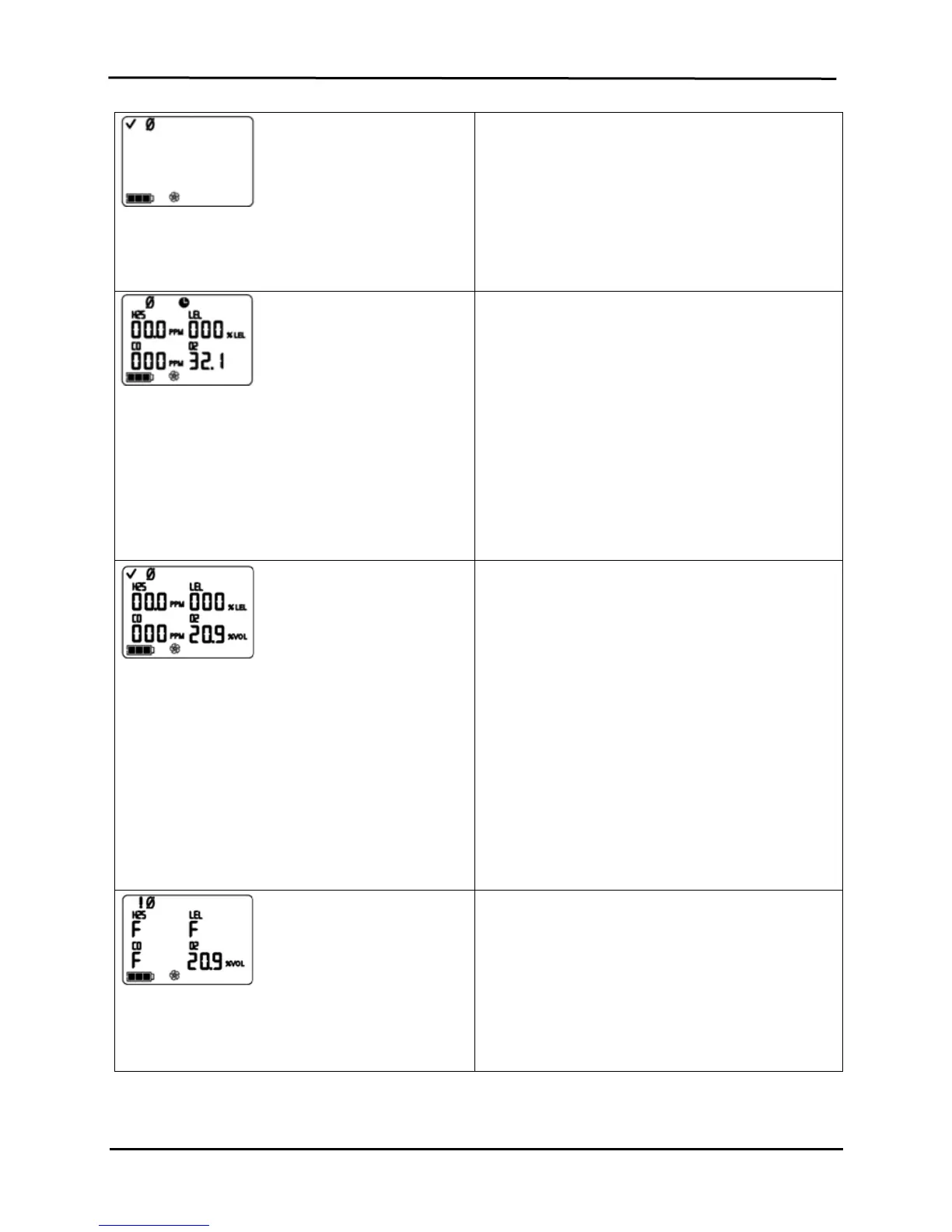
Zero Initiate Screen
Options:
Enter Zero
Bypass Zero
Press ENTER to begin the zero process and advance to
the Zero In-process Screen.
Press ON/OFF/MODE to bypass zero and calibration
and advance to one of two screens.
If bump test in-field is enabled, the user advances to
the Bump Test Initiate Screen.
If bump test in-field is disabled, the user advances to
the Peak Readings Screen.
Zero In-process Screen
Each sensor’s numerical value becomes zero except
O
2
. An updated O
2
span value displays. The clock icon
flashes and the zero icon displays.
NOTE: The “span reserve” of a sensor measures its sensitivity. The
displayed span value divided by the calibration gas value equals the
span reserve percentage. A span reserve percentage of greater than
70% indicates a “good” sensor; 50%-70% indicates “marginal”
sensitivity. When the span reserve percentage is less than 50%, the
sensor will not pass calibration.
llow the zero process to complete and advance to the
Zero Results (Pass or Fail) Screen.
After the zero process, press ON/OFF/MODE to
bypass calibration of the installed toxic and combustible
sensors. The user returns to the mode from which the
calibration process was entered (configuration or gas
monitoring).
NOTE: during the zero process, the O
2
sensor is calibrated (when set to
default gas volume of 20.9%)
Zero Results (Pass) Screen
The check mark displays to indicate a successful zero
and a short beep sounds. Each sensor’s numerical
values display at zero except O
2
.
Options:
Repeat zero
Begin calibration
Enter gas monitoring mode
Within Ten Seconds
Press ENTER to repeat the zero process.
Press ON/OFF/MODE to advance to one of two screens.
If zero was entered from…
…configuration mode, the user advances to the
Calibration Apply Gas Screen.
… gas monitoring mode and the calibration in-field
option is enabled, the user advances to the
Calibration Apply Gas Screen.
…gas monitoring mode and the calibration in-field
option is disabled, the user advances to the Gas
Monitoring Screen in the gas monitoring mode.
If neither ENTER nor ON/OFF/MODE is pressed, within
ten seconds, the user advances to the Gas Monitoring
Screen in the gas monitoring mode.
Zero Results (Fail) Screen
Displays an “F” or “P”, respectively, for each failed or
passed sensor. For O
2
, if the sensor passed its
calibration, the sensor reading displays.
Press ON/OFF/MODE (or wait ten seconds) to return to
the Zero Initiate Screen and repeat the zero process.


 To Next Page