Ventis™ MX4 Product Manual
29 © 2014 Industrial Scientific Corporation
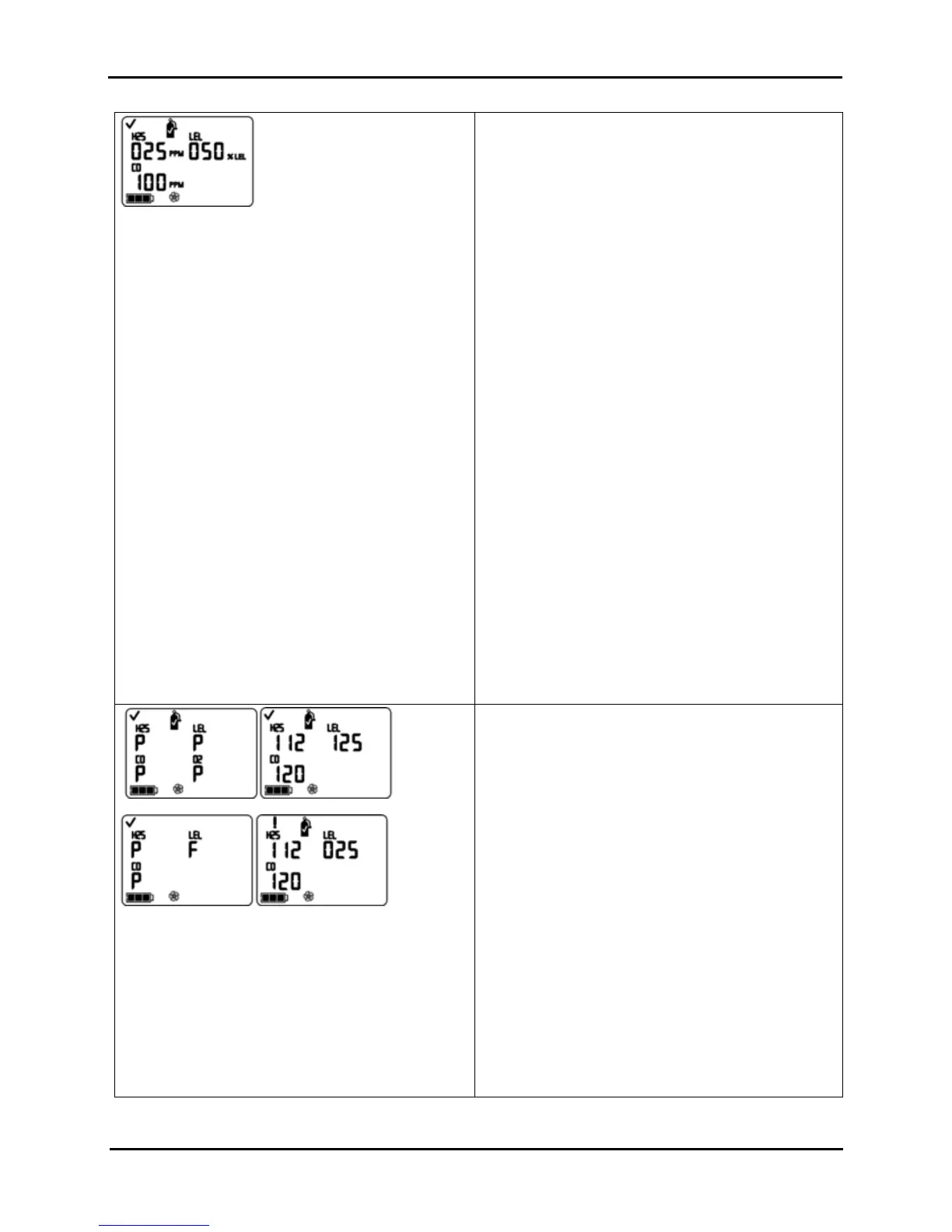
Calibration Apply Gas Screen*
The gas cylinder icon flashes. Each sensor’s display
shows the calibration gas concentration to be applied.
(The O
2
display is blank as the sensor was calibrated
during zeroing.) The monitor waits up to five minutes to
successfully sense the gas.
Calibration In-progress Screen*
If gas is sensed, the gas values for the LEL and
toxic sensors increase and the O
2
value decreases.
If gas is NOT sensed, a failed calibration registers
and the Calibration Failed Screen displays.
To Terminate
Press ON/OFF/MODE while the gas cylinder icon flashes
to terminate the quick calibration process (or to skip a
sensor’s calibration in standard calibration) and return to
the gas monitoring mode.
To Calibrate
From the already prepared gas cylinder, start the flow of
gas as noted below for the monitor/regulator combination
in use.
For an aspirated monitor with a demand flow
regulator, complete the tubing connection from the
regulator to the pump inlet.
For an aspirated monitor with a positive flow
regulator, turn (counterclockwise) the regulator’s
knob.
For a diffusion monitor with a positive flow
regulator:
Place the calibration cup over the upper portion
of the monitor’s case top (front of monitor). To
attach properly, complete or observe the
following.
o The cup fully covers the sensor ports.
o The monitor’s display and buttons are NOT
covered.
o The cup’s side arms fit securely in the
grooves on the sides of the monitor.
o The Ventis MX4 name on the calibration
cup is upright and readable.
o The cup’s nipple points up and away from
the monitor.
Turn (counterclockwise) the regulator’s
knob.
Sensor Results Screen*
Pass (top) or Fail (bottom) Screen
The display alternately shows a “P” for pass (or “F” for
fail) and the final span value reading for each sensor. A
check mark displays and a single beep sounds.
NOTE: The “span reserve” of a sensor measures its sensitivity. The
displayed span value divided by the calibration gas value equals the
span reserve percentage. A span reserve percentage of greater than
70% indicates a “good” sensor; 50%-70% indicates “marginal”
sensitivity. When the span reserve percentage is less than 50%, the
sensor will not pass calibration.
STOP THE FLOW OF GAS.
After calibration, or if calibration is terminated at anytime
during the process, stop the flow of gas as follows.
For an aspirated monitor with a demand flow
regulator, disconnect the tubing from the pump inlet.
For an aspirated or diffusion monitor with a
positive flow regulator, turn (clockwise) the
regulator’s knob.
All Sensors Pass
The user returns to the mode from which the calibration
process was entered (configuration or gas monitoring).
Sensor Fail
If one or more sensors fail calibration, the Calibration Fail
Screen displays and a system level alarm turns on.


 To Next Page