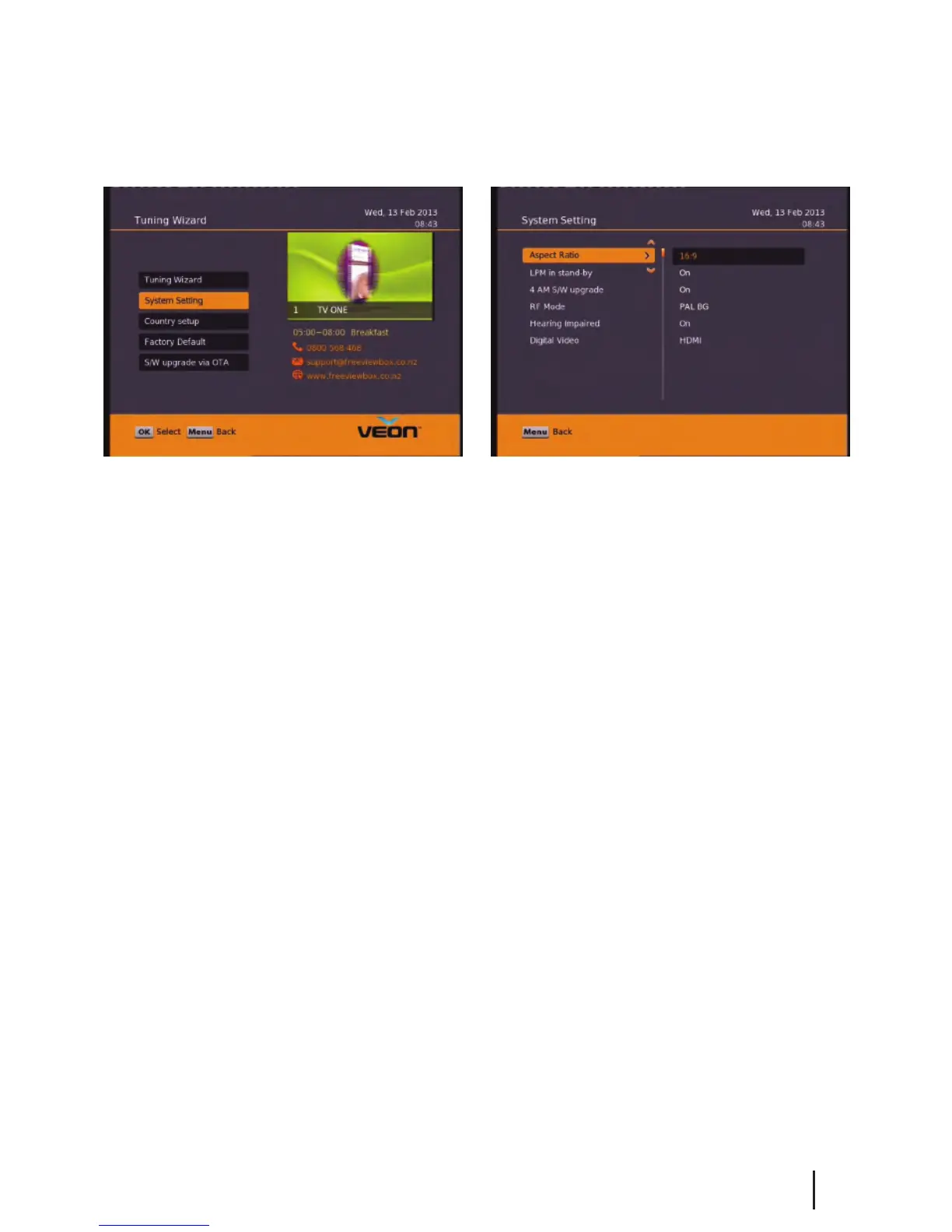
Main Menu - Installation - System Setting
Note: To adjust a setting use the right arrow on your remote. To select a setting use the OK button.
Aspect Ratio – This is to set the output picture shape depending on your TV. If you have a modern LCD or Plasma
TV or a wide screen, then you most likely need to set it to 16:9. If you have an older square TV then 4:3 Panscan will
most likely suit.
LPM in stand-by – This option turns Low Power mode on/o
4 AM S/W upgrade - With this option set to on your receiver will automaticlly update to the latest software at
4am. (When the software is broadcast)
RF Mode – With this setting you can adjust the RF output frequancy if its conicting with another unit or
broadcast.
Hearing Impaired – This option is to turn subtitles on/o.
Digital Video – Here you have the option of Auto, HDMI and DVI. DVI is HDMI video but no sound.
It is best to keep this setting to HDMI. The resolution will always be 576i.
Why a digital HDMI output at 576i?
Simply because current HDTVs with HDMI inputs have very good video up-scale chipsets built in. The best way to
benet from your TV’s built in up-scaling chipset is to feed it digital audio and video via an HDMI port such as the
one on the satBox and let your HDTV up-scale the crystal clear picture to t it’s screen
13


 To Next Page