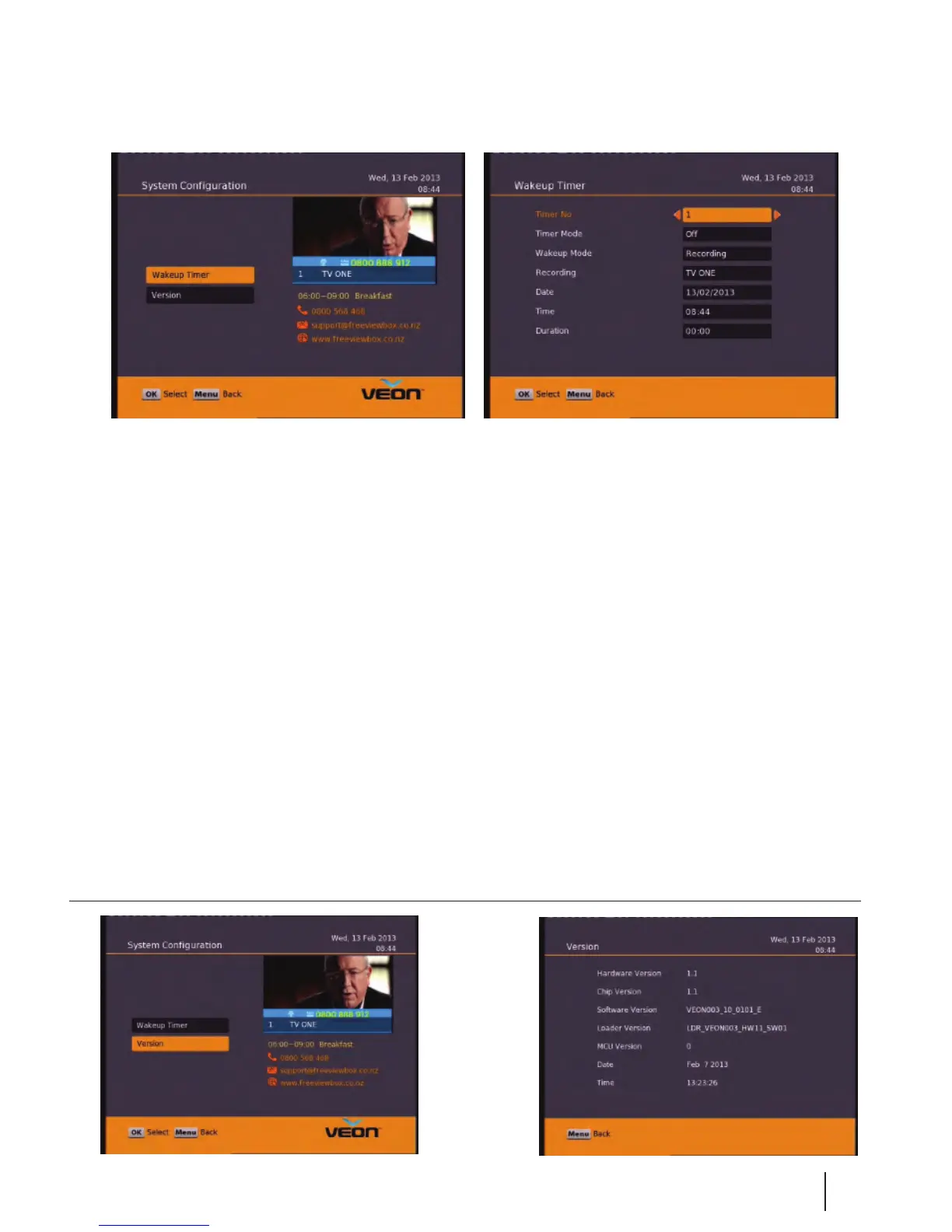
Main Menu - System Configuration - Wakeup Timer/Version
15
Wakeup Timer
You can set a service to be recorded at a specic time. Even if the digital receiver is in standby mode, it will start
recording at a specied time. When the recording comes to the end the unit will stay in standby until you press
the standby button. A maximum of 8 timers can be set at once.
1. Set the Timer Mode to Once, Daily or Weekly to make a recording. If this option is set to O, the timer will not
operate.
2. Set the Wakeup Mode to Recording, Services or Message. If you only want the unit to wake up on a channel at
the set time without recording, set this to Services
3. Set the channel you want to record, or set the message you want to appear at the set day and time.
4. Set the Date option to a desired date, on which the digital receiver will turn on. Use the left, right buttons on
your remote to navigate and change. The date format is Day/Month/Year.
5. Set the start Time option to a desired time, at which the recording will be started. Use the left, right and
number buttons on your remote to navigate and change. The time format is Hour:Minute.
6. Set the Duration option to a desired length of time, in which the recording will be nished. Use the left, right
and number buttons on your remote to navigate and change.
Version
This is an
information
page only.
Here you can
nd your units
Software/
Firmware


 To Next Page