19
Recording
Instant Record:
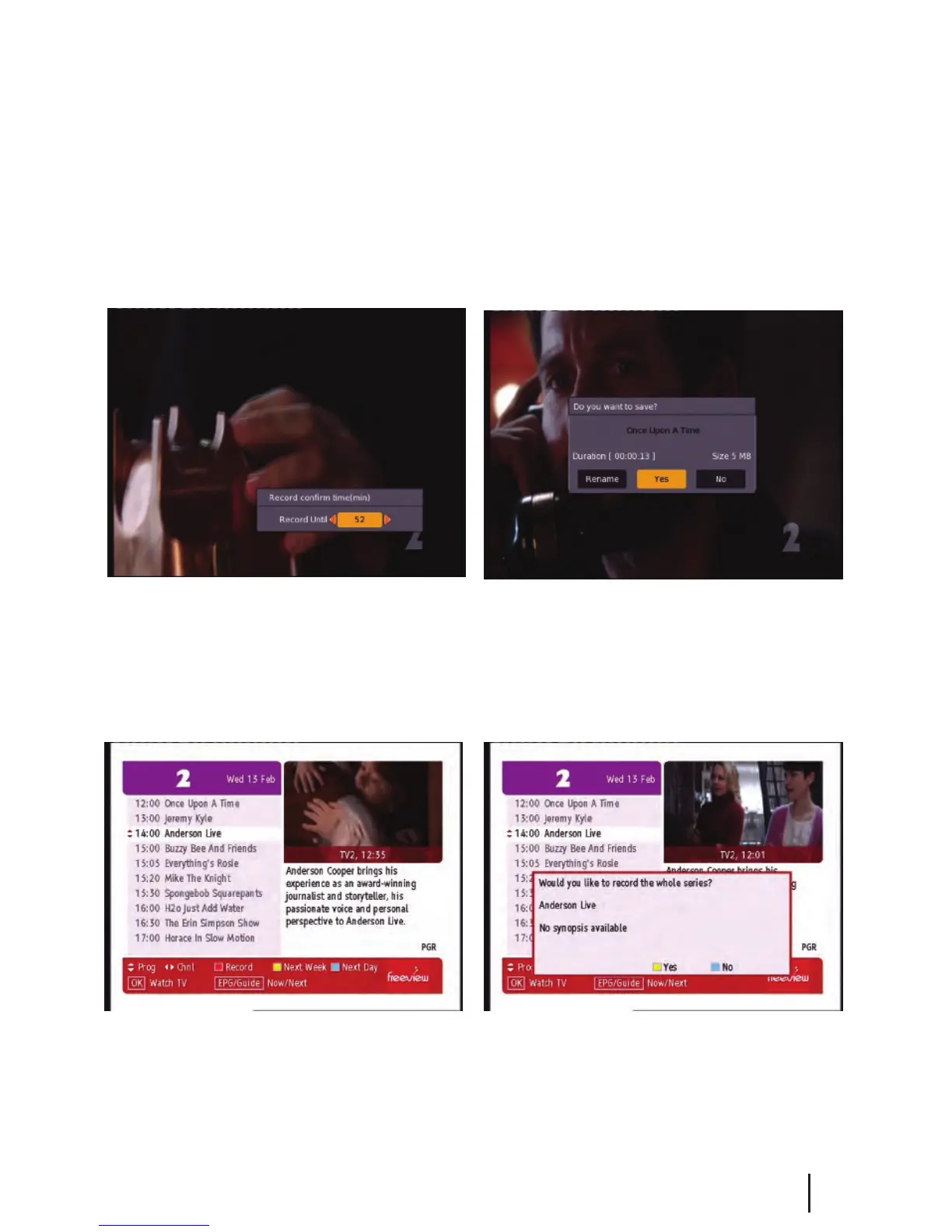
This is done by pressing the record button on the remote. (This is the grey button with a red circle under it.)
Pressing it will start recording on the channel you are currently watching and allow you to select the duration
of the recording. The default duration is to the end of the current programme. You can select to the end of the
following programme or manually enter a duration by pressing the left/right navigation keys. If you press the
stop button you will then have the options of renaming and continuing to record, just saving or discarding it.
Timer Recordings:
This is done through the EPG. Access the
EPG by pressing the EPG button (the grey
button under the red one) on the remote.
It will bring up the guide from which you
can then browse to choose a programme
to record.
Pressing the Red button on a selected show
in the EPG menu will mark the program to
be recorded. If the program is part of a series
you will have the option of recording the
whole series (Yellow button) or just this
episode (Blue button).
Please note: This unit has a single tuner so this means there will be some limitations to what channels
you can watch while you are recording. Freeview Satellite has two channel groups, when recording a
channel you can only watch another channel from the same group as the one you are recording.
(You
need a twin tuner unit to record and watch any other channel) See page 27 for channel groups.
The Recording functionality requires a FAT32 USB drive to be connected to the receiver.
We recommend using a external powered USB Harddrive. For details on formatting to
FAT32 see the Frequently Asked Questions.


 To Next Page